Three plugins in one bundle sounds like three more things you'll never open, and that's the doubt worth testing: is Motion Bundle a toy for presets, or a set of effects you'll reach for mid-session? It's the second, as long as you want movement and texture, and at $89 it's a good buy for that job.
It isn't for people who need a mixing reverb or a utility delay. It's for people who want a drum loop to fall apart in an interesting way.
Quick Verdict
We score Motion Bundle 4.1 out of 5. Excite Audio built three effects (Harmonic, Dimension, Fractal) around one shared control idea, and it works. At $89 you get cursor-driven automation, 250 presets in two of the three plugins, and low CPU use.
Buy it for ear candy, transitions and glitch. Skip it if you already own plenty of creative effects and mostly want foundational mixing tools.
Does It Actually Deliver on the Motion Pitch?
The pitch is that you shape sound by moving a cursor instead of drawing automation lanes. That's a gimmick on paper. In practice it's the whole point.
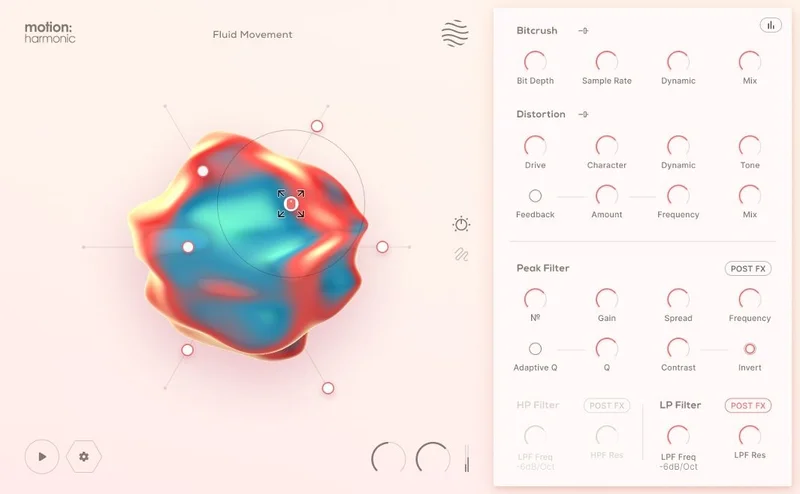
Every plugin in the bundle shares the same front end: a hexagon controller with six macro sliders, a reactive 3D visualiser, and per-slider mapping with min and max values. You drag a point around the hexagon and several parameters move together, each within the range you set.
Owners report that the live recording and pre-programmed paths give them ways to automate they hadn't used before. We buy that. A single gesture moving six things at once is faster than six lanes, and it sounds less mechanical.
The developer says there's no menu diving. That's mostly true. The macros handle the big moves, and the deeper controls sit one click away.
The Hexagon Controller and Cursor Paths
This is the part that makes the bundle feel different from a stack of unrelated plugins. Learn it once and all three behave the same way.
Recording a path
You can record cursor movement live or draw it in Line and Circle modes. The Timeline plays that path Forward, Reverse or Pendulum, and a Loop Path toggle keeps it cycling.
There's a Timeline Speed graph, a Fixed or Free duration option, and DAW Sync. Lock it to the grid and your movement lands on the beat.
Pendulum is the sleeper. Set a circle path, pendulum it, and a static pad starts breathing without you touching a thing.
Magnetic cursor control
Attract and Repel modes, with Magnet Range and Strength controls, give the cursor a pull. Your pointer gets drawn toward certain points or pushed off them.
It's clever, and it makes your movements less jittery than freehand dragging. Honestly, it's also the feature most people will ignore for a week and then love.
Audio reactive envelopes
An audio reactive envelope lets the incoming signal drive the motion. Put it on a drum bus and the effect moves with the hits instead of against them.
Motion: Fractal, the Glitch Machine
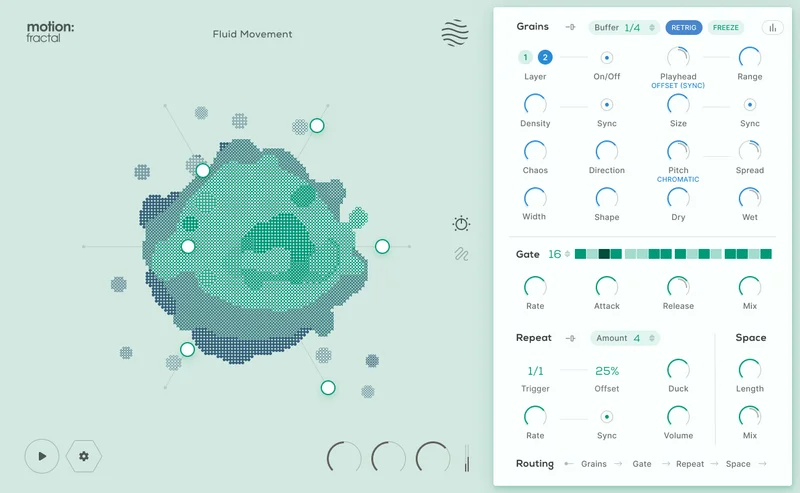
Fractal is the one we'd buy the bundle for. It has five sections: Grains Layer 1, Grains Layer 2, Gate, Repeat and Space.
Two granular layers
Each Grain Layer has five playhead modes: Manual, Scan, Offset Sync, Offset ms and Offset %. Density and Size can sync to your tempo. Direction, Width, Shape, Chaos, Pitch and Spread shape each grain.
Scan a loop slowly and you get a smeared, shimmering wash. Push Chaos up and it turns gritty and unpredictable. Both layers respond to audio input, so what you feed them matters.
Gate and Repeat
The Gate is a trance gate sequencer with up to 32 steps, plus Rate and Mix. Drop a pad into it and you get rhythmic chopping that follows your tempo.
Repeat controls timing and the number of repeats through Amount, Trigger, Rate and Offset. It's the stutter you'd otherwise automate by hand, and it's satisfying.
Space
The Space module is a hall reverb with Length and Mix. Owners and the developer both call it lush and atmospheric, and it does its job as a last stage. It has two controls, though. Don't expect to design a room here.
Fractal ships with 250 presets: 159 Dual Presets, 66 FX and Mapping Presets, and 25 Path and Cursor Presets.
Motion: Dimension, Delays and Reverb
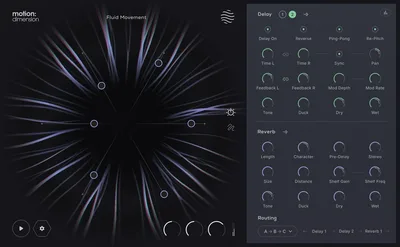
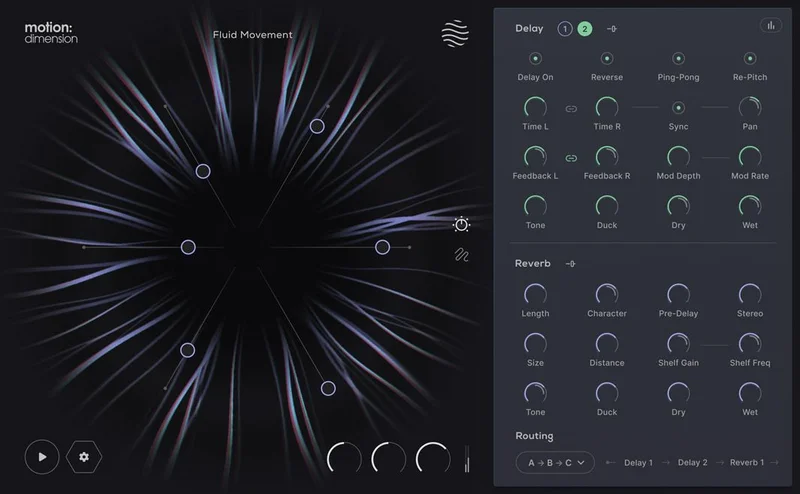
Dimension has three sections: Delay 1, Delay 2 and Reverb. The routing is the interesting part.
Four routing options
You choose All in Series, Series into Parallel, Parallel into Series, or All in Parallel. That's real flexibility for a creative effect. Run both delays in parallel into the reverb for a wide wash, or in series for a long, evolving echo.
The delays
Each delay has independent left and right timing, and four modes: Reverse, Ping-Pong, Normal and Re-Pitch. Delay Time, Feedback, Pan, Tone and Duck are all there, and it syncs to your DAW.
Duck is the one to use. Set it so the repeats get out of the way of your vocal and come back in the gaps.
Re-Pitch is great on a sparse synth line. Each repeat shifts, and the tail turns into its own melody.
The reverb
The reverb blends Plate and Hall, and the two types crossfade smoothly instead of switching. Controls include Length, Character, Pre-Delay, Size, Distance, Stereo width and Duck, plus Shelf Gain and Frequency, Tone, and a Hi-Lo Frequency Range.
That's a deep control set, and it's easy to dial in a big wash. We wouldn't call it your only reverb for mixing, though. It's built to be dramatic.
Dimension also carries 250 presets: 127 Dual Presets, 99 FX and Mapping Presets, and 24 Path and Cursor Presets.
Motion: Harmonic, the Weakest Link on Paper
Harmonic covers distortion, bitcrushing and filtering. It's the one that overlaps most with what you probably already own. Distortion and bitcrushers are everywhere.
Bitcrusher
You get Bit Depth, Sample Rate, Dynamic Control and Frequency Range. The Frequency Range control is useful because it lets you crush only part of the spectrum.
Distortion
Drive, Tone, a Character Dial, Dynamic Response and Feedback. Feedback is the ugly-in-a-good-way control. Push it and the distortion starts to ring and bite.
Filters
A high-pass and a low-pass, nothing fancy. They're there to clean up what the distortion makes.
Harmonic gets the same hexagon and cursor tricks as the others, which is what lifts it. A distortion you can steer with a gesture beats a static one. Still, if you own a good saturator, this is the plugin you'll use least.
Where It Falls Short
Let's be blunt. This is a bundle of creative tools, not a core toolkit. Owners describe it best at ear candy and transitions, and that's the ceiling.
Overlap is the real risk. If you already own granular, delay and distortion plugins, you may find yourself with duplicates. Some owners report underusing the bundle for exactly that reason.
It can also feel like a lot. Three plugins, a hexagon, a timeline, magnets, mapping, envelopes. The step-by-step interactive tutorials help, but the first hour is a learning curve.
And the phrase-based workflow isn't for everyone. If you like to program every parameter by hand, you'll find yourself fighting the design. That's annoying, and it's a fair reason to skip.
Is the Price Fair?
At $89 for three plugins and a combined 500 presets across Fractal and Dimension, yes. The cost works out low per plugin, and the shared interface means you learn once.
The value drops if you already have similar effects. If you don't, it's an easy yes. If you do, wait for a reason to need the cursor workflow.
There's no per-plugin price breakdown to compare against, so judge it as a bundle.
Performance and Stability
Owners report solid stability and low CPU use, in Bitwig and Cubase. No reported crashes. For plugins running granular engines and a 3D visualiser, that's a pleasant surprise.
Each plugin has input and output gain, a global dry/wet control, a safety limiter toggle and a global bypass. That limiter matters on Fractal and Harmonic, where Feedback and Chaos can spike the level. Leave it on while you explore.
Specs & Technical Details
| Spec | Detail |
|---|---|
| Developer | Excite Audio |
| Price | $89 |
| Plugin Format | N/A |
| OS Support | N/A |
| Activation | N/A |
| CPU Usage | Light (owners report low CPU use) |
| Trial Available | N/A |
| Version Reviewed | N/A |
Score Breakdown
| Category | Score | Notes |
|---|---|---|
| Sound Quality | 4.0/5 | Strong on texture, glitch and atmosphere; built for effect, not subtlety |
| Value for Money | 4.0/5 | Three plugins and 500 presets across two of them, minus overlap risk |
| Ease of Use | 4.0/5 | Hexagon is quick, but there's a lot to learn up front |
| Features | 4.5/5 | Cursor paths, magnets, audio reactive envelopes and flexible routing |
| CPU Efficiency | 4.5/5 | Low CPU use reported with no crashes |
| Overall | 4.1/5 | A fun, stable creative toolkit that suits texture over foundation |
The Call
Buy Motion Bundle at $89 if you want drums, pads and vocals to move, and you'd rather gesture than draw lanes. Fractal alone justifies it.
Skip it if your plugin folder is already stuffed with granular, delay and distortion tools, or if you want a reverb to sit quietly in a mix. For you it's an expensive duplicate.
For everyone else, it's the bundle that makes a loop feel alive.
Frequently Asked Questions
What's included in Motion Bundle?
Three plugins: Motion: Harmonic, Motion: Dimension and Motion: Fractal. Harmonic handles distortion, bitcrushing and filtering. Dimension has dual delays and a reverb. Fractal has dual granular layers, a gate, a repeater and a space module.
Does Motion Bundle use a lot of CPU?
Owners report low CPU use and no crashes, including in Bitwig and Cubase. That's solid for plugins with granular engines and a 3D visualiser. Your own session will vary with how many instances you run.
Is Motion Bundle good for beginners?
The presets and the hexagon controller make it easy to get a result fast. The step-by-step interactive tutorials help too. But three plugins with timelines, magnets and mapping can feel overwhelming, so give yourself an hour to learn the shared interface.