
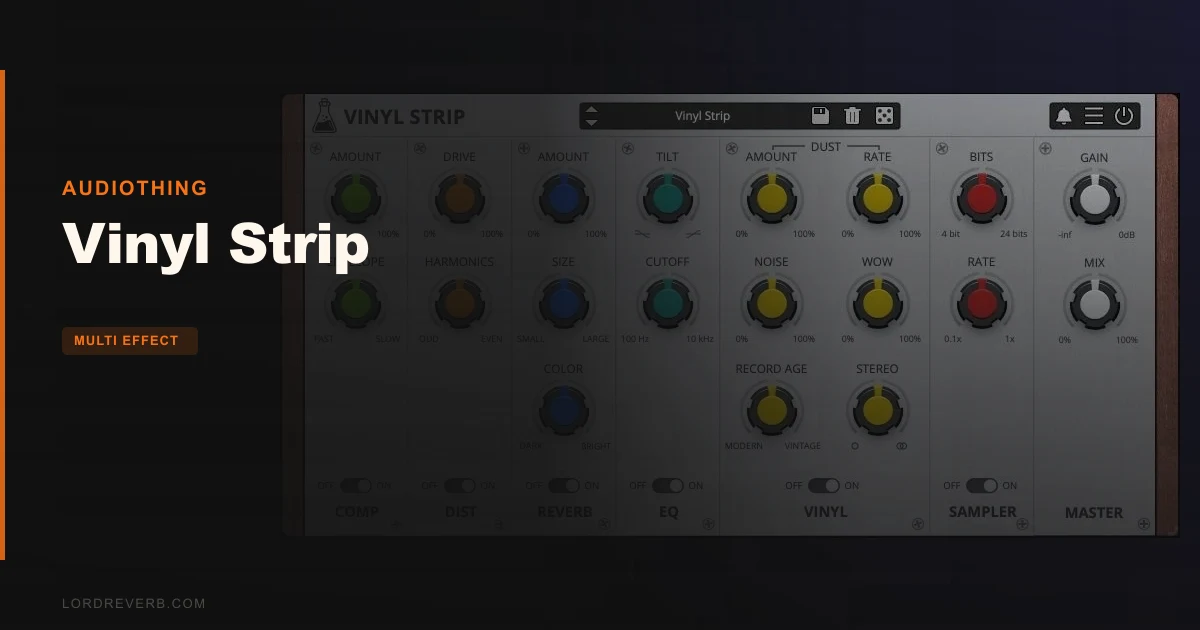
AudioThing's Vinyl Strip is a six-module, drag-and-drop multi-effect channel strip that puts Distortion, Compression, Bit Crushing, Tilt EQ, Vintage Reverb, and vinyl emulation in one lightweight plugin for $59. It's built for producers who want lo-fi texture fast, without wiring up six separate plugins across a send bus.
We pulled it up on a late-night lo-fi hip-hop session. The loop was a chopped Rhodes riff, clean and lifeless, sitting on a drum break that needed age. Three minutes later, Vinyl Strip had it sounding like it was dubbed off a 45 in 1972. That speed is the whole pitch.
But we also pushed it past that comfort zone. That's where the real story is.
Six Modules, One Strip: What's Actually Here
Vinyl Strip isn't a vinyl-only plugin. That's the thing most people miss about it. The name is a bit misleading. The Vinylizer module handles the actual crackle, dust, and surface noise simulation. The other five modules are a fully functional retro processing chain that works on anything.
The six modules are Distortion, Compressor, Bit Crusher, Tilt EQ, Vintage Reverb, and Vinylizer. You can drag any of them into any position in the chain. That's not a gimmick. We ran the Bit Crusher before the Compressor on a snare, and the compressor pumped the crushed texture in a way that felt satisfyingly wrong. Flip it, and the result is a squashed hit with broken edges. Two completely different sounds. Same settings. Different order.
This is a plugin for beat-makers, lo-fi producers, and anyone scoring to picture who needs grit fast. It's not for mastering engineers who need precise multiband control or engineers running mono-only signal workflows who need proper mid/side handling. There's none of that here.
Living With It: Three Sessions In
Setup takes about four minutes. AudioThing uses a serial number redeemed via their account portal, then an offline or online licence file activation. No iLok. No dongle. We had it scanning in Logic Pro X within five minutes of download.
In daily use, the Tilt EQ is more useful than it first appears. It's a single shelf control that tilts high and low frequencies in opposite directions around a pivot point. We set it to cut above roughly 8kHz and boost below simultaneously, pulling about 2–3dB of top-end air while adding low-mid density. One knob doing the work of two shelf bands. Fast and musical on pads and samples.
We put Vinyl Strip across a full drum bus, kick, snare, hat, and two percussion loops, and loaded five simultaneous instances across separate tracks. CPU didn't flinch. We're talking negligible meter movement in Ableton Live 12 on an M2 MacBook Pro. That's a real-world pass that larger multi-effect suites often fail.
The Vinylizer module is where it gets clever and a little annoying in equal measure. The crackle generation is convincing. It doesn't loop obviously, and the stereo imaging of the surface noise sits realistically wide. But there's no control over the frequency spectrum of the noise itself. You can't push the crackle darker or brighter to match your source material's vibe. That lack of spectral shaping is frustrating when you're trying to blend the texture into a mastered reference track at -14 LUFS.
The free trial cuts output to silence every 45 seconds. That's long enough to hear what the plugin does, but not long enough to feel how it sits across a full 8-bar loop with everything else playing. It disrupts proper evaluation. Annoying, and we understand why they do it, but still annoying.
The Trade-Offs
The modular drag-and-drop is Vinyl Strip's strongest feature. It's also where AudioThing made a design choice that splits opinion. Every module is deliberately simple. The Compressor has threshold, ratio, attack, and release. No knee control. No sidechain input. That simplicity makes it approachable, but it means Vinyl Strip can't function as a proper bus compressor with external sidechain trigger. If you want to duck the vinyl effect to a kick, you're routing around it, not through it.
The Vintage Reverb is similarly broad. It sounds like a small room or a short plate and does that job well on individual tracks. But there's no pre-delay control and no diffusion parameter. We love it on a snare at around 0.4 seconds of decay. We hate it when we want to add depth to a full mix bus, because it smears transients in a way you can't dial out.
The 15 presets cover instruments, drums, pads, and master categories. They're genuinely useful starting points, not showcase patches that sound ridiculous in context. The randomiser is legitimately fun. We'd click it ten times on a pad sound and always land somewhere usable.
Against the Field
iZotope's Vinyl is gone. It was free, it was everywhere, and it's discontinued. Vinyl Strip is its logical paid successor for producers who built workflows around that plugin. It does more, it costs $59, and it runs on current OS versions. That's a clear upgrade path.
RC-20 Retro Color by XLN Audio costs more and is a closer spec competitor. It has a wider noise palette, more detailed vinyl artifacts, and a wobble section with pitch modulation that Vinyl Strip doesn't have. RC-20 wins for nuanced lo-fi sound design work. Vinyl Strip wins for speed and CPU budget. RC-20 Retro Color review
Baby Audio's Comeback Kid and similar character plugins don't overlap directly here. For tape saturation specifically, Chow Tape Model (free) will do more damage with better control. If tape is your primary goal, skip Vinyl Strip and use that instead. best free saturation plugins
For full channel strip comparison, Vinyl Strip undercuts most traditional channel strip plugins on price and CPU but gives up dynamics flexibility. If your mix needs a proper optical compressor emulation in the same chain, look elsewhere. best channel strip plugins
The Real Verdict
Vinyl Strip does one job with real conviction: it ages your sound fast, across multiple tracks, without hurting your CPU. At $59, it's a reasonable spend for any producer working in lo-fi, hip-hop, indie, or any genre where texture is part of the aesthetic. The drag-and-drop signal routing is genuinely useful, not decorative.
Skip it if you need a bus compressor with sidechain, detailed reverb control, or any mid/side processing. It's not built for that. But if you've been copying and pasting six plugins across every lo-fi track for the past three years, Vinyl Strip condenses that chain into something you can actually save, recall, and randomise. AudioThing plugins overview
Score Breakdown
| Category | Score | Notes |
|---|---|---|
| Sound Quality | 4.0/5 | Convincing lo-fi textures; Vinylizer crackle holds up even at close listen, but lacks spectral shaping control |
| Value for Money | 4.0/5 | $59 for six modules with drag-and-drop routing is fair; sales pricing makes it a no-brainer |
| Ease of Use | 4.5/5 | Fast to dial in; preset randomiser accelerates workflow; trial interruptions make pre-buy testing annoying |
| Features | 3.5/5 | Six modules cover the essentials, but no sidechain, no modulation, and no spectral noise control leave gaps |
| CPU Efficiency | 5.0/5 | Genuinely one of the lightest multi-effect plugins we've stacked, zero meter movement on multiple instances |
| Overall | 4.1/5 | A clever, fast, CPU-honest retro strip that earns its place in any lo-fi or character-driven production rig |
Alternatives to Consider
RC-20 Retro Color (XLN Audio): More detailed artifact control, wobble modulation, and a deeper noise palette. It costs more and uses more CPU. Worth it for dedicated lo-fi sound designers. RC-20 Retro Color review
Chow Tape Model (free): Open-source tape emulation with bias, flutter, and degradation controls that go far deeper than Vinyl Strip's distortion module. Free, and brilliant for tape-specific saturation. Doesn't give you a full processing chain. best free plugins for producers
Portal by Output: A completely different angle, granular, not retro-linear. Not a direct alternative, but if you want textural weirdness rather than vinyl nostalgia, Portal does things Vinyl Strip can't imagine. best multi-effect plugins
If you're a lo-fi producer with five instances of this thing running by the end of your first session, the $59 will feel like you got away with something. If you're a mastering engineer hoping it'll handle a bus, you'll be disappointed before the kettle boils.
Frequently Asked Questions
Is Vinyl Strip compatible with Apple Silicon Macs?
Yes. Vinyl Strip ships as a Universal 2 Binary, which means it runs natively on M1, M2, and M3 Macs without Rosetta 2 translation. AudioThing confirmed Apple Silicon native support from v1.5.0 onward. You'll want to make sure your DAW is also running natively for the full CPU benefit.
Can you use Vinyl Strip on a mono track?
Yes, the plugin accepts mono signals without issue, it'll load on any mono audio or instrument track in your DAW. The Vinylizer's crackle and surface noise are generated in stereo, so if you're strict about keeping a signal chain mono, you'll need to check the stereo width of the output before your next stage. There's no built-in mono sum or mid/side mode.
Does the module order actually matter, or is it just cosmetic?
It matters. A lot. Running the Bit Crusher before the Compressor gives you pumping, squeezed digital noise. Flipping that order squashes the clean signal first, then degrades it, which sounds softer and more like a worn tape dub. Putting the Vinylizer first in the chain, then running Distortion behind it, adds harmonic saturation on top of the crackle rather than underneath it. These are genuinely different sounds, not cosmetic UI changes.
Is Vinyl Strip good for mastering, or just mixing?
It's a mixing tool. The lack of sidechain on the compressor module, the absence of mid/side processing, and the relatively broad-strokes reverb make it unsuitable for professional mastering chains where precision is critical. It can add character across a mix bus at very gentle settings, but if mastering is your primary use case, a dedicated mastering suite will serve you far better. Use Vinyl Strip on individual channels and groups, not as the last plugin before your limiter.