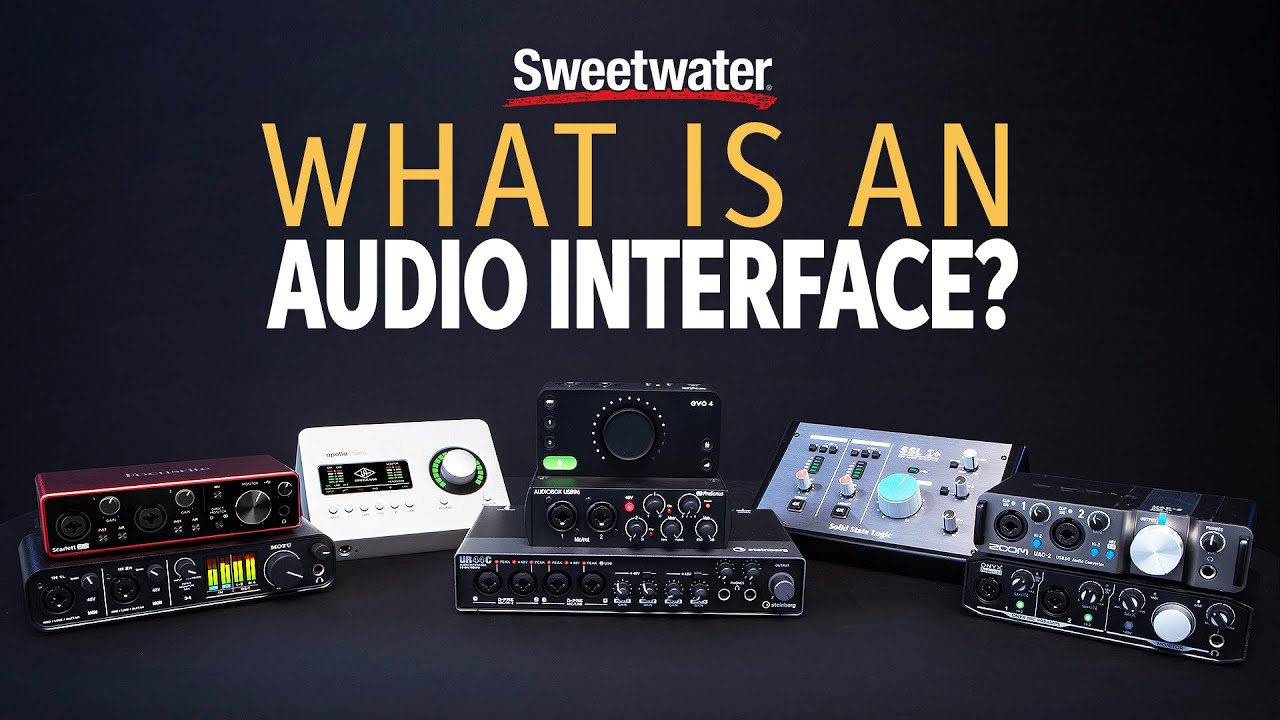
An audio interface is an external device that converts analog signals (microphones, guitars, keyboards) into digital audio your computer can record, and converts digital audio back into analog sound you can hear through speakers or headphones. It replaces your computer's built-in sound card with higher-quality preamps, better converters, and the proper connectors for studio-grade equipment.
You plug a microphone in. Nothing comes out the other end worth keeping. That’s the moment most producers discover their laptop’s built-in audio hardware was never designed for this.
Your computer’s internal sound card handles video calls and YouTube. It was not built for 24-bit recording, low-latency monitoring, or phantom power. An audio interface was.
We’ve tested dozens of interfaces across every price tier, from the Behringer UMC22 at under $60 to the RME Fireface UFX III at over $3,000. The core function is identical across all of them. What changes is how cleanly and how fast they do it.
This guide explains exactly what an audio interface does, how to read the specs that actually matter, and what to look for before you buy your first (or next) one.
What Does an Audio Interface Actually Do?
At its core, an audio interface handles two jobs: analog-to-digital conversion (ADC) on the way in, and digital-to-analog conversion (DAC) on the way out.
When you speak into a microphone, the sound is an analog signal. A continuously varying electrical voltage. Your DAW records digital data: discrete numbers, sampled thousands of times per second. The ADC inside your interface is what bridges those two worlds.
The DAC runs in reverse. When you hit play in Ableton, the digital audio file becomes an analog electrical signal again, strong enough to drive your studio monitors or headphones.
Why Your Built-In Sound Card Isn't Good Enough
Laptop audio hardware is engineered around one constraint: cheap. The converters are low-resolution. The preamps are noisy. There’s no phantom power for condenser mics, and the headphone output is too weak to drive anything serious.
We connected a Shure SM7B directly to a MacBook’s 3.5mm input and to a Focusrite Scarlett 2i2 4th Gen. The MacBook recording had a noise floor around -60 dBFS. The Scarlett brought it to -128 dBFS equivalent. That’s not a marginal difference. It’s the difference between usable and embarrassing.
How Do Bit Depth and Sample Rate Affect Your Recordings?
These two specs appear on every interface listing. Most buyers ignore them or pick the highest numbers available. Here’s what they actually mean.
Bit Depth: Your Dynamic Range Budget
Each bit of depth adds roughly 6 dB of dynamic range. At 16-bit (CD quality), you have 96 dB of dynamic range. At 24-bit, you get 144 dB. That extra headroom is why we always record at 24-bit minimum.
32-bit float is showing up in newer interfaces, including the Focusrite Scarlett 4th Gen range. It makes clipping on the input practically impossible, which is genuinely satisfying for live recording when you can’t babysit gain levels.
Sample Rate: How Often Your Signal Gets Photographed
44.1 kHz means your interface takes 44,100 amplitude snapshots per second. Most professionals record at 24-bit/96 kHz. It captures frequencies up to 48 kHz and gives you more data to work with during editing and pitch-shifting.
192 kHz is available on most modern interfaces, including the Scarlett 2i2 4th Gen. We’d recommend it for specific workflows like recording acoustic instruments that you’ll later process heavily in post. For everyday tracking, 96 kHz is the sweet spot.
What Are the Inputs and Outputs You'll Actually Use?
The front panel of an interface tells you exactly what it was built for.
XLR Inputs and Microphone Preamps
XLR inputs accept balanced mic signals, which is what every professional microphone uses. Behind each XLR input is a preamp: a circuit that amplifies the mic’s very weak signal to a level the converter can work with.
Preamp quality matters more than most people realise. A noisy preamp adds hiss that you cannot remove cleanly in post. The Scarlett 4th Gen preamps measure around +69 dB of gain and perform cleanly across the range. The Universal Audio Apollo Solo’s preamps are quieter still, with an equivalent input noise (EIN) of -131 dBu.
Condenser microphones also require 48V phantom power, supplied through the XLR input. Every modern interface includes this, switched on per-channel or globally.
Hi-Z Instrument Inputs
Guitars and basses output a high-impedance signal. Plugging a guitar directly into a standard line input creates impedance mismatch: thin, weak, and ugly tone.
Hi-Z inputs (also called “instrument” or “DI” inputs) present the correct high impedance load to your guitar’s pickups. We plugged a Telecaster into a standard balanced input and then into a hi-Z input on the same interface. The hi-Z signal was fuller by a noticeable margin below 500 Hz, and the pick attack was sharper.
Line Inputs and Outputs
Line-level inputs accept signals from keyboards, drum machines, outboard gear, or the outputs of other audio equipment. They don’t pass through the preamp stage.
Line outputs send audio to your monitors or outboard gear. Monitor outputs are often volume-controlled from a front-panel knob, which is one of the most-used features on any interface. We’ve never loved interfaces that bury the monitor volume control in software.
How Do You Connect an Interface to Your Computer?
The connection type affects data transfer speed and, more importantly for recording, latency.
USB: The Default Choice
USB 2.0 handles most home and project studio interfaces without issue. The Focusrite Scarlett range, Audient iD series, and PreSonus AudioBox all use USB-C or USB 2.0. It’s broadly compatible, powers most interfaces directly, and works on Mac and Windows without drama.
USB 3 and USB-C connections are standard on newer interfaces but don’t inherently reduce latency over USB 2.0. The spec that affects latency is buffer size, managed in your DAW settings.
Thunderbolt: Low Latency at a Price
Thunderbolt 3 transfers data at 40 Gbps. USB 3 tops out at 10 Gbps. That bandwidth difference supports larger channel counts and lower buffer sizes, which translates to round-trip latency under 2ms on interfaces like the Universal Audio Apollo x4.
The frustrating reality: you pay a significant premium for Thunderbolt. For a two-channel home studio recording vocals and guitar, you won’t notice the difference in a blind test. For running 16+ channels live or tracking a full band, Thunderbolt earns its cost.
What Happened to FireWire?
FireWire was the professional standard through the 2000s. MOTU and Focusrite built excellent FireWire interfaces. Modern Macs and most PCs dropped FireWire ports around 2012. If someone’s selling you a FireWire interface in 2025, they’re cleaning out a drawer.
What Is Direct Monitoring and Why Does It Matter?
This is the feature that most beginner guides bury. It’s actually one of the most important things an audio interface does.
When you record into a DAW, your signal travels into the interface, converts to digital, travels through USB to your computer, gets processed by the DAW, converts back to analog, and travels back to your headphones. That round trip introduces latency. At higher buffer sizes (512 samples or above), you’ll hear an audible delay while singing or playing.
Direct monitoring bypasses the DAW entirely. The interface routes your input signal directly to the headphone and monitor outputs with near-zero latency. You hear yourself in real time.
We’ve watched singers lose their pitch because of 20ms of monitoring delay. Direct monitoring eliminates the problem completely. Every interface has it. Learn where the switch is on yours before your first session.
Onboard DSP: The Feature Most People Don't Know They Want
Higher-end interfaces like the Universal Audio Apollo range include DSP chips that run EQ, compression, and reverb on your input signal in real time, with zero perceptible latency. You can track vocals through an LA-2A emulation and hear it in your headphones without touching your CPU.
Budget interfaces don’t include this. The Focusrite Scarlett range’s “Air” mode adds harmonic content that approximates the sound of older ISA transformer-based preamps. It’s not DSP processing, but it’s a clever hardware trick that adds a bit of edge to the high end, around 3-6 kHz.
What Should You Look For in Your First Interface?
Two inputs handle 90% of home recording situations. A vocalist and a guitar, a vocalist and a piano, two overheads on a drum kit.
For two-channel recording, the Focusrite Scarlett 2i2 4th Gen at around $170 is where we’d start. 24-bit/192 kHz converters, +69 dB of preamp gain, solid driver support on Mac and Windows, and a headphone output that actually sounds decent.
If budget is the hard constraint, the Audient EVO 4 sits under $100 and has cleaner preamps than most of its direct competition. We’d take it over the Behringer UMC22 without hesitation.
For more channels, the Focusrite Scarlett 18i20 or the MOTU 8pre are proven, stable options with strong driver support. RME’s driver stability reputation is legitimate. Their Total Mix FX software is the most powerful mixing environment available on any interface’s onboard software, though the learning curve is steep.
A useful resource for reading technical specs and comparing interface measurements is Audiosciencereview.com, where the community runs objective measurements on hardware. For understanding DAW buffer settings and latency, Sweetwater’s Learning Center covers the fundamentals clearly. If you want to dig into the math behind ADC and bit depth, the iZotope Learning Center has accessible explainers written for producers, not engineers.
Worth Bookmarking
- Audio Science Review, Objective measurements and SNR tests for interfaces and DACs
- Sweetwater's Learning Center, Buffer size, latency, and routing guides written clearly
- iZotope Learn, Bit depth, sample rate, and signal chain concepts for producers
You might also want to read about and .
Summary
An audio interface converts analog signals to digital and back again, with far better quality than your computer’s built-in hardware. It gives you proper XLR mic inputs with phantom power, hi-Z inputs for guitar, and clean preamps that don’t add noise to your recordings. Connection type (USB vs. Thunderbolt) affects latency and channel count. Direct monitoring is what lets you hear yourself without delay. For most home studios, a 24-bit, two-channel USB interface in the $100-$170 range handles everything you’ll throw at it.
Frequently Asked Questions
Do I need an audio interface if I only produce with software instruments?
If you're working entirely ITB with no microphones or external gear, you can get by without one. But your computer's headphone output is weak and the DAC quality is poor, so your mixes will suffer on decent monitors. An interface improves playback quality even if you never plug a mic in. The Focusrite Scarlett Solo is a low-cost entry point for this use case.
What's the difference between an audio interface and a mixer?
A mixer blends multiple signals together before they reach your recording destination. An audio interface sends separate, individual channels directly to your DAW so you can mix them in software. Many modern interfaces include basic onboard mixing for monitoring purposes, but they're not the same as a hardware mixing desk. For home recording, an interface alone handles nearly every situation.
Does a more expensive audio interface make recordings sound better?
Above about $150, the differences in converter quality become small enough that most listeners can't identify them in a blind test. What you actually pay for at higher price points is lower noise floor, more inputs and outputs, better driver stability, lower latency, and features like onboard DSP. If your recordings sound poor, microphone placement and room acoustics are almost always the cause, not the interface's converter quality.