We were two hours into a lo-fi hip-hop beat when the session hit that familiar wall: the drum loop was fine, but it felt borrowed. We needed something that breathed like a real kit, sat back in the mix, and didn’t cost us an afternoon of programming. We dropped in UJAM Virtual Drummer SOLID 2, picked style 14, dialled the Intensity knob to about 60%, and had a usable groove in under two minutes.
That’s the pitch. SOLID 2 is a $119 virtual drummer plugin built for producers who want real-sounding drum tracks without building them from scratch. It’s not trying to be BFD or replace a session drummer with a Ph.D. in groove. It’s trying to get you moving. For a lot of workflows, it does exactly that.
First Impressions: Clean Interface, Quiet Power
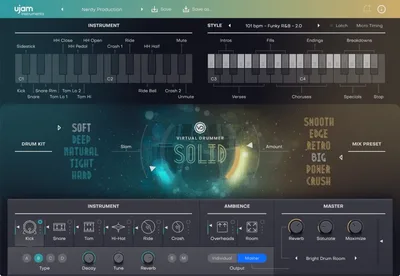
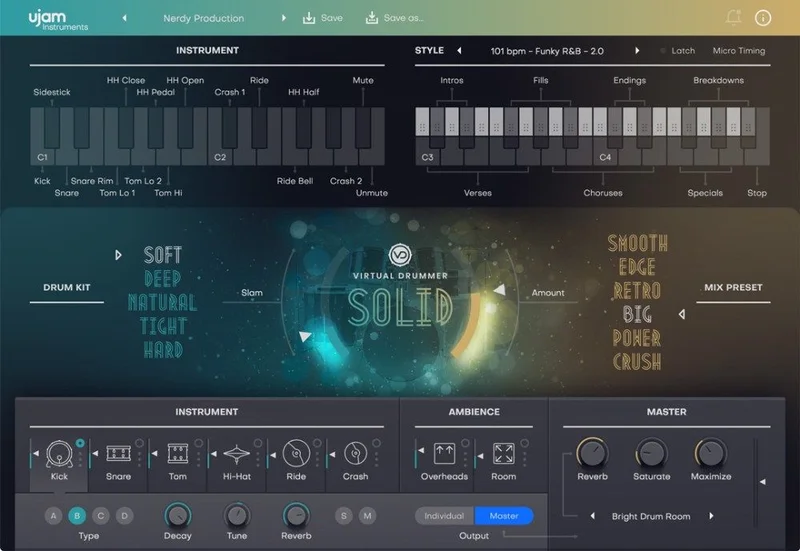
Installation is painless. UJAM’s licence manager handles activation, and the library downloads cleanly in the background while you work. Opening SOLID 2 for the first time, you get a single-screen interface: a large photo of a drum kit, a style browser on the left, and a horizontal strip of controls across the bottom.
No tab-diving. No eight-page manual needed. The Complexity and Intensity knobs alone shape most of the feel. It’s almost suspiciously simple. That simplicity is a deliberate choice, and whether it’s a strength or a limitation depends entirely on what you came here to do.
Getting It Into a Real Workflow
SOLID 2 drops into a DAW session the way a drum loop does, except you can change the feel without hunting through folders. The style browser lists 60 labelled grooves with fills, intros, and outros baked in. You trigger sections via MIDI notes in the C1-B1 range, which takes about five minutes to map to your controller or piano roll.
The drag-and-drop MIDI export is where the plugin earns real trust. Drag a pattern out of the browser, drop it into your piano roll, and it becomes editable MIDI. That’s the escape hatch. If SOLID 2’s internal groove isn’t quite right, you take the MIDI and fix it yourself.
The friction point we hit was load time. Switching between the five drum kits mid-session caused a 3-4 second pause every time. Not catastrophic, but annoying when you’re trying to audition sounds quickly. We’d recommend picking a kit before you start building, not while.
Individual output routing also requires manual setup in your DAW. It works, but it’s not plug-and-play. Budget ten minutes the first time.
What It's Genuinely Good At
The grooves sound like a drummer played them. We ran the “Pocket” style through a session with a Fender Rhodes and upright bass, and the kick and snare sat back in the mix without fighting. No EQ needed to tame low-mid buildup. The room mic bleed on the overheads gave the kit depth without washing out the stereo field.
With 1,380 patterns across 60 styles, there’s enough variation to cover an entire album without repeating a groove verbatim. We tested this across four separate tracks in different genres: soul, hip-hop, indie rock, and sparse singer-songwriter. Three of the four worked without swapping the kit.
The drag-and-drop MIDI export proved its worth on the rock track. We pulled the groove out, doubled the snare hits at the chorus, and dropped a ghost note on beat three. Total time: four minutes. That’s a satisfying workflow.
The 6 mix presets inside the plugin are a clever touch. “Room” and “Punch” both did useful things to the transient shape. “Punch” added roughly 2-3dB of attack presence on the snare, noticeable without being heavy-handed.
The Rough Edges
Sound design is not on the menu. You can’t tune the kick, adjust the snare tension, or swap individual drum pieces. You choose a kit. That’s it. For producers who want to blend a 60Hz kick from one source with a cracking 200Hz snare from another, SOLID 2 will frustrate you.
There’s also no humanisation dial. The “feel” of a groove comes from the style you pick, not from adjustable parameters. If style 22 is too stiff, you either find another style or export the MIDI and edit manually. That’s a real limitation compared to XLN Audio Addictive Drums and similar plugins, where randomisation and timing offset controls exist specifically for this problem.
The CPU load is moderate, sitting around 8-12% on a mid-spec M2 MacBook Pro during playback with individual outputs active. Not a CPU hog. But the 3-4 second kit-switching lag we mentioned earlier feels like a library management issue that UJAM should have solved by now.
Who This Is Really For
- ✅ Buy if you write songs and need a drum track that sounds real without building it from scratch
- ✅ Buy if you produce hip-hop, soul, or indie and want a sta rting point you can drag into your DAW as MIDI
- ✅ Buy if you're already in the UJAM ecosystem and want drums that match the workflow of their other UJAM virtual instruments
- ❌ Skip if you want granular control over kit tuning, compression, or individual drum sound design
- ❌ Skip if you're building electronic or heavily processed drum sounds that need architectural flexibility
- ❌ Skip if you already own a deep sampled drum library. SOLID 2 won't add much you don't have
Score Breakdown
| Category | Score | Notes |
|---|---|---|
| Sound Quality | 3.8/5 | Kits sound like real rooms; limited tonal variety across the five options |
| Value for Money | 3.5/5 | $119 is fair but only if the simplified approach matches your workflow |
| Ease of Use | 4.5/5 | One screen, two main knobs, drag-and-drop MIDI. Brilliant for fast sessions |
| Features | 3.3/5 | 1,380 patterns is impressive; lack of sound design tools is a real gap |
| CPU Efficiency | 3.5/5 | Playback is fine; kit-switching lag is annoying |
| Overall | 3.8/5 | A focused, honest tool that knows exactly what it is |
Alternatives to Consider
If SOLID 2’s ceiling is too low, here are three tools worth comparing.
XLN Audio Addictive Drums 2 is the closest direct competitor. It offers more kit customisation, individual drum tuning, and a humanisation engine. It’s also more expensive and has a steeper learning curve. If you want to dial in a snare sound rather than just choose one, Addictive Drums is the better call.
Native Instruments Studio Drummer (part of Komplete) goes deeper on acoustic realism, with three meticulously recorded kits and full mixer integration. The price difference is significant, but if you’re already in the Komplete ecosystem, it’s the smarter spend.
GetGood Drums plugins offer a similar “fast drummer” philosophy but with more control over dynamics and articulation. Producers working in heavier genres, modern pop, or anything needing aggressive snare transients will get more from GGD than from SOLID 2.
For a different take on simplifying drum production, our UJAM SLAP review covers their approach to drum processing rather than drum generation.
And if you’re working with more experimental or textured sounds, the Solids Chromaphone 3 sound bank is worth a look as a complement to any drum plugin in your chain.
Our Verdict
SOLID 2 does one thing well: it gets a convincing drum track onto your timeline without asking much from you. That’s not a small thing. A lot of songs exist because the demo had decent enough drums to sell the idea to a collaborator or label.
At $119, it’s priced correctly for what it does. We’d buy it for a songwriter’s toolkit or a production workflow where drums are a means to an end. We’d skip it for anyone who considers the drum sound a core part of their identity as a producer.
The honest version: this is a brilliant sketch tool that’ll disappoint anyone who wants a canvas.
Frequently Asked Questions
Is UJAM Virtual Drummer SOLID 2 suitable for beginners?
Yes. The interface is one screen with two main control knobs and a style browser. There's no deep routing or complex setup required to get a working drum track. Beginners can have a convincing groove running within minutes of installation. The learning curve is as shallow as virtual drummer plugins get.
Can you export SOLID 2 patterns as MIDI?
Yes. Drag-and-drop MIDI export is built in. You pull a pattern from the browser directly into your DAW's piano roll, and it becomes fully editable MIDI. This is one of SOLID 2's strongest features. It means you're not permanently locked into the plugin's internal engine if a groove needs adjustment.
How does SOLID 2 compare to SOLID 1?
SOLID 2 significantly expands the content library, adding more styles, patterns, and kits compared to the original. UJAM offers an upgrade path from SOLID 1, which makes the jump less painful on the wallet. If you're already using SOLID 1 and finding the style count limiting, the upgrade is worth considering.
Does SOLID 2 work with Logic Pro, Ableton Live, and Pro Tools?
Yes. SOLID 2 ships in VST2, VST3, AU2, and AAX formats, all 64-bit only. That covers Logic Pro (AU), Ableton Live (VST3 or AU), and Pro Tools (AAX). If you're on a 32-bit system or an older DAW that only supports 32-bit plugins, this one won't load.