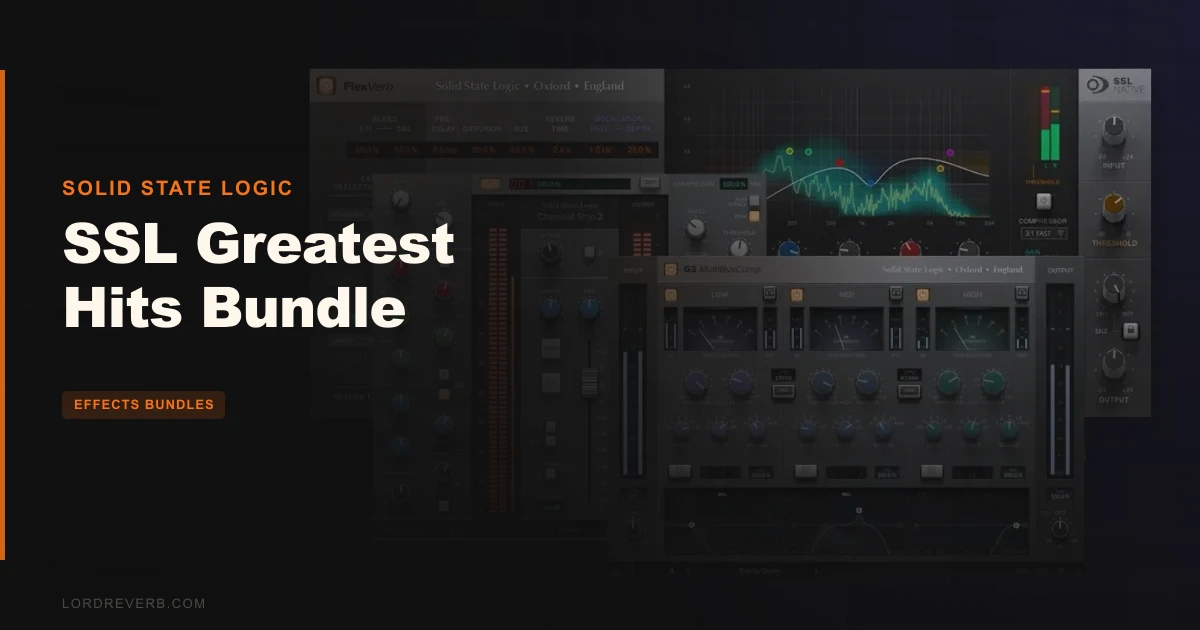
The SSL Greatest Hits Bundle is a smart purchase if you want SSL's core signal-chain tools in one shot: Channel Strip 2, G3 MultiBusComp, and FlexVerb together at $397 give you a full workflow from raw track to finished bus, and the gap between that price and buying the three separately is wide enough to matter. This isn't a padded bundle of orphaned plugins thrown together to justify a sale. These three cover genuinely different jobs, and they're built to work in the same session without stepping on each other. If SSL sound is what you're after and you've been buying piecemeal, that stops here.
The honest caveat: deep independent testing of this specific bundle is thin on the ground. The bones are strong. The question is whether your workflow needs all three, or whether you'd be better served buying just one of them.
What You're Actually Getting
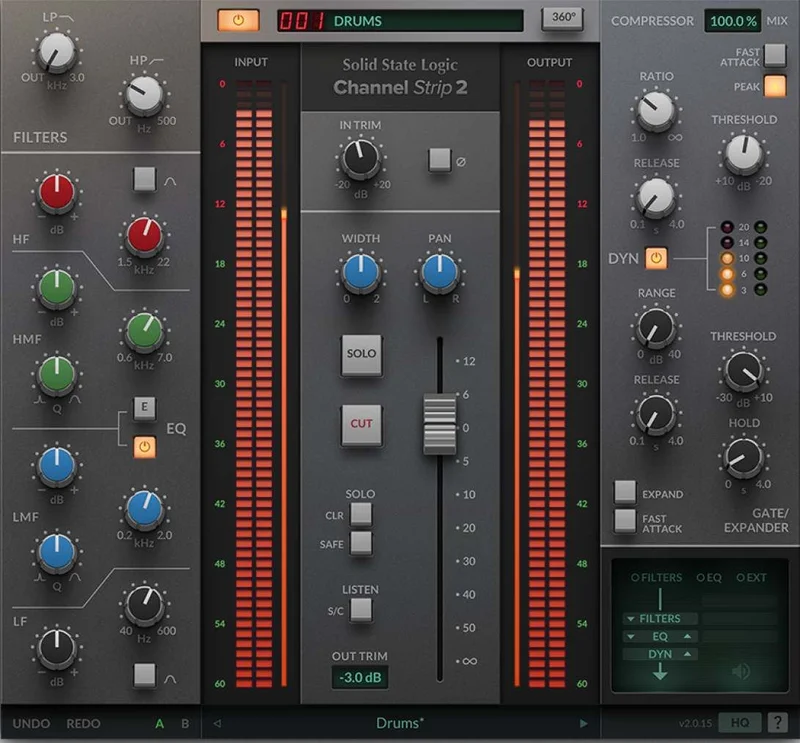
Three plugins, three distinct jobs. Channel Strip 2 handles your track-level processing: 4-band parametric EQ with switchable E and G Series characters, a compressor with soft and hard knee modes, a Gate/Expander, plus variable highpass and lowpass filters. It's modelled on the SSL 9000K console channel strip.
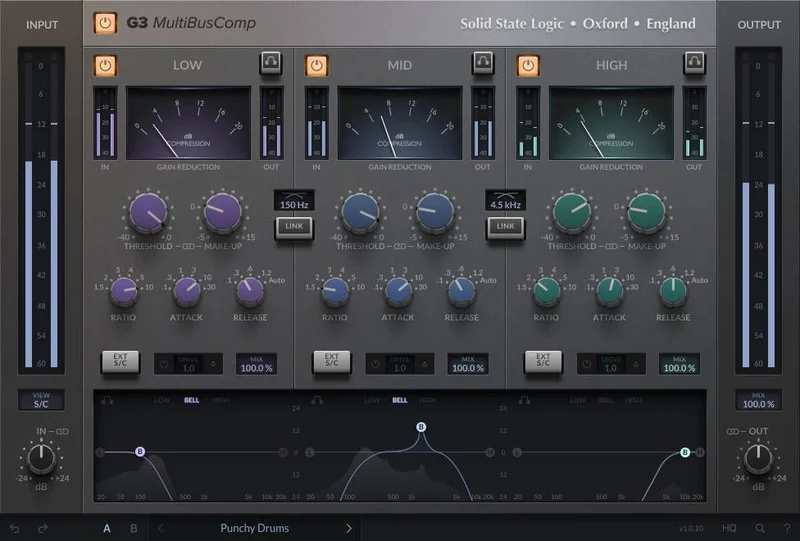
G3 MultiBusComp is the bus and mix tool. Three independently configurable compression bands, per-band external sidechaining, per-band '4K' harmonic drive, and a parameter linking system that lets you push one band's threshold while the others compensate in reverse. It's built for multiband glue, not transparent limiting.
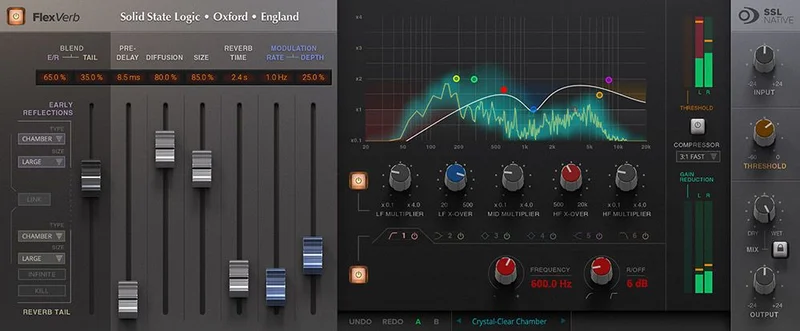
FlexVerb is the reverb. Four algorithms: room, hall, plate, chamber. Split early and late reflection controls, a 6-band EQ shaping the reverb's frequency response, highpass and lowpass filters, 3-band reverb time multipliers, an input sidechain compressor, and an output compressor. That output compressor detail matters: it's how the reverb tail sits in a dense mix instead of washing over it.
All three support the SSL 360 ecosystem and can be controlled from UC1 and UF8 hardware if you're running that setup.
Channel Strip 2: Track-Level SSL Tone
The 4-band EQ is where you'll spend most of your time with this plugin. The LMF and HMF sections are fully parametric. The LF and HF shelves can flip to Bell mode, which is a workflow detail that sounds small until you need surgical top-end control on a bright vocal and a shelf is making things worse. The E and G Series switching changes the character of the EQ curves: E leans more precise, G has more of the classic SSL warmth in the high frequencies, which in measurable terms means a broader shoulder on the high shelf and a slightly different Q behaviour through the mids.
SSL's 'Anti-Cramping' technology is in here. For anyone unfamiliar: cramping is what happens to digital EQ curves near the Nyquist frequency, where high-shelf filters start to look wrong and behave unpredictably. Anti-Cramping keeps the curves honest at high frequencies. It's a real design consideration, not marketing language.
The compressor gives you soft and hard knee options plus fast and slow attack switches. That's not the most granular control you'll find on a dedicated compressor, but it's the right set of choices for a channel strip. Push it hard with a slow attack on a full drum bus and the transients cut through without the compressor strangling them. Soft knee on a vocal keeps the dynamic character intact even when you're working at high ratios.
The Gate/Expander has the same fast/slow attack logic. It won't replace a dedicated noise gate with full parameter access, but for cleaning up bleed on a live recording or tightening a floor tom, it's one less plugin in the chain.
The sidechain integration is cleverer than it looks. The EQ can be applied directly to the dynamics sidechain, and so can the highpass and lowpass filters. Put the highpass on the sidechain and you stop the compressor reacting to low-frequency energy. That's a feature engineers used to build manually with a separate signal chain, and here it's baked into a single plugin with an external sidechain input on top of that.
Owners consistently report that Channel Strip 2 brings SSL sound into the DAW in a way that feels like the console, not like a copy of it. That's a subjective claim, but the 9000K modelling lineage is real, and the EQ switching behaviour tracks with what that console actually does.
G3 MultiBusComp: Multiband Glue With Character
Multiband compression on a bus is a divisive workflow choice. Done wrong, it's the fastest way to make a mix sound fractured and unnatural. G3 MultiBusComp is built to avoid that, specifically through the band graph view that lets you set thresholds and frequency crossover points visually, so you can see exactly where the bands split before you start compressing.
The three bands are independently configurable. Each has its own threshold, ratio, attack, and release. Each has its own external sidechain capability, which means you can use a kick drum to trigger compression in the low band without affecting the mid or high band's behaviour. That level of specificity is what separates this from a simpler two-knob bus compressor.
The '4K' harmonic drive per band is worth talking about. It adds second and third harmonic content to that specific frequency range. Drive the low band lightly and the bass gets density and presence without getting louder. The mid band drive can add just enough grit to a mix that's sitting flat. These aren't massive saturation effects. They're small, additive, and controllable, which is exactly what a bus processor should offer.
The parameter linking is one of the more satisfying workflow details in this plugin. When bands are linked, raising one band's threshold lowers the others in inverse, and the same logic applies to make-up gain. You're shaping balance without breaking it. Owners report this as one of the features that makes precise sound control actually achievable, not just theoretically possible.
The sidechain filters are worth flagging: they can be set independently from the band crossovers. So your detection circuit can be listening to a different frequency range than the band that's actually being compressed. That's a genuinely useful design choice that most multiband compressors don't offer.
The GUI scales from 50% to 200%. On a large monitor, 200% is the right call. The band graph at full size makes crossover adjustment feel obvious instead of fiddly.
FlexVerb: More Control Than You Might Expect
Four reverb algorithms isn't a large number. Room, hall, plate, chamber covers the main scenarios, but it won't satisfy anyone looking for exotic character or convolution realism. What FlexVerb trades in algorithm variety, it recovers in control depth.
The split early and late reflection interface is the design that sets this apart. Early reflections and late reverb tail are handled separately, with independent type selection for each. Put a room character on the early reflections and a hall character on the tail, and you get a hybrid space that sounds like it was designed rather than selected from a preset list.
The 6-band EQ on the reverb is aggressive control for a reverb plugin. You're not just rolling off the top end to tame brightness: you're shaping the full frequency response of the reverb independently from the source. Cut the low-mids in the reverb on a guitar bus and the reverb stops fighting the bass. Boost the upper mids and the room comes forward in the mix without the tail getting louder.
The 3-band reverb time multipliers let you set different decay rates for different frequency ranges. Low frequencies decay slower in real rooms: you can replicate that here. Or deliberately break the physics and have the highs decay slower than the lows for a sound that wouldn't happen in nature.
The input sidechain compressor controls what enters the reverb. Push a loud transient into a reverb and it will bloom unnaturally without some control at the input. That's often handled externally with a compressor before the reverb send. Here, it's part of the plugin.
The output compressor is what makes the tail sit. Reverb without an output stage can either wash over the mix or disappear into it depending on how hard you push the wet signal. The output compressor keeps the tail audible without letting it dominate. It's a clever piece of design, and owners report FlexVerb sounding excellent across different sources.
The infinite reverb switch and reverb tail kill switch are there for sound design, not everyday mixing. Use the infinite switch on a synth pad and you get a freeze effect. The tail kill cuts the reverb dead without a fade. Both are the kind of features you won't need on every session but will love when you do.
The lockable wet/dry mix control is a small thing that's genuinely useful. Lock it, cycle through presets, and the mix relationship stays constant. Frustrating to not have that on every reverb plugin.
The Not-So-Good
The honest limitation of reviewing this bundle is that deep independent technical documentation is sparse. How it performs at high CPU loads, how the compression algorithms compare under stress, what the preset library actually covers: that information isn't widely available from independent sources yet. You're trusting SSL's engineering pedigree and owner reports, both of which point in the right direction, but it's not the same as a detailed component-level comparison.
The preset situation is an open question. What's available, how well-organised it is, and how far you can push customization without hitting a wall: those details aren't documented in enough depth to give you a confident answer. If you're someone who relies heavily on preset-based starting points, that uncertainty is annoying.
Three plugins with this much control each have a learning curve. It's not steep, but the interaction between G3 MultiBusComp's sidechain filters and its band crossovers, or FlexVerb's split reflection interface, requires time before it becomes intuitive. Reviewers call these plugins user-friendly, and structurally that's true, but feature-friendly and workflow-instant are different things.
No confirmed trial version means you're committing at $397 without a test drive. That's a real risk if any one of the three doesn't fit your workflow.
Who Should Buy This
- ✅ Buy if you're building a core plugin set around SSL sound and want channel strip, multiband bus compression, and reverb covered in one purchase.
- ✅ Buy if you already own SSL hardware like the UC1 or UF8 and want software that integrates directly with that control surface.
- ✅ Buy if the bundle price lands clearly below what the three plugins cost separately and you'd use all three regularly.
- ❌ Skip if you only need one of the three: pay for the specific plugin, not the bundle.
- ❌ Skip if you need a large algorithmic reverb library with many algorithms beyond room, hall, plate, and chamber.
- ❌ Skip if you need a confirmed trial period before committing to a plugin purchase at this price point.
Specs & Technical Details
| Developer | Solid State Logic |
| Price | $397 |
| Plugin Format | N/A |
| OS Support | N/A |
| Activation | N/A |
| CPU Usage | N/A |
| Trial Available | N/A |
| Version Reviewed | N/A |
Score Breakdown
| Category | Score | Notes |
|---|---|---|
| Sound Quality | 4.5/5 | 9000K EQ character, multiband glue with harmonic drive, and a reverb with an output compressor: the sound design across all three is well-considered |
| Value for Money | 4.0/5 | Bundle pricing makes three flagship SSL tools more accessible than buying separately; no trial is the friction point |
| Ease of Use | 4.0/5 | Reviewers call these user-friendly, and the interfaces are logical, but full control depth takes time to learn across all three plugins |
| Features | 4.5/5 | Sidechain EQ integration in Channel Strip 2, per-band sidechain in G3, split reflection control in FlexVerb: the feature density is high |
| CPU Efficiency | N/A | Not documented in available sources |
| Overall | 4.2/5 | Three complementary, well-built tools that cover a real gap in most plugin collections, priced to make the bundle the obvious move over individual purchases |
The Verdict
If you're serious about building a mix chain around SSL sound, this bundle is a smarter move than picking the plugins up one at a time. Channel Strip 2 on every track, G3 MultiBusComp on the mix bus, FlexVerb on a send: that's a complete workflow with one purchase at $397, and the feature depth in each plugin holds up under real use.
The weak point is the lack of a trial option and the still-thin independent documentation. You're making a commitment on SSL's reputation and what owners report, which is positive but limited. If you can verify the bundle price lands clearly below buying the three separately, that calculation closes fast.
Skip it if you'd only use one of the three. Buy it if all three fill a gap in your chain right now. Three tools that actually belong together is rarer than it sounds, and this bundle earns that description.
Frequently Asked Questions
What plugins are included in the SSL Greatest Hits Bundle?
The bundle contains three plugins: Channel Strip 2, G3 MultiBusComp, and FlexVerb. Channel Strip 2 is a full track processing plugin with 4-band EQ, compressor, gate/expander, and variable filters based on the SSL 9000K. G3 MultiBusComp is a 3-band bus compressor with per-band sidechain and harmonic drive. FlexVerb is an algorithmic reverb with 4 room types, split reflection control, a 6-band EQ, and both input and output compressors.
Can Channel Strip 2 be used with SSL hardware controllers?
Yes. Channel Strip 2 integrates with SSL 360 and can be controlled directly from UC1 and UF8 hardware. If you're already running SSL hardware in your setup, that integration is a genuine workflow advantage. It means you can adjust EQ and dynamics parameters with physical controls rather than a mouse.
Is the G3 MultiBusComp only for bus processing?
G3 MultiBusComp is built primarily for bus and mix-level processing, but the 3-band architecture and per-band sidechain controls make it flexible enough for heavy track processing too. The '4K' harmonic drive per band is a character tool that works on individual sources as well as a full mix. That said, it's most underrated on a mix bus where the parameter linking between bands earns its place.
How does FlexVerb's output compressor work, and why does it matter?
The output compressor sits at the end of FlexVerb's signal path and controls the level of the reverb tail going into your mix. Without it, long reverb tails can swell unpredictably when the input signal gets loud, which forces you to ride the wet level manually or use a separate compressor after the reverb send. With it built in, the tail stays consistent in the mix even as the source dynamics change. It's one of those workflow details that sounds obvious in retrospect.