Pitch ‘N Time Pro goes head-to-head most often with iZotope Radius and Logic Pro’s native Flex Pitch, and this review lands squarely in the middle: it’s the best-sounding stretch algorithm for Pro Tools post-production work on acoustic sources, and it’s the wrong buy for almost everyone else.
At $799 for version 3.0, Serato is asking you to pay a premium that made sense in 2015. The algorithm is genuinely excellent. The platform lock-in and Apple Silicon situation make this a harder sell in 2026 than it’s ever been.
If you mix orchestral sessions, dialogue, or acoustic records inside Pro Tools and you need phase-coherent multi-track pitch-shifting that doesn’t smear transients, this is still your tool. If you’re on Logic, Ableton, or an M-series Mac without patience for Rosetta workarounds, skip it entirely.
How It Compares Out of the Box
The three tools producers compare Pitch ‘N Time Pro against most often are iZotope Radius (built into RX and VocalSynth), Logic’s Flex Pitch, and zplane’s Elastique (the engine inside countless DAWs).
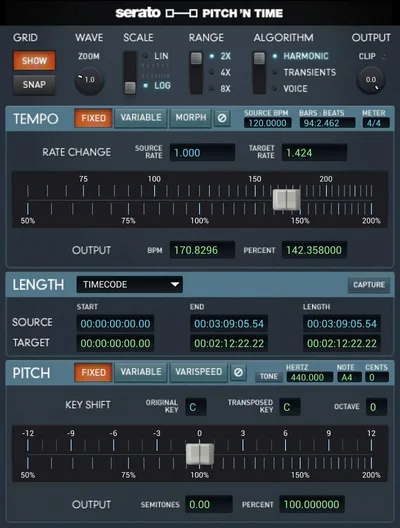
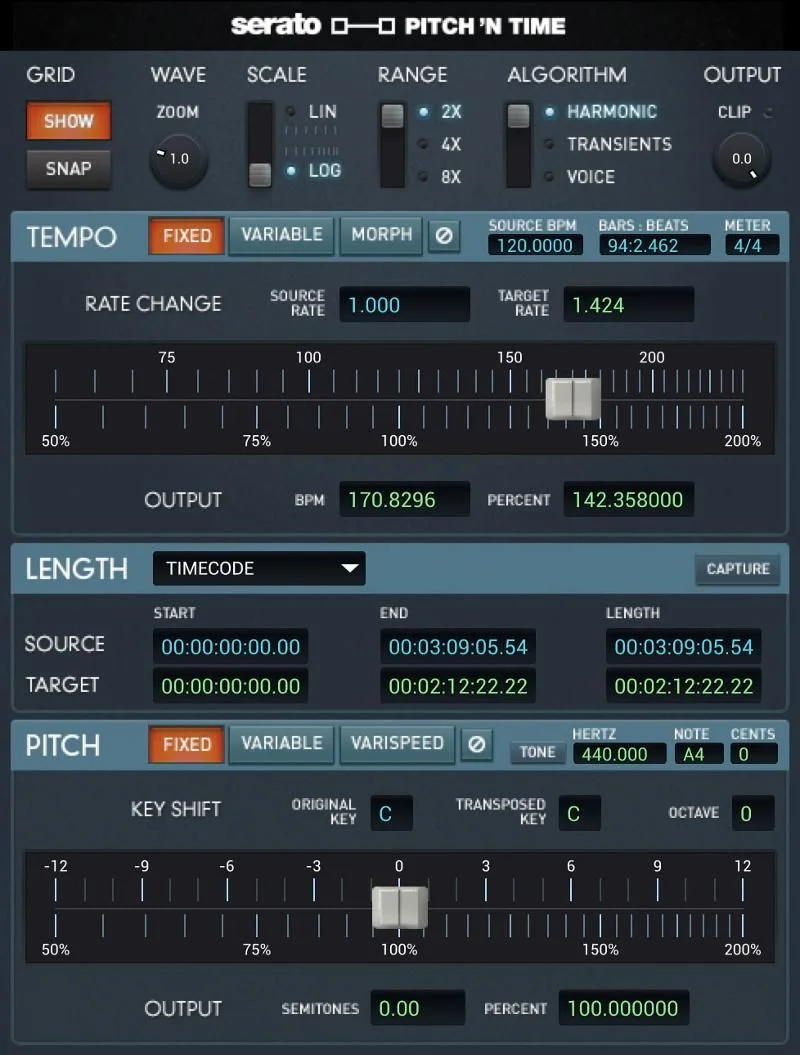
First-impression difference: Serato’s interface looks dated. There’s no waveform display for direct manipulation the way Melodyne or Flex Pitch gives you. You’re working with numerical inputs and marker points rather than a drag-and-grab visual editor.
What you get instead is range. Time compression and expansion from 12.5% to 800% of the original tempo. Pitch shifting across ±36 semitones. These aren’t specs you hit a ceiling on. The processing quality at the extremes is where Serato separates itself, and we’ll get into that in the next section.
For plugin comparisons across pitch-shifting tools, the algorithm quality at extreme settings is the real test.
Performance Deep Dive
We stretched a dry acoustic guitar recording to 50% of its original speed using Pitch ‘N Time Pro, iZotope Radius, and Logic’s Flex Pitch engine.
Pitch ‘N Time Pro held the transient attack of each pluck with the least smearing of the three. At 50% stretch, the note onset was still identifiable without the flanging or metallic warble that appeared in Radius at the same setting. Logic’s Flex Pitch lost clarity on the string resonance tail below 60% speed.
On dialogue, we ran a vocal line pitched up 7 semitones. Pitch ‘N Time Pro kept the formant character intact without obvious cartoon-chipmunk shift. Radius matched it closely but required more manual formant correction to get there.
The Time-Morph feature for marker-based timing adjustments works well for nudging arrangement timing on long-form content. We placed three markers across a 32-bar string section and shifted the middle passage forward by 8%. The phase coherence across the 12-track session held without flamming.
Multi-Channel Mode is the headline spec for post-production. Simultaneous processing across up to 48 tracks with phase coherence maintained throughout. That’s not a feature iZotope Radius or Logic’s tools offer at the session-wide level.
CPU load during render is heavy. Real-time monitoring via the plugin isn’t smooth, which is the frustrating part.
Where It Wins
The algorithm is the argument. Serato’s auditory scene analysis breaks audio into components before stretching, which is why acoustic sources survive extreme processing better than they do through generic time-domain algorithms.
We love Multi-Channel Mode for orchestral post work. Stretching a 36-track string session by 15% and maintaining phase coherence across every mic position is something you can’t replicate natively inside Pro Tools.
Variable Pitch Mapping handles note-level corrections without the full Melodyne commitment. It’s not as visual, but for a producer who lives in Pro Tools and doesn’t want to bounce stems out to a separate editor, it keeps the workflow tight.
The network-sharable iLok licensing is underrated for studios with multiple rooms. One license, multiple engineer access points. That’s a real operational advantage.
Where the Competition Wins
Logic’s Flex Pitch is free. That’s a brutal sentence for an $799 plugin.
For anyone working primarily in Logic, Flex Pitch’s visual interface, direct waveform manipulation, and real-time playback beat Pitch ‘N Time Pro’s workflow without contest. It’s not as strong at the extreme stretch percentages, but 95% of pitch correction work never touches those extremes.
iZotope Radius provides real-time preview that actually works. Auditioning a pitch shift before committing is a basic workflow expectation in 2026. Pitch ‘N Time Pro’s limited real-time preview is annoying. It slows down the session.
The Rosetta situation is the biggest competitive loss. Running a $799 plugin through Rosetta emulation on an M-series Mac in 2026 is ugly. Apple Silicon native execution should not still be an open question at this price point.
zplane’s Elastique powers the stretch engine in Ableton, Studio One, and Reaper natively. It’s a strong algorithm with zero platform friction. Pitch ‘N Time Pro can’t touch that portability.

Who Should Buy Which
- ✅ Buy if you're a Pro Tools post-production engineer handling orchestral sessions, film scores, or acoustic dialogue work where phase-coherent multi-track processing is a hard requirement.
- ✅ Buy if your studio runs multiple Pro Tools seats and network iLok licensing removes per-seat friction from your workflow.
- ✅ Buy if you need extrem
e stretch ratios (below 25% or above 400%) on acoustic sources without metallic artifacts, this is where the Serato algorithm earns its keep.
- ❌ Skip if you're on Logic Pro. Flex Pitch does nearly all of this for free.
- ❌ Skip if you're on an M-series Mac without a dedicated Rosetta workaround, native performance isn't there yet, and that matters at this price.
- ❌ Skip if you need real-time pitch preview as part of your creative process. The workflow friction is real and it adds up.
Score Breakdown
| Category | Score | Notes |
|---|---|---|
| Sound Quality | 4.5/5 | Algorithm handles acoustic sources and extreme ratios better than any DAW-native tool we've tested |
| Value for Money | 2.5/5 | $799 for a Pro Tools-only AAX plugin is a hard sell when Logic ships comparable tools for free |
| Ease of Use | 3.0/5 | Numerical input workflow and limited real-time preview make auditioning slow and frustrating |
| Features | 3.5/5 | Multi-Channel Mode and Variable Pitch Mapping are genuine differentiators; real-time preview gap hurts |
| CPU Efficiency | 3.0/5 | Heavy offline render load; Rosetta overhead on Apple Silicon adds latency not present on Intel |
| Overall | 3.8/5 | A brilliant algorithm trapped inside a 2015-era workflow at a 2026 price that's hard to defend outside niche post-production use |
Alternatives to Consider
iZotope RX (Radius Algorithm)
If real-time preview and a modern editing interface matter to you, iZotope RX with the Radius engine is the direct competitor. It works across DAWs, ships with strong spectral repair tools alongside pitch-shifting, and the workflow is satisfying in a way Pitch ‘N Time Pro’s isn’t. Check the iZotope plugin guide for our take on the full suite.
Melodyne 5 Studio
For note-level pitch correction with visual waveform editing, Melodyne 5 Studio is the standard. It’s DAW-agnostic via ARA2 integration, the visual interface is brilliant for surgical work, and it handles polyphonic material. It’s not a session-wide multi-track stretcher, but for vocal and instrument correction it outclasses Pitch ‘N Time Pro’s Variable Pitch Mapping in flexibility.
Serato Hex FX
If you’re already in the Serato ecosystem and want creative pitch manipulation rather than corrective post work, read our Serato Hex FX review before buying anything. Different tool, different purpose, but worth knowing where Serato’s creative vs. corrective plugins split.
Also worth researching: zplane’s Elastique-powered plugins if DAW portability is your priority. Ableton Live’s native warp engine runs Elastique 3 and costs zero extra dollars.
Here’s where we land: Pitch ‘N Time Pro has the best-sounding stretch algorithm we’ve run acoustic material through. If Pro Tools is your permanent home and you’re processing multi-track orchestral or acoustic sessions where phase coherence matters at the session level, it earns $799 once and pays back over years of use.
But the Apple Silicon situation is legitimately frustrating in 2026. Running this without Rosetta is not confirmed, and at $799 that’s unacceptable. Logic users, Ableton users, anyone on an M-series Mac looking for a native solution: this is the wrong buy.
The algorithm deserves to live in a better house. Until Serato rebuilds the workflow around it, the house is the problem.
Frequently Asked Questions
Does Pitch 'N Time Pro work on Apple Silicon Macs?
Not natively, as of the most recent version we reviewed. It runs under Rosetta 2 emulation on M-series Macs, which adds processing overhead and introduces compatibility friction with newer Pro Tools versions. Check Serato's official compatibility page before purchasing if you're on an M1, M2, or M3 machine. A $799 plugin should not require an emulation layer in 2026.
Is Pitch 'N Time Pro only for Pro Tools?
Yes. It's AAX format only, which means it works exclusively inside Pro Tools. There's no VST3 or AU version, so Logic, Ableton, Studio One, and Reaper users are locked out entirely. If you're not committed to Pro Tools as your primary DAW, this plugin isn't an option regardless of the algorithm quality.
How does Pitch 'N Time Pro's Multi-Channel Mode work?
Multi-Channel Mode processes up to 48 audio tracks simultaneously while maintaining phase coherence across all channels. This is the feature post-production engineers use for stretching orchestral sessions, drum overheads, or any recording where multiple microphones captured the same source. Processing tracks independently without phase coherence causes flamming and comb filtering. Multi-Channel Mode solves that at the session level.
Is the 30-day demo fully functional?
Serato offers a 30-day demo license through iLok License Manager, and based on available information it gives full access to the plugin's features within the trial window. We'd strongly recommend using the full demo period on a real session before committing to $799. Run it on your hardest pitch-shifting job and compare the output against whatever you're currently using. That's the only test that matters.