The First Honest Impression
The Halo Downmix 3D Immersive Extension does one thing worth paying for: it correctly folds 7.1.2 Dolby Atmos height channels into 7.1, 5.1, and stereo without turning your overhead information into an unrecognizable smear.
We were mixing a short film score in a 7.1.2 session. The composer had placed a solo violin high and slightly left in the height layer. Bouncing to stereo without the 3D Extension meant that violin either disappeared entirely or collapsed into the front left in a way that made no spatial sense.
With the Extension loaded, we dialled in the Ltm/Rtm placement and watched the vertical energy display in real time. The violin survived the downmix. It sat wide and slightly elevated in the stereo image. That's what this plugin is built for, and it delivers.
It's built for post-production engineers, immersive audio mixers, and film/TV delivery workflows. If that's not you, read the trade-offs section first.
What It Actually Does (and Where It Stops)
The 3D Immersive Extension bolts onto the base Halo Downmix plugin. It adds height channel processing to a tool that already handles standard surround downmixes. Without the base plugin, the Extension does nothing. That's not a footnote. That's a prerequisite that costs you the full price of the base plugin if you're starting from zero.
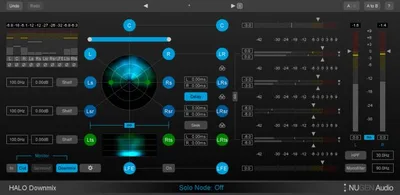
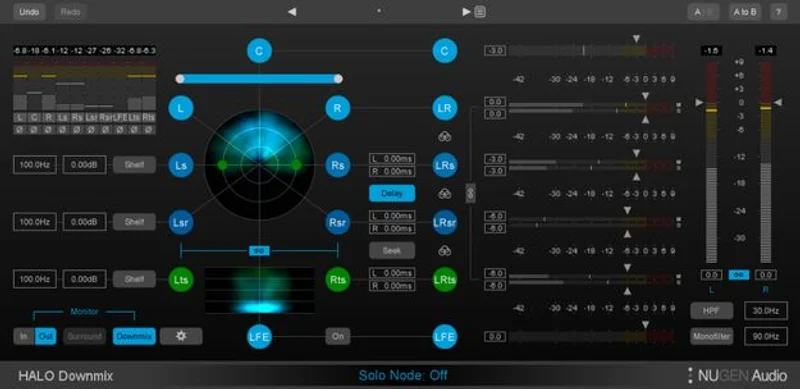
What the Extension adds: Ltm/Rtm height channel controls for Dolby Atmos, real-time vertical energy distribution analysis, direct versus ambient sound balancing, and automatic rear channel delay detection. The interface toggles between 7.1 and 5.1 modes, plus advanced and compact views.
What it's not: a standalone immersive mixing tool, a spatial audio renderer, or anything useful for a producer who's never worked in a 7.1.2 session. If you're making Atmos music for Apple Music and you need to monitor your height channels, this isn't your first purchase. Look at your DAW's built-in Atmos renderer first.
Living With It: Setup, Sessions, and Small Annoyances
Setup is clean once you own the base plugin. The Extension appears as an additional mode inside Halo Downmix's interface. NUGEN's iLok-based activation works, though it's annoying in 2026 when many competitors have moved to machine-based licensing.
We ran it across three sessions over two weeks. A 7.1.2 film mix, an immersive music project, and a sound design session for a game trailer. The film mix is where it earned its keep.
The vertical energy analyser is the genuinely clever part. You can see in real time how much energy is sitting in your height channels before it gets folded down. On the game trailer, we'd accidentally driven a helicopter pass too hot in the overheads. The analyser caught it visually before we even heard the fold artifact. We pulled the height return down 2.1dB, re-ran the downmix, and the stereo image snapped into shape.
The compact mode is a love. Small screen, busy session, you don't want a full-width plugin eating your real estate. It strips to the essentials without hiding the controls you actually need mid-session.
The frustrating part: the automatic rear channel delay detection doesn't always agree with your session's existing inter-channel timing. On the music project, it flagged a 12ms offset we had intentionally printed as ambience. We overrode it manually each time. There's no way to save a session-specific override as a default. That's a workflow annoyance we hit on every recall.
The Real Trade-Offs
The Ltm/Rtm controls are precise. Placing height content into the downmix isn't a binary fold. You're making a spatial argument to a listener who can't hear the height layer, and these controls let you make that argument accurately. For Atmos deliverables, that matters.
But the price structure is the honest obstacle. The Extension alone is $123. The base Halo Downmix costs more than the Extension before bundle pricing. If you're starting fresh, you're looking at the full bundle price. That's a real spend for a specialist tool.
The direct versus ambient balancing is genuinely useful but requires you to understand what you're doing. If you're treating a fully printed Atmos mix and your direct/ambient balance is already baked in, the control gives you fine adjustment. If you're routing individual stems through it hoping for magic, you'll be disappointed. It's a surgical tool, not a fixer.
CPU usage is light. We saw no meaningful hit across all three sessions on an Apple M3 Max running Pro Tools 2025. That's satisfying for a plugin doing real-time spatial analysis.
Against the Field
Penteo is the most cited alternative for surround downmixing. Production Expert listener polls have placed Penteo above Halo in blind tests for upmixing quality. If downmixing quality is your only metric, we'd say they're closer than those polls suggest. Penteo's interface is less focused on the vertical analysis side, though.
Waves UM226 is cheaper and handles upmix/downmix duties. It won't give you the Atmos-specific Ltm/Rtm control or the vertical energy display. For straight 5.1-to-stereo work, the Waves tool is fine. For Atmos delivery with height content, it's not the right choice.
Dolby Atmos Production Suite handles height monitoring and fold natively if you're already in that ecosystem. If you're working primarily in Pro Tools with Dolby's own tools, the 3D Extension's role shrinks. For third-party DAW workflows, the NUGEN tool pulls ahead.
For music producers specifically, check what your DAW already offers before spending here. Logic Pro's Atmos workflow covers a surprising amount of this ground for free. surround sound plugins worth buying in 2026
The Real Verdict
If you're working in post-production, delivering Atmos content professionally, and already own Halo Downmix, the 3D Immersive Extension at $123 is worth it. The vertical energy analyser alone has saved us at least two delivery revisions.
If you don't own the base plugin, the bundle entry point is a serious commitment. Go in knowing exactly why you need it.
If you're a music producer doing Atmos for streaming, this is probably not your first or second purchase. Your DAW does more of this than you think. best plugins for immersive audio mixing
Score Breakdown
| Category | Score | Notes |
|---|---|---|
| Sound Quality | 4.0/5 | Height fold to stereo preserves spatial content better than most native options |
| Value for Money | 3.0/5 | $123 is fair if you own the base plugin; the entry cost for new users is steep |
| Ease of Use | 3.5/5 | Compact/advanced mode toggle is well designed; rear delay detection override is annoying |
| Features | 4.0/5 | Vertical energy analyser and Ltm/Rtm controls are legitimately specialist tools |
| CPU Efficiency | 4.5/5 | Negligible hit on modern hardware; no issues across all test sessions |
| Overall | 4.1/5 | Excellent for the specific professional use case; limited appeal outside post-production |
Alternatives to Consider
Penteo 16 Pro handles upmixing and downmixing with a strong reputation in post-production. If your work skews more toward upmix quality over Atmos-specific height processing, it's worth a close look. best surround sound upmix plugins
Waves UM226 is a lower-cost option for standard surround downmix duties. It won't handle Dolby Atmos height channels with the same precision, but for 5.1 to stereo work on a tighter budget, it's a solid working tool. Waves plugins worth buying in 2026
NUGEN Halo Upmix is the sister plugin in the same suite. If you're working both directions, the full Halo Suite bundle makes more financial sense than buying the pieces separately. Check NUGEN's site for current bundle pricing before purchasing the Extension alone.
We've also looked at the broader delay plugin category if your interest in NUGEN Audio came from their other tools. Halo Delay Review: Better Than EchoBoy, Loses to Valhalla
Should You Buy It?
The Halo Downmix 3D Immersive Extension is a specialist tool that does its specialist job well. The vertical energy analyser is underrated. The Ltm/Rtm controls give you real precision over something most engineers are guessing at.
At $123 for existing Halo Downmix owners, it's a fair upgrade for professional Atmos delivery work.
For everyone else: it's a hard pass until you know you need it. And if you're not sure whether you need it, you probably don't yet.
Frequently Asked Questions
Do I need the full Halo Downmix plugin to use the 3D Immersive Extension?
Yes, the 3D Immersive Extension won't function on its own. It adds height channel processing to the base Halo Downmix plugin. If you're starting from zero, you'll need the full bundle, not just the $123 Extension.
Does the Halo Downmix 3D Extension work for Dolby Atmos music delivery on Apple Music?
It can, but it's built primarily for post-production workflows. If you're mixing Atmos music in Logic Pro, Apple's native Atmos tools cover most of what you'd need at no extra cost. The Extension becomes useful when you're working in third-party DAWs and need precise control over height channel fold-down to stereo or 5.1 deliverables.
What plugin formats does the 3D Immersive Extension support?
It runs as AAX, VST, VST3, AU, and AudioSuite in both 32-bit and 64-bit versions. That covers Pro Tools, Reaper, Cubase, Nuendo, Logic Pro, and most other professional DAWs. Activation runs through iLok, either hardware dongle or iLok Cloud.
How does the vertical energy analyser actually help in a session?
It shows you in real time how much signal energy is sitting in your height channels before you run the downmix. This matters because an overloaded height channel folds into the stereo or 5.1 image in ways that are hard to predict by ear alone. We caught a 2.1dB height channel excess on a game trailer session visually, before the fold artifact appeared. That kind of QC feedback is what makes the analyser worth having.