If you're weighing the Benn Jordan Bundle against a standalone creative delay like Valhalla Delay or something from the Output ecosystem, this review lands clearly in the bundle's favour for one specific type of producer. Not for everyone. But for the right person, it's not close.
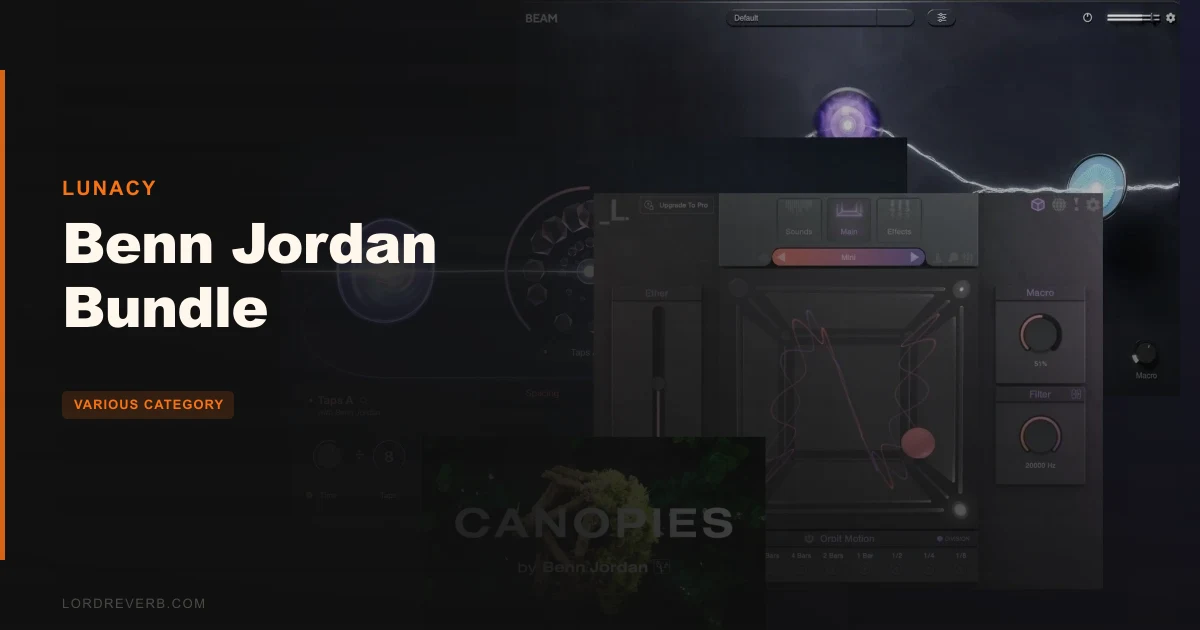
This is Lunacy Audio's complete Benn Jordan collaboration in a single package: BEAM 2.0, Taps, Portals, CUBE Mini, and the Canopies CUBE expansion. At $149, you're getting two effects plugins, a sampler engine, a preset expansion, and a modular routing environment. That's a lot to assess.
The short version: if you make music where space, texture, and evolving sound design matter more than clean fidelity, this bundle was built for you. If you're here for a bread-and-butter delay with a simple interface, look somewhere else. We'll be specific about which is which throughout.
How It Compares Out of the Box
The Benn Jordan Bundle gets compared most often to Valhalla Delay, Output Portal, and iZotope Stutter Edit. That comparison is understandable but slightly off-target. Valhalla Delay is a delay plugin. Output Portal is a feedback tool. Stutter Edit is a performance effect.
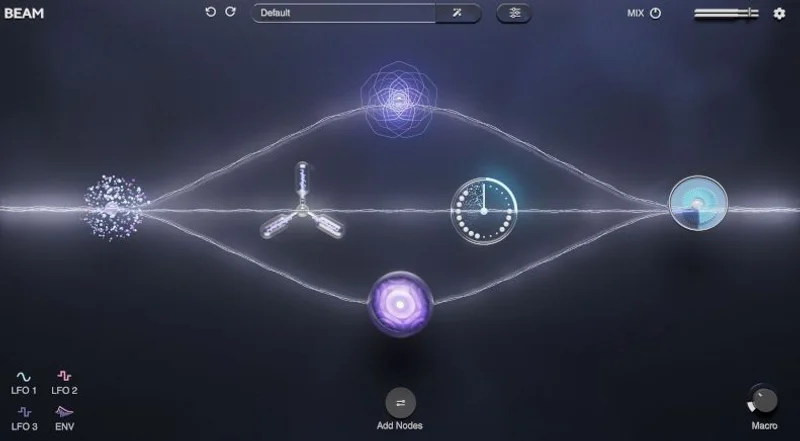
Taps and Portals are closer to that territory, but BEAM shifts the whole thing into modular effect-routing space. A fairer comp is something like the Unfiltered Audio bundle or the Baby Audio TAIP/BEAM pairing. You're not buying a delay unit. You're buying a compositional texture system.
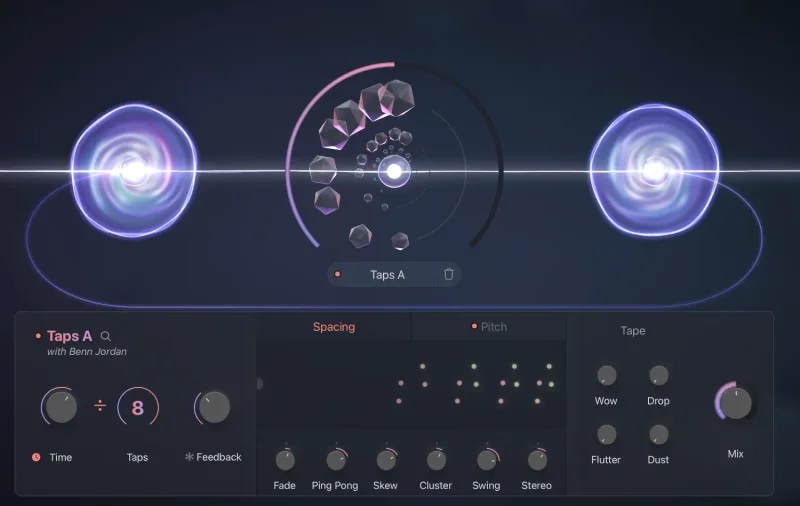
First impressions: the UI is clean. Lunacy has a design language that's visually consistent across BEAM, CUBE Mini, and the standalone plugins. Nothing feels bolted together. The Taps editor, where you individually adjust pitch and spacing for up to 8 delay taps, is the standout on first load. It's not a feature you see in Valhalla or Replika. It's genuinely different.
BEAM 2.0 already exists as a standalone product. The bundle adds Taps and Portals as BEAM nodes, with up to 3 of each loaded simultaneously. That distinction matters. We'll get to why.
Taps: The Delay Plugin That Thinks Melodically
Most multi-tap delays treat their taps as timing events. Taps treats them as pitch events too. That's the design decision that separates it from almost everything else in this category.
Load Taps on a pad and pull up the editor. You have 8 taps. Each one has its own pitch control. Set tap 1 at root pitch, tap 3 a fifth up, tap 5 a minor third above that. Now you're not writing a delay. You're writing a melody that echoes out of a single held note.
That's not a workflow trick. That's the intended use case.
Time, Taps, and Feedback Controls
The main panel gives you Time (free-running or tempo-synced), a Taps count, and Feedback. Divide and Multiply extend the range significantly, letting you push taps far outside standard rhythmic subdivisions. If you want a tap pattern that doesn't land on any conventional beat grid, this is how you get there.
The Freeze button holds current feedback in place. Use it on a long sustain and you get an instant freeze loop you can sculpt in real time. It's satisfying in the way that a good hardware freeze is satisfying: immediate, musical, not fussy.
Tape Controls: Wow, Flutter, Drop, Dust
These are the four analog colour parameters. Wow adds low-frequency pitch drift. Flutter adds higher-frequency instability. Drop handles speed inconsistency. Dust injects noise.
Push Wow past 50% on a clean electric guitar and it starts to feel like a worn cassette. That's exactly what it should do. These controls aren't subtle at high values, which is right. A tape saturation tool that's too polite is useless.
At low values (Wow at 10-15%, Dust at 5-8%), the effect is more like a presence-widener than an obvious degradation tool. That lower range is where it's most useful for mixing, rather than sound design.
The Taps Editor: Complex Spacing and Pitch Modes
This is the best part of the plugin. The Complex Spacing knob shifts all 8 taps rhythmically at once, moving from grid-locked to freeform without individual editing. Complex Pitch does the same across all pitch settings simultaneously.
Pull Complex Pitch hard to the right on a plucked guitar loop. The repeats start climbing in pitch with each tap, creating a rising shimmer that you'd normally have to build in a DAW with pitch-shifted delay sends and careful automation.
You can do that in a single plugin instance now.
50 presets ship with Taps, designed by leading sound designers including Benn Jordan. The Parallax pack adds 50 more, these combining Taps and Portals within BEAM. Both packs are included in the bundle. The presets aren't throwaway starter material. Several of them are actually the right starting point for a session, not just demos.
Portals: Feedback as a Design Surface
Portals is stranger than Taps. It's a feedback system, not a delay unit. The distinction isn't just semantic.
With a conventional delay, feedback is a parameter you dial back to avoid runaway signal. With Portals, feedback is the instrument. The smart feedback compensation system keeps levels reasonable even at 100% feedback. That's the specification that makes Portals actually usable instead of theoretically interesting.
Set feedback to 100%. Your signal doesn't blow up. It sustains, transforms, reacts. That's the design promise, and based on the developer's description of the compensation system, it's a real architectural decision, not a marketing line.
Gate, Delay, and Feedback Controls
Gate shapes when the feedback loop opens and closes. Delay sets the loop time. Feedback controls the intensity of the re-circulation.
Use Gate with a short Delay on a percussion hit and you get a rhythmic stuttering effect that evolves over time. Use Gate with a longer Delay on a synth pad and the texture breathes in a way that's difficult to program manually. The combination of all three creates what Lunacy calls "rhythmic evolving motion," and that phrase is accurate.
Portals Inside BEAM: Nested Feedback Routing
This is where Portals gets interesting for producers willing to go deep. Inside BEAM, you can load up to 3 Portals nodes. Those nodes can run in serial or parallel. Serial means the output of one feedback loop feeds into the next. Parallel means separate loops running simultaneously on the same source signal.
Serial routing creates feedback chains that are unpredictable in the best way. Send a short vocal sample through two chained Portals nodes, each with different Delay times and Gate settings. What comes out doesn't sound like a delay effect. It sounds like the source material has been restructured.
That's not an exaggeration. That's the use case Benn Jordan built this for.
Annoying caveat: to access Portals at all, you need BEAM. The standalone Portals plugin isn't a thing. Taps exists as a standalone VST3/AU/AAX plugin. Portals only lives inside BEAM. If you're evaluating the bundle as a delay-first purchase, that matters.
BEAM 2.0: The Environment That Makes This Work
BEAM is the engine. Without it, you have Taps as a standalone delay plugin and nothing else from the modular side. With it, Taps becomes one of up to 3 nodes, Portals adds feedback routing, and the whole system connects to BEAM's modulation architecture.
300+ Global Presets and 200+ Node Presets
BEAM ships with over 300 global presets built by designers including Venus Theory, J.Views, Dash Glitch, Databroth, and Alckemy Neuro. These aren't anonymous factory patches. They're curated by designers who work in the same sonic space Benn Jordan occupies. The style is consistent.
200+ node presets mean sub-preset browsing within individual effect slots. You can dial in a Taps node preset without touching the global patch. That's a workflow detail that saves time once you know the system.
200+ impulse responses range from physical spaces to entirely synthetic textures. Metal chains, ambient voids, hybrid spaces. The IR collection is part of what makes BEAM more than a delay routing environment. It's a full reverb-plus-effects chain.
Deep Modulation: 3 LFOs and Macro Control
BEAM's modulation system gives you 3 LFOs with a dedicated shape editor and preset browser, plus a Macro control. The LFO shape editor is proper. You're not stuck with sine, square, and triangle. Custom shapes feed into any automatable parameter inside BEAM.
Assign an LFO to Portals' Gate timing and the rhythm of the feedback loop changes with the shape you've drawn. Assign the Macro to multiple parameters simultaneously and you get a single knob that transforms the entire signal chain.
For live performance or real-time sound design, the Macro control is the thing we'd map to hardware first.
Intelligent Preset Designer
BEAM has a preset generator that builds new patches from scratch using a probability cluster algorithm. That's Lunacy's own description. In practice: click a button, get a new patch. Some will be brilliant. Some will be unusable. It's the kind of randomisation tool that's genuinely fun in the early hours of a session when you're looking for a starting point rather than a specific sound.
We're sceptical of AI preset generators as a primary workflow tool. As a starting-point scrambler, this one sounds like it earns its place.
CUBE Mini and Canopies: The Compositional Layer
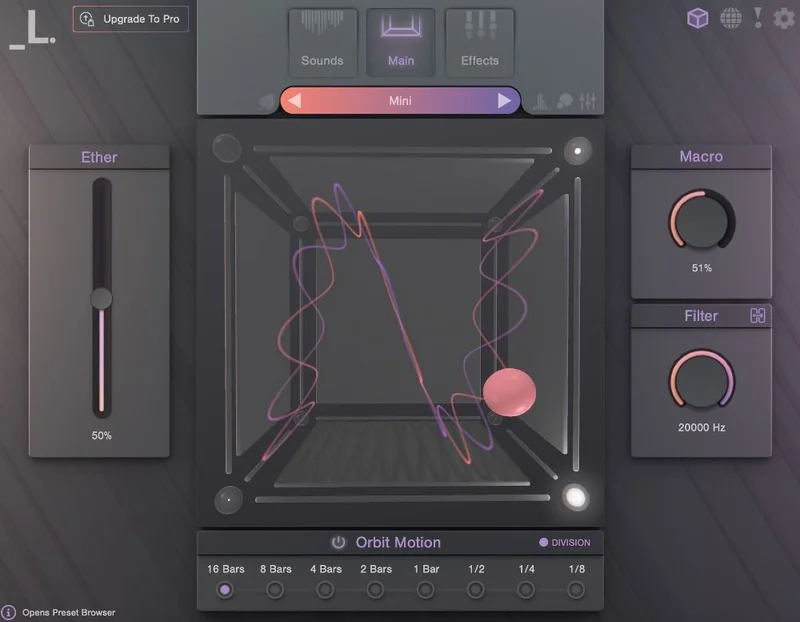
CUBE Mini is a sampler and vector synth. It ships with 35 multi-sampled instruments and 120 presets. 8 sample editors give you arpeggiator, filters, envelopes, step sequencers, reverse, mono, glide, pan, and tuning per sample slot. 13 FX modules cover the full chain from filtering through to convolution reverb.
This is a full instrument. Not a bonus patch collection.
The Eco-Mode CPU-saving feature is the detail that matters for producers running heavy sessions. Lunacy built in RAM and CPU minimisation as a dedicated mode. We'd want more specifics on the actual reduction numbers, but the fact it exists as a named feature suggests it was a real concern during development.
Canopies: Benn Jordan's CUBE Expansion
Canopies is a 15 sound-source expansion for CUBE, recorded with earthy acoustic instruments: guitars, vihuelas, kalimbas, and others, with experimental articulations and synthesiser textures layered in. 50 presets come with it.
The design aesthetic is specific. Fog-blanketed woodlands, firefly-lit treescapes. That's Lunacy's language for it, and it's accurate. This isn't a general-purpose expansion. It's a palette. If that palette fits your music, Canopies is underrated at the bundle price. If you make hard techno, skip it.
Load a Canopies kalimba preset through a Portals node in BEAM. Add LFO modulation on the Gate timing. Set Complex Pitch in Taps to 60% with 5 active taps. What you get is a rhythmic metallic texture that doesn't sound like any of its component parts. That's the integration the bundle is designed around.
For the Producer Just Starting with Lunacy
If you've never used BEAM before, the bundle is the most efficient entry point Lunacy offers. You get the core engine, two effects designed to demonstrate what it does at a high level, and a sampler instrument that gives you sound material to run through it.
The learning curve is real. BEAM's modular routing isn't as immediately approachable as a single-plugin workflow. Give it a weekend session, not a Tuesday afternoon between client revisions.
The 300+ global presets matter here. They're not just for producers who don't want to build patches. They're documentation in sound. Load a preset, look at what's connected to what, follow the signal path, and reverse-engineer the design. That's the fastest way to learn the system.
Our honest advice for newcomers: start with the Parallax preset pack before touching Portals manually. It shows you what serial feedback routing looks like before you build it yourself. Then try to recreate one patch from scratch. You'll understand BEAM faster than any tutorial would teach you.
Buy it. The value at $149 makes the learning investment worthwhile.
For the Working Producer in Daily Sessions
The question here isn't whether the bundle sounds good. It's whether it fits into a production workflow that has deadlines.
Taps as a standalone plugin slots in easily. It's VST3/AU/AAX compatible across all major DAWs. Drop it on a bus, select a preset, adjust the tap editor, done. That's a five-minute workflow.
BEAM is slower to dial in. It's not a quick-insert tool. It's a creative environment that rewards time investment. If your sessions are mostly client work with fixed turnarounds, BEAM lives in your production time, not your mixing time.
The Intelligent Preset Designer is genuinely useful for fast inspiration. Drop into BEAM when you need an unusual texture quickly, generate a few patches, pick the closest one, trim it. That workflow works. It's not how the system is designed to be used, but it functions that way.
One thing we wish Lunacy had addressed: the workflow documentation is thin. The feature set is sophisticated enough that it deserves more than marketing copy and preset descriptions. Third-party tutorials exist, but official deep-dives are sparse.
Buy it for creative work. Use Taps standalone for deadlines. Save BEAM for sessions with room to explore.
For the Sound Designer and Experimental Producer
This is who the bundle was built for. Full stop.
Portals with 3 nodes in serial is a generative system. You're not processing audio in a conventional sense. You're feeding it into a feedback architecture that reshapes it over time. The Gate control becomes a rhythmic sculptor. The Delay time becomes a structural variable. The smart feedback compensation keeps it from becoming a noise exercise.
Load a single one-second audio sample. Send it through two serial Portals nodes with different Gate settings. Add a third Taps node with Complex Pitch at 70% and 6 active taps. Automate the Macro control over 8 bars. What plays back has the DNA of the original sample and almost none of its surface characteristics.
That's not a trick. That's a compositional approach. Benn Jordan uses it this way. The presets demonstrate it. And the system is stable enough to use in a real session, not just a sound design experiment.
The CUBE Mini plus Canopies layer gives sound designers source material that's already sonically distinctive. Vihuelas and kalimbas aren't common sample sources. Running them through Portals feedback chains produces textures that are genuinely hard to find elsewhere.
Buy it. No hesitation for this use case.
For the Mixing Engineer
Be honest with yourself here. Most of this bundle is not for mixing.
Taps is useful in a mix context. The 8-tap editor with individual pitch control is clever on guitar buses and synth sends. The tape controls add analog character at low settings without obvious degradation. The 50 presets include some that work as mix inserts rather than pure sound design tools.
BEAM, Portals, CUBE Mini, and Canopies are compositional tools. They live in pre-mix space. Putting Portals on a lead vocal bus is a creative decision, not a mixing decision. That's fine if that's what you want. But if you're buying this expecting a collection of transparent, precise mix tools, you'll be frustrated.
Our recommendation for mixing engineers: buy the bundle if you also produce. The Taps standalone plugin justifies the investment for mixing use. Everything else is a bonus that becomes valuable if you step into composition and sound design.
Wait if you're purely a mix engineer. Taps standalone might suit you better as a targeted purchase.
Where It Wins
The per-tap pitch control in Taps is the clearest competitive advantage. No plugin at this price point, and very few at any price, gives you individual pitch control on 8 independent delay taps with a Complex Pitch macro that moves all of them simultaneously.
Smart feedback compensation in Portals is the second win. Running any feedback system at 100% is normally a liability. Lunacy built the compensation in so you can design at the extreme end without managing levels manually. That's an engineering decision that enables a different workflow.
The BEAM integration is a structural advantage over standalone effects. Running 3 Taps nodes plus 3 Portals nodes in a modular chain, with LFO modulation on each, is not something you can do with Valhalla Delay or Output Portal by themselves.
CUBE Mini and Canopies extend the bundle beyond effects into a complete production environment. That breadth, at $149, is genuinely hard to match.
Where the Competition Wins
Valhalla Delay is more immediately usable for clean, precise delay work. Its interface takes seconds to learn. Taps takes longer, especially the editor.
Output Portal has better standalone documentation and a stronger tutorial ecosystem. Producers new to feedback design will find it easier to onboard than Portals inside BEAM.
iZotope Stutter Edit 2 wins for live performance integration and MIDI control depth. BEAM's Macro control is good, but Stutter Edit was built for performance workflows in a way the Benn Jordan Bundle wasn't.
CPU usage is an open question. Lunacy's CUBE Mini has an Eco-Mode, which suggests CPU consumption was worth engineering around. No CPU figures are published for 3 Portals nodes plus 3 Taps nodes plus BEAM modulation on a mid-spec machine. Check the trial in a dense session before buying if your rig is on the older side.
Who Should Buy Which
- ✅ Buy if you make ambient, cinematic, or experimental electronic music and want creative delay and feedback tools that go beyond conventional echo processing.
- ✅ Buy if you're new to Lunacy's ecosystem and want the full BEAM environment with effects designed to show it at its best.
- ✅ Buy if you're a sound designer who needs unusual source material and a feedback architecture to process it through.
- ❌ Skip if you need a simple, fast delay plugin with no learning curve. Taps alone is worth the look, but the full bundle is too much.
- ❌ Skip if you're a mixing engineer with no interest in composition or sound design. The mixing-specific value is limited to Taps standalone.
- ❌ Skip if your machine is old and you haven't checked the CPU requirements. The modular BEAM environment with full node stacks needs headroom, and the data on exactly how much isn't fully published yet.
Specs & Technical Details
| Developer | Lunacy Audio |
|---|---|
| Price | $149 |
| Plugin Format | VST3 / AU / AAX |
| OS Support | Mac / Windows |
| Activation | N/A (check Lunacy Audio website for current activation method) |
| CPU Usage | Medium to Heavy (Eco-Mode available in CUBE Mini; full BEAM node stacks untested independently) |
| Trial Available | Check Lunacy Audio website |
| Version Reviewed | BEAM 2.0 / Taps & Portals current release / CUBE Mini current release |
Score Breakdown
| Category | Score | Notes |
|---|---|---|
| Sound Quality | 4.5/5 | Per-tap pitch and smart feedback compensation produce results you can't get from standard delay plugins |
| Value for Money | 4.5/5 | Two effects, a modular environment, a sampler, and a preset expansion at $149 is genuinely hard to beat |
| Ease of Use | 3.5/5 | Taps standalone is accessible; BEAM's modular routing and Portals take real time to learn |
| Features | 4.5/5 | 8-tap pitch editor, smart feedback compensation, 3-node stacking, 300+ presets, LFO shape editor |
| CPU Efficiency | 3.5/5 | Eco-Mode in CUBE Mini is a good sign; full node stacks in BEAM need independent verification |
| Overall | 4.3/5 | One of the most compositionally complete bundles in this price range, with real limitations for pure mixing use |
Try It Before Committing
If a trial or demo is available on the Lunacy Audio website, do three things before buying. Load a single sustained note through Taps with 6 active taps, push Complex Pitch to 65%, and check whether the pitch-shifted repeats sit musically in your mix context or clash with your key. Not every project wants climbing pitch echoes.
Second, stack two Portals nodes in BEAM with the same Gate setting and different Delay times. Listen to what the interaction between the two loops sounds like at 80% feedback. That's the sound the bundle is selling you. If it excites you, buy it immediately.
Third, open CUBE Mini with a Canopies preset and run it through a Taps node inside BEAM. If that combination makes you want to write something, the bundle is right for your music. If it sounds like a sound effects library, it probably isn't.
Alternatives to Consider
If you want creative delay with strong pitch-shifting capabilities but a simpler interface than Taps, Valhalla Delay review is the closest comparison. It's more immediately usable but lacks per-tap pitch control.
For feedback-focused sound design as a standalone tool, Output Portal review is the most direct Portals alternative. It has better tutorial support and a more established user community, but doesn't integrate into a BEAM-equivalent modular environment.
If the CUBE Mini and Canopies compositional tools are the draw, best sample-based instruments for electronic music covers instruments in this space with broader comparison. Lunacy's Benn Jordan angle is specific enough that direct swaps are hard, but the category comparison is useful.
If you're building a full Lunacy ecosystem setup and want to understand BEAM 2.0 modular effects review on its own terms before buying the bundle, start there. The bundle makes more sense once you understand what BEAM does independently.
The Verdict
The Benn Jordan Bundle is a very compositionally specific delay and feedback toolkit for its price. It's not pretending to be a general-purpose delay plugin. It's not a mix tool dressed as a sound design system. It knows exactly what it is.
Taps is brilliant for anyone who thinks of delay as a melodic event rather than a timing tool. The per-tap pitch editor with Complex Pitch control is the kind of feature you invent workarounds to replicate in other plugins, then feel slightly ridiculous about when a direct solution exists.
Portals is clever and the smart feedback compensation is a real structural advantage. The dependency on BEAM is the honest limitation. If BEAM isn't in your workflow already, it's an additional onboarding cost, not just a software prerequisite.
The bundle is underrated relative to the amount of territory it covers. CUBE Mini alone would be a reasonable standalone purchase. Canopies plus Taps plus Portals plus BEAM at $149 is a difficult argument to dismiss.
Buy it if you make music where texture, space, and evolving sound matter. Skip it if you're buying it to replace your current delay plugin with something faster.
The worst use of this bundle is as a conventional delay. The best use of it is as a compositional environment where the delay is just the starting point. Know which one you're buying it for.

Related reviews: Komplete 26 Collectors Edition Upgrade · Komplete Select Beats
Frequently Asked Questions
Does Portals work as a standalone plugin outside of BEAM?
Portals is only available as a node inside BEAM. You need BEAM to access it. Taps, by contrast, works as a fully standalone VST3, AU, and AAX plugin across all major DAWs, without any BEAM dependency. If standalone Portals functionality is important to your workflow, that's worth knowing before purchasing.
How many Taps and Portals nodes can I run simultaneously in BEAM?
Up to 3 Taps nodes and up to 3 Portals nodes simultaneously inside BEAM. Those nodes can be configured in serial or parallel routing. Running all 6 at once with BEAM's modulation active will draw significant CPU, though independent benchmarks aren't published yet. Check performance in a trial session on your specific machine.
What exactly is in the Benn Jordan Bundle?
The bundle includes BEAM 2.0, Taps (standalone plugin plus BEAM node), Portals (BEAM node only), CUBE Mini (sampler and vector synth), and Canopies (a 15 sound-source CUBE expansion). It also includes the Parallax preset pack (50 presets combining Taps and Portals), 50 standalone Taps presets, 300+ BEAM global presets, 200+ impulse responses, and 200+ node presets.
Is the Benn Jordan Bundle suitable for beginners to music production?
CUBE Mini with its 120 presets is accessible for beginners. Taps as a standalone plugin is learnable without deep technical knowledge. BEAM and Portals have a steeper learning curve, particularly the modular routing and nested feedback design. The Parallax preset pack is the best starting point if you're new to the system, since it shows the full capability before you build patches manually.
What is the per-tap pitch control in Taps and why does it matter?
The Taps editor lets you set an individual pitch value for each of the up to 8 delay taps independently. The Complex Pitch control moves all of them simultaneously in a continuous sweep. This means a single delay plugin instance can produce harmonically related echoes, rising pitch sequences, or dissonant intervals without external pitch processing. It's a feature that exists in very few delays at this price point.
Does the smart feedback compensation in Portals actually prevent level problems at 100% feedback?
According to Lunacy's design specification, yes. The compensation system is designed to keep levels reasonable even at maximum feedback, which is what makes Portals usable as a compositional tool rather than just a sound design risk. We'd recommend running the trial at high feedback settings on your specific signal source before committing, since the behaviour will vary with the material you're processing. The developer's stated goal is stability at 100%, which is a genuine engineering commitment if it holds.