
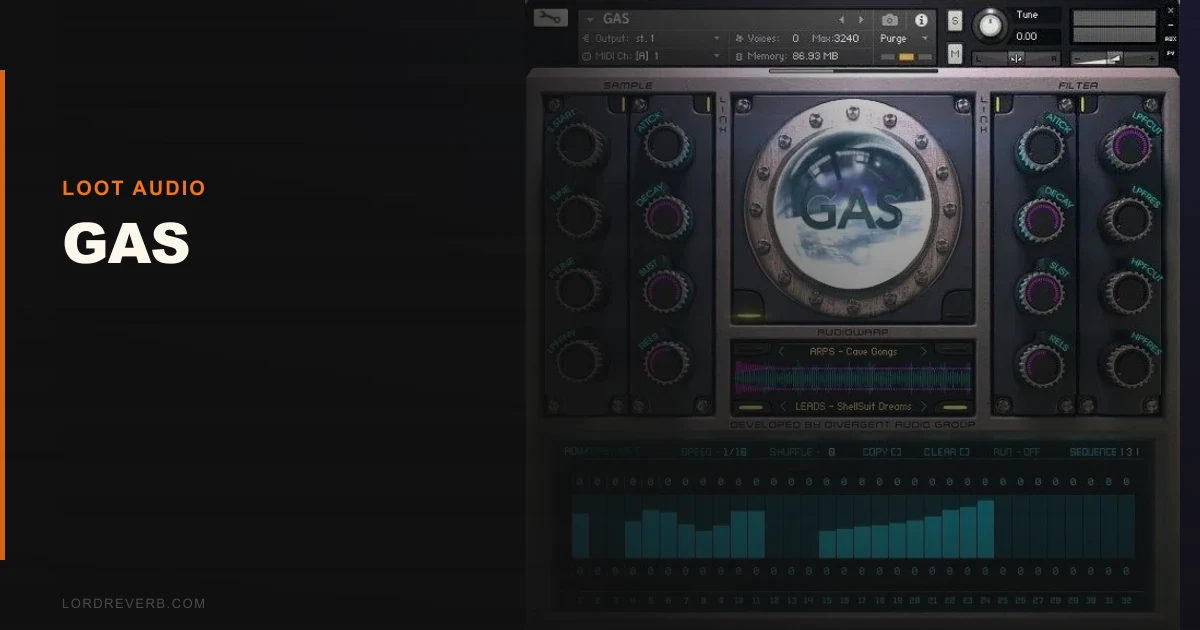
GAS by Loot Audio sits in the same conversation as Spitfire LABS and Output Arcade when producers talk about free or low-cost Kontakt instruments worth keeping. This review lands here: GAS is the more interesting creative tool, but it comes with a narrower use case than either of those competitors. If you’re after bread-and-butter sounds, look elsewhere. If you want something genuinely unusual for texture work, read on.
GAS by Loot Audio gets compared to Spitfire LABS and Output Arcade almost every time it comes up in producer forums. Those are fair comparisons, but not quite accurate ones. LABS gives you orchestral and experimental textures with a polished, broadcast-ready sheen. Arcade gives you loops and melodic phrases built for pop and electronic production. GAS is doing something dirtier and more specific than either. It’s a Kontakt instrument built around degraded, gaseous, and processed sounds: the kind of textures that sit underneath a lead without announcing themselves.
This is for producers who already live in ambient, cinematic, lo-fi, or experimental electronic. It’s not for someone building a hip-hop drum kit or a pop topline. Know that going in.
How GAS Compares Out of the Box
Load it next to LABS “Soft Piano” and the contrast is immediate. LABS feels polished, recorded in a room with a budget. GAS feels like something recorded through a faulty tape machine in a parking garage. That’s not a criticism. That texture is exactly what certain mixes need.
Against Arcade’s melodic loops, GAS doesn’t compete at all. Different job. The closer competitor is something like Glitchmachines Hysteresis or Twisted Tools packs: sound design territory, not melodic instrument territory.
First-impression loading time in Kontakt 7 was clean. No crashes, no missing samples error. The UI is sparse to the point of being slightly frustrating. Everything works, but you’ll spend time figuring out what the unlabelled macros are actually doing.
Performance Deep Dive
We ran GAS on a session with 14 other Kontakt instruments loaded. CPU hit was light, sitting around 4-6% on an Apple M2 Max in Ableton 12. That’s well below heavier libraries like Spitfire’s BBCSO Discover, which regularly sits at 15-20% on similar sessions.
Sample playback is 24-bit. We couldn’t verify the original sample rate from documentation, which is one of several frustrating gaps in Loot Audio’s specs sheet.
Velocity sensitivity tops out at two distinct layers on most patches. Push a note at 40 velocity versus 110 velocity and you hear a volume difference, but the tonal character barely shifts. Compare that to Native Instruments’ Una Corda, which uses 5 velocity layers with distinct mic positions per layer. For slow pad work, two layers is fine. For anything rhythmic or melodic, it sounds mechanical fast.
The mod wheel opens up additional texture variation on most patches, and that’s where the instrument gets interesting. Pull the mod wheel at 60% on the patch we were testing and a low-frequency granular shimmer appears underneath the main tone. That’s the sound design value of this library.
Where GAS Wins
The source material is the advantage. Loot Audio recorded real physical objects and processed them into playable instruments. You get organic grain that a synthesizer can’t fake without significant layering work.
We placed a GAS pad under a clean Omnisphere string patch at -12dB in the mix. The strings stayed present. The GAS layer added a physical weight underneath without crowding the midrange. That took about 90 seconds to dial in. Getting a synthesizer to do the same job would take considerably longer.
It also wins on price. For producers building an ambient or cinematic toolkit on a budget, the entry cost here is low enough that a single session where it solves a texture problem pays for itself.
The patches are also short in the tail, which sounds like a weakness but isn’t always. Short tail means you can layer it with your own reverb and control the space yourself rather than fighting a pre-baked room.
Where the Competition Wins
Spitfire LABS wins on polish and variety. LABS has released over 60 instruments, all free. The individual quality per patch is higher, and the velocity layers are deeper.
Output Arcade wins on workflow speed. You get loops that drop straight into a session grid. GAS is a sound design tool, not a loop player. Different jobs.
The hardest concession: GAS requires full Kontakt. That means if you’re on Kontakt Player, this library won’t unlock. Full Kontakt retails at check the Native Instruments site for current pricing, and that’s a real barrier for newer producers who don’t already have it. Several LABS instruments run on the free Kontakt Player. GAS doesn’t. That’s a significant workflow limitation depending on where you are in your studio setup.
Documentation is thin. We found ourselves running blind on at least three controls in the UI.
Who Should Buy GAS?
✅ Buy if you own full Kontakt and work in ambient, cinematic, or experimental electronic production regularly.
✅ Buy if you need unusual layering textures and don’t want to spend hours sound-designing them from scratch in Serum or Massive.
✅ Buy if you’re already familiar with Glitchmachines or similar degraded-texture libraries and want something playable via MIDI rather than a sample pack.
❌ Skip if you’re on Kontakt Player only. It won’t work.
❌ Skip if you produce hip-hop, pop, or anything where your textures need to be identifiable and melodically active.
❌ Skip if you’re looking for your main instrument rather than a layering tool. GAS is a supporting character, not a lead.
Score Breakdown
| Category | Score | Notes |
|---|---|---|
| Sound Quality | 3.8/5 | Organic grain and character, limited velocity layers hold it back |
| Value for Money | 4.0/5 | Low price makes the risk easy to take for its niche audience |
| Ease of Use | 3.0/5 | Sparse UI and thin documentation create unnecessary friction |
| Features | 3.3/5 | Mod wheel depth is clever, but overall feature set is lean |
| CPU Efficiency | 4.3/5 | Light footprint, runs cleanly alongside heavy sessions |
| Overall | 3.8/5 | Strong niche tool, wrong product for the wrong producer |
Alternatives to Consider
If GAS isn’t the right fit, here are three tools covering adjacent territory.
Spitfire LABS review remains the first recommendation for producers who want free experimental textures with better documentation and Kontakt Player compatibility. The individual releases vary, but the average quality is higher than GAS across the board.
Glitchmachines Hysteresis review is the more aggressive alternative. It’s a synthesizer rather than a sampler-based instrument, so the CPU profile differs, but the degraded, industrial texture territory overlaps directly with GAS.
Native Instruments Una Corda review is the more expensive, more polished version of the “unusual sampled instrument” category. Five velocity layers, three mic positions, and proper documentation. If your budget stretches, Una Corda delivers a richer result in the ambient and cinematic space.
Also worth checking: best Kontakt instruments for ambient production for a broader look at what’s available in this format.
GAS is a satisfying layering tool when it fits. It’s an annoying dead end when it doesn’t. At its price point, producers already deep in Kontakt-based ambient or cinematic work should try it. Producers still building their core toolkit should skip it and spend those same funds on a library with wider application. Don’t let GAS become your own personal GAS problem.
Frequently Asked Questions
Does GAS by Loot Audio work with the free Kontakt Player?
No. GAS requires the full version of Kontakt, not the free Kontakt Player. If you load it in Kontakt Player, it will run in a 15-minute demo mode before cutting out. You'll need Kontakt 6 or higher with a full license to use it properly.
What kind of sounds does GAS actually contain?
GAS is built around degraded, processed, and lo-fi textures sampled from real-world sources. Think granular drones, organic pads with grit, and atmospheric textures rather than clean melodic instruments. It's built for layering under other sounds, not for carrying a melody on its own.
Is GAS useful for genres outside ambient and cinematic music?
It works as a background texture layer in lo-fi hip-hop and experimental electronic. Outside those genres, the use cases thin out quickly. If your sessions are in pop, EDM, or acoustic production, the sounds won't earn their place in your mix.
How does GAS compare to free alternatives like Spitfire LABS?
Spitfire LABS offers more variety, better velocity layers, and Kontakt Player compatibility, all for free. GAS has a dirtier, more degraded character that LABS doesn't replicate, which is its only real advantage. If you don't specifically need that lo-fi grain, LABS is the stronger starting point.