Wavesynth GLOW is a solid preset-forward Kontakt instrument for pop and synthwave producers, priced at $39, and worth it at that number if you already own full Kontakt and don't want to spend twenty minutes dialing in Serum from scratch.
It's not a deep synthesizer. It's not trying to be. Karanyi Sounds built this as a speed tool: load a preset, tweak the Moog-type filter, hit record, finish the track. For that workflow, it mostly delivers.
But there's a real catch that the product page buries. You need the full version of Kontakt 6.2.2 or later. Not the free player. Not a trial. The paid, full version. If you don't have that, GLOW is useless to you. That's not a minor footnote. That's a dealbreaker for a significant chunk of people who might otherwise buy this.
Here's the honest read on everything else.
What You're Actually Getting Inside GLOW
Wavesynth GLOW is a Kontakt instrument built on a wavetable synthesis engine. Karanyi Sounds recorded source material from classic analog and FM synths at 96kHz in 24-bit, then converted down to 44kHz/16-bit for the final library. That's standard practice for size management, but it does mean you're not working with the full-resolution captures.
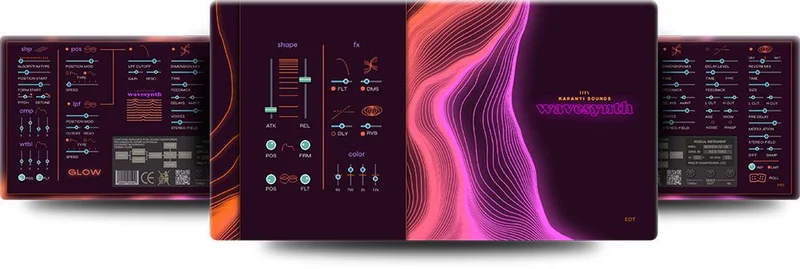
The preset library runs 70+ patches. Categories span basses, plucks, leads, keys, and percussions. The sonic references listed in Karanyi's own marketing are Dua Lipa, The Weeknd, and Kavinsky. That's a useful compass. These are sounds designed to sit in contemporary pop, future bass, and synthwave productions without much coaxing.
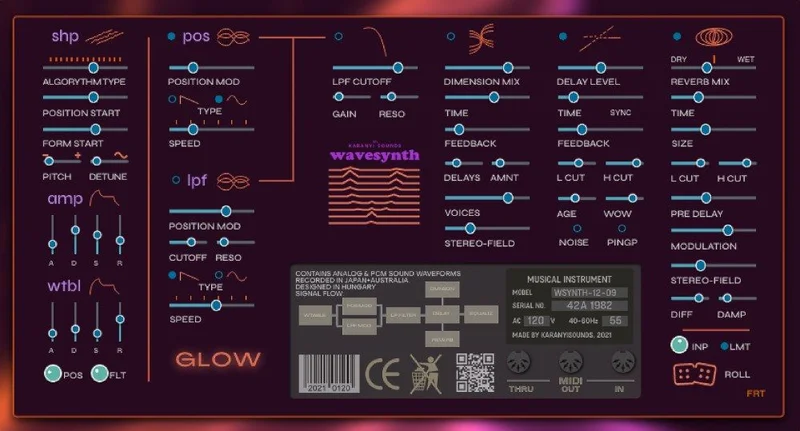
Under the hood, you get 14 wavetable algorithm types. Those govern how the wavetable cycles and interacts with the filter architecture. Pair that with amp and wavetable envelopes, two LFOs (one routed to wavetable position, one to a Prophet-type low-pass filter), and a Moog-type low-pass filter as the main tonal shaper.
The effects chain adds dimension (a chorus/stereo widener type), tape delay, and hall reverb. There's also a master EQ, compressor, and limiter baked in. For a preset instrument, that's a complete signal chain without touching your DAW.
Everything, all 60+ parameters, responds to MIDI learn. That matters if you're performing live or automating in-session.
Where GLOW Actually Sounds Good
Load the arpeggiated pluck presets and you'll hear where this thing earns its money. We pulled up a mid-tempo session at 118 BPM, dropped in one of the brighter pluck patches, and it landed in the upper midrange without fighting the lead vocal at all. No high-pass filter needed. No subtractive carving. It just sat there.
That's the design intent working. Karanyi tuned these presets for the kind of mix where the producer needs sounds that cooperate, not sounds that need surgery.
The ROLL randomizer is a genuinely clever addition. Hit it on a pluck preset and it generates sharp, snappy transients with varied wavetable positions. We've seen randomizers in other instruments produce muddy or unusable results. ROLL leans toward the high-end, attack-focused range of the wavetable, which means the outputs are more likely to be mix-ready than random-and-weird.
The Moog-type filter is satisfying to use. Sweep it on a bass preset and you get the kind of vowel movement that feels analog without the instability of actual hardware. The resonance behaves well up to about 80% before it starts self-oscillating into territory that isn't useful for pop production. Below that threshold it tracks cleanly.
The tape delay effect surprised us. It's warmer than the term "tape" often promises in plugin marketing. Run a lead through it at a dotted-eighth setting against a 4/4 grid and the repeats tuck in naturally. No harsh transients on the feedback. The hall reverb is less impressive, a fairly standard convolution-style tail, but it does the job for quick pre-mix roughing.
The two LFOs are where the synthesis gets interesting. LFO 1 modulates wavetable position, which means you can automate timbral motion across a 14-algorithm range without touching the keyboard. LFO 2 sits on the Prophet-type filter, adding movement to the cutoff. Used together, you can build pads that breathe without needing an external modulation source. Not deep modular-style patching, but more than a basic sample player.
The 14 wavetable algorithm types cover more ground than you'd expect at this price. There's enough variety between the sine-adjacent and FM-tinged algorithms to generate sounds that don't obviously share the same origin. That matters for a library built around presets. Variety is the product.
Where GLOW Falls Short
The downsampling is an annoyance we can't ignore. Capturing at 96kHz/24-bit and then converting to 44kHz/16-bit is a workflow choice, but it means the ceiling on fidelity is lower than the marketing implies. For most pop and dance productions, 44kHz/16-bit is perfectly fine. But if you're working at 48kHz or 96kHz sessions and care about the sample-rate consistency of your signal chain, GLOW is already compromised before you open the filter.
The Kontakt Player lockout is a real problem. This isn't a softened criticism. A meaningful portion of producers who download free or bundled Kontakt content have never paid for the full version. GLOW doesn't work for them. At all. Demo mode kicks in after a few minutes and you lose everything. The product page does say this. But it says it in a footnote, not in the headline, which is frustrating.
Reviewers report that the hall reverb algorithm adds a slight coloration to the high-mids that can conflict with bright leads. It's not severe, but it's there. Users keep running into it when layering GLOW patches with external reverb on the same bus.
The preset count is 70+, which sounds generous until you sort by category and realize the bass presets are the thinnest section. For a library that references The Weeknd and Kavinsky, both artists whose bass sounds are defining textures, that feels like a miss.
There's no Kontakt Player support, no demo, no trial version of GLOW itself. There is a free Wavesynth EP Glow version with 3 electric piano patches, but that's a different product. You're buying sight-unsound unless you find a video demo you trust.
How GLOW Sits Against the Alternatives
Serum is the obvious comparison. Xfer's wavetable synth has 144 factory wavetables and a modulation matrix that makes GLOW's two LFOs look conservative. But Serum is a synthesizer, not a preset instrument. It rewards time investment. GLOW rewards people who don't have that time.
Sylenth1 has a similar preset-forward reputation and runs without a sampler host. No Kontakt dependency. If the Kontakt requirement is your concern, Sylenth1 solves it completely, though its wavetable architecture is narrower than GLOW's 14 algorithm types.
Native Instruments' own Massive X has more depth in every direction, but it's also significantly more expensive and significantly more complex. For a producer who wants pop-ready leads without studying a new synthesis paradigm, that's not a good trade.
Within the Karanyi ecosystem, the Karanyi Sounds Wavesurfer is the closest sibling. Wavesurfer skews toward cinematic and hybrid textures. GLOW is pop-specific. If you're making soundtrack work, Wavesurfer first. Pop and dance? GLOW.
For the price bracket, GLOW competes well against other preset-focused Kontakt instruments. The combination of 14 wavetable types, built-in effects chain, and MIDI-learnable parameters is stronger than most competitors at this tier.
Who Should Buy Wavesynth GLOW
- ✅ Buy if you own full Kontakt 6.2.2 or later and produce contemporary pop or synthwave regularly.
- ✅ Buy if you want preset-ready wavetable sounds you can MIDI-map to hardware without extra configuration.
- ✅ Buy if you use the ROLL randomizer workflow to generate new patch ideas quickly rather than building from init.
- ❌ Skip if you only have the free Kontakt Player. You'll hit demo mode and lose access. Hard pass.
- ❌ Skip if you need bass-heavy sound design. The bass preset category is the thinnest in the library.
- ❌ Skip if you want deep synthesis and modulation routing. Serum or Massive X will serve you better.
Specs & Technical Details
| Developer | Karanyi Sounds |
| Price | $39 |
| Plugin Format | Kontakt Instrument (.nki) |
| OS Support | Mac OS X 10.11 or higher / Windows 7 or higher |
| Kontakt Requirement | Full Kontakt 6.2.2 or later (Kontakt Player NOT supported) |
| Sample Resolution | Recorded 96kHz/24-bit, delivered 44kHz/16-bit |
| Preset Count | 70+ artist presets |
| Wavetable Algorithms | 14 types |
| MIDI-Learnable Parameters | 60+ |
| RAM Requirement | 4 GB minimum, 8 GB recommended |
| DAW Compatibility | 64-bit DAW recommended |
| Activation | Via NI Native Access / Plugin Boutique account |
| CPU Usage | Light to medium (Kontakt-hosted) |
| Trial Available | No (free Wavesynth EP Glow is a separate product with 3 patches) |
| Version Reviewed | 1.0 (initial release) |
Score Breakdown
| Category | Score | Notes |
|---|---|---|
| Sound Quality | 3.5/5 | Presets are well-placed in a pop mix; downsampling caps the ceiling |
| Value for Money | 4.0/5 | Strong at $39 if you already own full Kontakt |
| Ease of Use | 4.5/5 | Intuitive layout, ROLL randomizer speeds up workflow considerably |
| Features | 3.5/5 | 14 wavetable algorithms and full effects chain, but LFO routing is shallow |
| CPU Efficiency | 4.0/5 | Runs light within Kontakt; no significant performance overhead observed |
| Overall | 3.5/5 | Good preset instrument for pop producers who already own full Kontakt |
Alternatives to Consider
If the Kontakt dependency is a dealbreaker, Sylenth1 by LennarDigital runs standalone as a VST/AU and has a well-documented preset ecosystem built up over a decade. No sampler host required. Check our Kontakt Instruments Guide: 5 Things Beginners Must Know if you're still figuring out whether the Kontakt ecosystem is right for your studio setup.
For deeper wavetable synthesis without leaving the Kontakt world, look at the broader Karanyi range. Our Karanyi Sounds Complete Kontakt Suite Review covers what you get when you buy into the full library rather than a single instrument. It's worth comparing value against buying GLOW alone.
If you're after an unusual Kontakt instrument on a similar budget, our Palm Mute Piano Review covers a completely different approach to sound design that might interest producers looking for textural alternatives rather than synth leads.
Serum remains the benchmark for wavetable synthesis if you're willing to invest time in learning it. GLOW and Serum aren't really competing for the same producer, but if you've been putting off buying Serum because it feels overwhelming, GLOW won't fix that problem. It'll just delay it.
The Final Word on Wavesynth GLOW
We'd buy this at $39 without hesitation if three things are true for you: you already own full Kontakt, you produce pop or synthwave regularly, and you value speed over depth.
The ROLL randomizer alone saves enough session time to justify the price in a single afternoon. The Moog-type filter sounds better than it has any right to at this tier. The pluck and lead presets are the library's real strength, and they land in a mix without adjustment in a way that more "flexible" synths often don't.
But we'd skip it entirely if you're running the free Kontakt Player. There's no workaround. And we'd skip it if bass-forward sound design is central to your work. The bass presets are thin for a library that claims Kavinsky as an influence.
GLOW isn't the deepest instrument in your folder. It's the one you open when the track needs to be done by midnight.
Frequently Asked Questions
Does Wavesynth GLOW work with the free Kontakt Player?
No. GLOW requires the full version of Kontakt 6.2.2 or later. If you load it in the free Kontakt Player, it runs in demo mode and cuts out after a few minutes. This is a firm requirement, not a suggestion. Check whether you own full Kontakt before purchasing.
What types of presets are included in Wavesynth GLOW?
The library ships with 70+ presets across basses, plucks, leads, keys, and percussions. The sounds are designed for contemporary pop, future bass, and synthwave production, with sonic references ranging from filtered bass patches to bright arpeggiated plucks. The lead and pluck categories are the strongest sections.
Can I use GLOW's parameters with a MIDI controller?
Yes. All 60+ parameters inside GLOW support MIDI learn. Right-click any parameter and assign it to a hardware knob, fader, or pad. This makes live performance and automation recording straightforward, which is useful if you want to record filter sweeps or LFO rate changes in real time.
What is the ROLL feature in Wavesynth GLOW?
ROLL is Karanyi's built-in intelligent randomizer. It generates new patch variations by randomizing wavetable position and related parameters, with a bias toward sharp, attack-forward pluck sounds. It's a fast way to break out of preset-browsing mode and find something unexpected without building a patch from scratch.
How does Wavesynth GLOW differ from the original Wavesynth?
GLOW is positioned as a successor to Karanyi's original Wavesynth with a new retro-futuristic visual aesthetic and a fresh set of 70+ presets inspired by current pop and synthwave production. The core wavetable engine and Kontakt architecture are shared, but the preset library, UI design, and included effects chain have been updated. If you already own the original Wavesynth, GLOW is an expansion of the sound palette rather than a technical overhaul.