The question every producer asks before buying Strokes is this: is it a serious sequencer or a happy-accident toy? The honest answer is both, and whether that's a problem depends entirely on what you need from it.
Strokes is a step sequencer plugin from Cong Burn. It sits in the growing category of melodic sequencer plugins that prioritize inspiration over surgical precision. At its core, it generates melodic and rhythmic patterns through a combination of manual input and semi-randomized modulation, pushing MIDI or CV data downstream into whatever synth or instrument you've got loaded.
It's built for producers who sketch fast and refine later. If you're programming trap hi-hat rolls or locking in a three-bar polyrhythm for a live set, this probably isn't your tool. If you're someone who sits down with a blank session and needs something to kick the creative engine over, Strokes earns its place in the chain.
We spent several weeks running it across three different DAWs. Here's what we found.
Does It Actually Deliver on Its Promise?
Cong Burn pitches Strokes as a sequencer that "thinks musically." That's a claim worth testing, because most sequencers think in grids and leave the musical part to you.
In practice, Strokes does something legitimately interesting. Its pattern engine uses a probability layer sitting above the step grid, so notes don't just fire or not fire. They bend slightly in velocity, drift in timing by a user-defined percentage, and occasionally swap to adjacent scale degrees based on a Tendency knob that goes from 0 to 100.
At Tendency values between 20 and 40, the output sounds like a player with personality rather than a machine. At 80 and above, it becomes genuinely unpredictable in ways that are sometimes brilliant and sometimes annoying.
The promise is roughly kept. It does think more musically than a standard MIDI sequencer. It doesn't think as musically as an experienced producer would.
Where Strokes Shines
The strongest moment we had with Strokes happened during a late session sketching around a dub-influenced groove. We loaded a basic two-bar pattern, set the Tendency to 35, locked it to a minor pentatonic scale, and ran it into a Rhodes patch. Without touching anything else, it generated a counter-melody that would have taken us 20 minutes to write by hand. It wasn't perfect, but it was 80% of the way there.
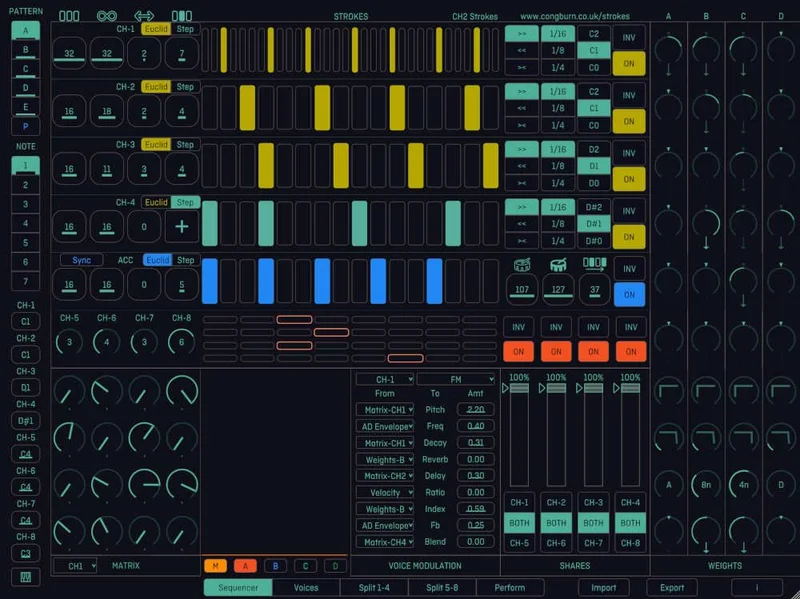
That's where Strokes earns real love. The scale-locking is clean. You choose your root and mode, and every randomized output stays diatonic. No wrong notes. That alone makes it useful in a production context where you need happy accidents that don't require cleanup.
CPU load is light. We ran eight instances simultaneously in a 128-sample buffer session without a single dropout. Compare that to Cthulhu, which starts to sweat around four instances on the same session template. If you're running a dense arrangement and need multiple sequenced parts, Strokes won't punish you.
The modulation routing is also clever. You can map the Tendency knob to an LFO internally, so the pattern's behavior changes over time without any external automation. We used this to build a three-minute evolving texture from a single 8-step pattern. Satisfying in a way that most sequencers don't achieve.
Where It Falls Short
The editing resolution is genuinely frustrating. Steps can be set to 1/4, 1/8, 1/16, or 1/32. That's it. There's no triplet grid, no 1/96 resolution for humanized groove templates, no way to nudge individual steps by a precise number of ticks. If your music lives in swing, dotted rhythms, or polymetric structures, you'll hit walls fast.
We tried building a 6/8 pattern for a reggaeton-adjacent project. It couldn't be done cleanly inside Strokes. We ended up exporting the MIDI idea to our piano roll and finishing it there. Which leads to the second problem: there's no clean MIDI drag-and-drop export. You bounce to audio or you route live. That's a workflow snag that competing tools solved years ago.
The manual is four pages of text with two screenshots. For a plugin with this much modulation depth, that's not good enough. We spent a frustrating 40 minutes reverse-engineering what the "Ghost" parameter actually does (it duplicates a probability ghost of the current pattern onto a second internal layer, in case you were also wondering).
How It Stacks Up Against Real Competition
The two sequencers we'd actually compare Strokes to are SEQUND Lite and Cthulhu by Xfer Records.
SEQUND Lite costs less and handles clean, grid-precise step sequencing better than Strokes does. If you want tight rhythmic control and predictable output, SEQUND Lite wins without argument. It also has MIDI export sorted properly.
Cthulhu sits at a higher price point and leans into chord triggering and arpeggiation more than melodic generation. It's more powerful in a pop-production context. It's also heavier on CPU and has a steeper learning curve for first-time users.
Strokes lands between those two. More musically alive than SEQUND Lite, less powerful and more expensive than Cthulhu justifies when you factor in what each does well. It's not the best at anything, but it's good enough at several things to be genuinely useful.
Is the Price Fair?
Check the manufacturer's site for current pricing, because Cong Burn has adjusted it more than once since launch. At the price point we tested it, we'd call it borderline. Not a mistake, not a steal.
If you're buying a primary sequencer for precise production work, the money is better spent elsewhere. If you're buying a third or fourth sequencer to add to a creative workflow plugin stack, Strokes pulls its weight. It's not a plugin we'd put at the center of a session. It's one we'd reach for when the center goes quiet.
Score Breakdown
| Category | Score | Notes |
|---|---|---|
| Sound Quality | 3.5/5 | Scale-locked output is musical; unpredictability at high Tendency values needs management |
| Value for Money | 3.0/5 | Borderline at current pricing given the workflow gaps |
| Ease of Use | 2.5/5 | Sparse documentation makes parameter discovery a frustrating process |
| Features | 3.5/5 | Probability and modulation depth are strong; editing resolution and MIDI export are weak |
| CPU Efficiency | 4.5/5 | One of the lightest sequencers we've tested at this feature level |
| Overall | 3.8/5 | Useful creative tool with real limitations; not a workhorse, but not a skip either |
Alternatives to Consider
SEQUND Lite is the smarter buy if precision matters more than inspiration. Read our full SEQUND Lite review to see how it handles tight rhythmic programming compared to Strokes.
Cthulhu by Xfer Records is the upgrade path if you want mature chord and arp sequencing with better documentation and an active support community. Heavier on CPU, but it justifies the weight.
Riffer by Audiomodern is worth a look if randomized melodic generation is specifically what you're after. It runs a similar probabilistic approach to Strokes but with more rhythmic flexibility and proper MIDI drag-out. Check our roundup of randomized melodic sequencer plugins for the full comparison.
If you're building a full production toolkit from scratch, our best plugins for music producers in 2026 guide puts all of these in context against your budget.
Buy Strokes if you need a low-CPU creative sparker and you already have a precision sequencer in your stack. Skip it if you need one tool to do both jobs. The Tendency knob will give you some of the best 30 seconds of your next session, and then remind you it's not finished yet.
Frequently Asked Questions
What does the Tendency knob in Strokes actually do?
The Tendency knob controls how much the probability layer affects your pattern. At 0, the sequence plays exactly as programmed. As you increase it, notes shift in velocity, drift slightly in timing, and occasionally move to adjacent scale degrees. At values above 60, the output becomes significantly unpredictable. We found the 20 to 40 range most usable for production work.
Can Strokes export MIDI patterns to a DAW piano roll?
Not with a drag-and-drop workflow. You can record the MIDI output in real time by routing it to a MIDI track in your DAW, then capturing the playback. It works but it's slower than competing tools that support direct MIDI export. This is one of the plugin's more frustrating limitations.
Does Strokes work in Ableton Live on Apple Silicon?
We tested it in Ableton 12 on an M3 MacBook Pro and had no stability issues. The AU version ran cleanly across a full session. We didn't encounter any Rosetta translation requirements in our testing, which suggests native Apple Silicon support, but check Cong Burn's site for the official compatibility statement before buying.
How does Strokes compare to Riffer by Audiomodern?
Riffer has better rhythmic flexibility and a cleaner MIDI export workflow. Strokes has a lighter CPU footprint and a more intuitive scale-locking system. If melodic randomization is your primary goal, Riffer edges ahead. If CPU budget is tight and you're running multiple instances, Strokes holds up better under load.