
Your string section needs movement, and a sustained chord just sits there like a wall. Programming a believable ostinato by hand is slow, fiddly work. You’ll stack short notes, nudge velocities, then wonder why it sounds like a metronome in an orchestra costume.
That’s the gap Pattern Strings fills. It’s a Kontakt library of recorded string ostinatos from Ben Osterhouse, priced at $95. It’s for composers, game and film writers, and anyone who needs rhythmic string energy now rather than after an hour of piano-roll surgery.
We like the idea a lot. Whether your machine can run it is a separate question, and we’ll get to that.
Why Is Faking a String Ostinato So Painful?
Picture a cue due tonight. You need a driving, nervous string figure under a chase scene.
You draw in staccato notes. They sound fine alone, then robotic in context. Every repeat hits the same, with no bow direction logic and no sense of a player breathing through the phrase.
Pattern Strings skips that fight. The rhythms are already played by real instruments, so the phrasing is baked in. You choose patterns and arrange them instead of drawing every note.
It’s the same relief a drum loop gives you over programming hi-hats note by note.
How Does Pattern Strings Perform?
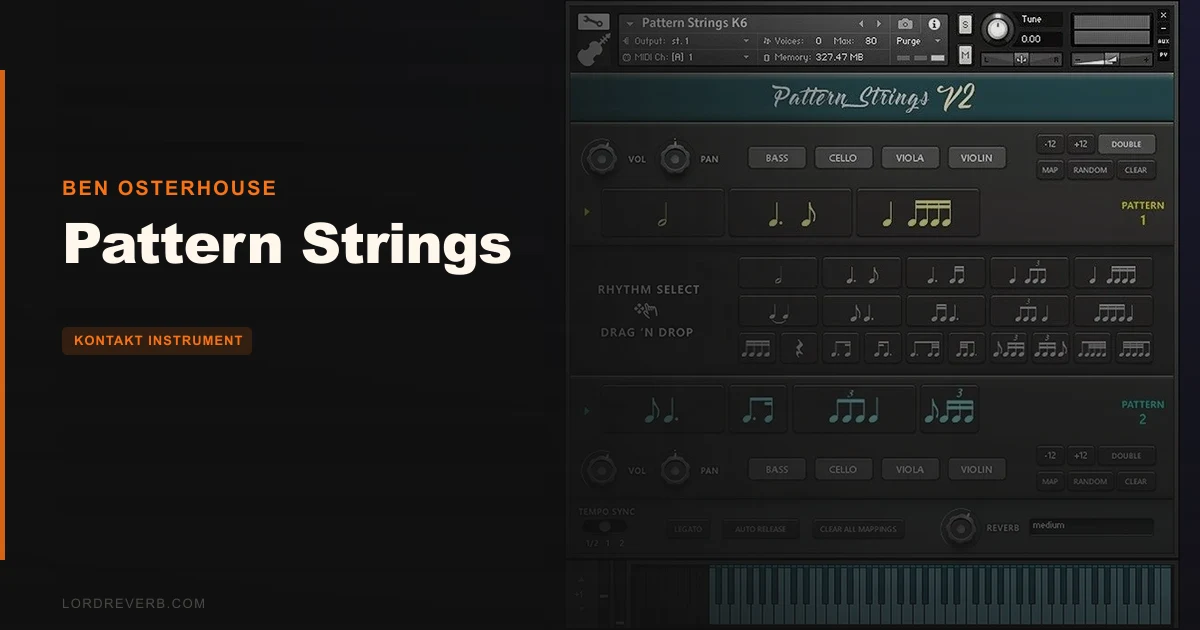
The core is 19 rhythmic patterns, recorded at two dynamic layers. They’re played on violin, viola, cello and bass, with 4 round robins on each instrument.
Samples were recorded at both 80bpm and 90bpm. Every instrument combination is rendered single and with stereo doubling.
The workflow is the clever part. You drag and drop rhythms to build a sequence, then drag them around to reorder. The Random button will generate a sequence for you when you’re out of ideas.
Legato mode syncs new notes with previously held ones, so you can change pitch under a running pattern. Automatic bow direction plays downbow samples on downbeats and upbow on upbeats. That’s the detail that kills the machine-gun repeat.
Custom Keyswitches save pattern variations to coloured keyboard keys, so you can switch live while a cue plays.
Owners report it adds movement to strings more convincingly than more expensive libraries. Some also use it as an experimental ostinato lab and a way to learn rhythm and note notation.
What Works and What Doesn't?
The good stuff first. Dynamic Loading loads only what you need, so enabling every instrument uses the same memory and CPU as one. The Doubling feature adds stereo-doubled samples without extra voices or memory. Three quality presets, low, medium and high, give you some control.
Now the annoying part.
CPU is the sore spot. Users report pops and clicks even on low quality when holding more than a few notes. Older computers struggle. For some owners it stays CPU-intensive at the lowest setting. Check your machine before you commit.
Tempo is the second catch. The samples live at 80bpm and 90bpm. Slow a cue down too far and the time-stretching shows up as artifacts. The tempo-sync switch gives you half speed or double speed, which helps, but it’s no cure.
Say your cue sits at 60bpm. Don’t expect it to sound as good as one at 85.
It also does one thing. Ostinatos, not a broad palette of string articulations.
Is Pattern Strings Worth the Money?
At $95, we think the value is real if ostinatos are on your regular menu. You get 8.32GB of samples, four instruments, two layers, four round robins and a sequencing workflow that saves real time.
Owners say it beats pricier libraries at adding motion. That matches what the design promises.
But the real cost isn’t the sticker. You need Kontakt Full Version 5.8.1 or later, a separate paid application. Budget for that, plus 8.5GB of free drive space.
If your laptop is old, the price isn’t the risk. The clicks and pops are. Worth it for the right rig. Wasted money for the wrong one.
Who Should (and Shouldn't) Buy This?
✅ Buy if you write cues where rhythmic strings drive the energy and you’re tired of drawing them note by note.
✅ Buy if you already own Kontakt Full and run a reasonably modern machine.
✅ Buy if you work in the 80 to 90bpm zone, or near it.
❌ Skip if you’re on an older computer that already chokes on sample libraries.
❌ Skip if you need slow ballads or wide tempo flexibility without artifacts.
❌ Skip if you want a full string toolkit with sustains, spiccato and tremolo.
Specs & Technical Details
| Spec | Detail |
|---|---|
| Developer | Ben Osterhouse |
| Price | $95 |
| Plugin Format | Kontakt instrument (Kontakt Full Version 5.8.1 or later required) |
| OS Support | N/A |
| Activation | N/A |
| CPU Usage | Heavy for some users, even on low quality |
| Trial Available | N/A |
| Version Reviewed | N/A |
| Library Size | 8.32GB of samples, 8.5GB free drive space needed |
Score Breakdown
| Category | Score | Notes |
|---|---|---|
| Sound Quality | 4.0/5 | Owners say the movement beats pricier libraries, though tempo stretching hurts away from 80-90bpm. |
| Value for Money | 4.0/5 | Strong content for the price, but Kontakt Full is an extra cost. |
| Ease of Use | 4.5/5 | Drag-and-drop sequencing, Random button and keyswitches keep it quick. |
| Features | 4.0/5 | Legato mode, auto bow direction and doubling, but ostinatos only. |
| CPU Efficiency | 2.5/5 | Dynamic Loading helps, yet clicks and pops are reported even on low quality. |
| Overall | 3.9/5 | Great ostinato tool held back by CPU demands and a narrow tempo sweet spot. |
What Else Is Worth Considering?
Spitfire Symphonic Motions
It’s the obvious rival for rhythmic string movement. It lacks the solo instruments that Pattern Strings offers, so if you want a lone violin or cello driving a figure, Pattern Strings has the edge.
Programming your own ostinatos in a general string library
If you already own a broad Kontakt string library, you can draw patterns by hand. It costs nothing extra and gives total control. It also costs you time, and it rarely matches the phrasing of recorded rhythms.
Should You Buy Pattern Strings?
Buy it if you write rhythmic string cues near 80 to 90bpm and your computer can take a heavy Kontakt load. At $95, you’re paying for motion that would cost you hours to fake.
Check your CPU first. Own Kontakt Full 5.8.1 or later before you hit buy. If your machine already struggles, or your tempos run slow, this one’s the wrong tool.
For the right rig it earns its slot. For the wrong one, it’s a folder of clicks.
Related reviews: CinePerc Review 2026 · Quijongo Guanacasteco Oscar Jimenez
Frequently Asked Questions
Does Pattern Strings work in the free Kontakt Player?
No. It requires Kontakt Full Version 5.8.1 or later, which is a separate paid application. Factor that into your total cost before you buy.
How much drive space does Pattern Strings need?
The library contains 8.32GB of samples and needs 8.5GB of available hard drive space. Dynamic Loading means only what you use gets loaded into memory.
Can I use Pattern Strings at slower tempos?
You can, but expect trouble. The samples were recorded at 80bpm and 90bpm, and users report time-stretching artifacts when you push the tempo too far from that range. The tempo-sync switch offers half or double speed to help.
Will Pattern Strings run on an older computer?
Maybe not well. Users report CPU heaviness on older machines, with pops and clicks even on low quality when holding more than a few notes. Test your setup carefully before relying on it for a deadline.