
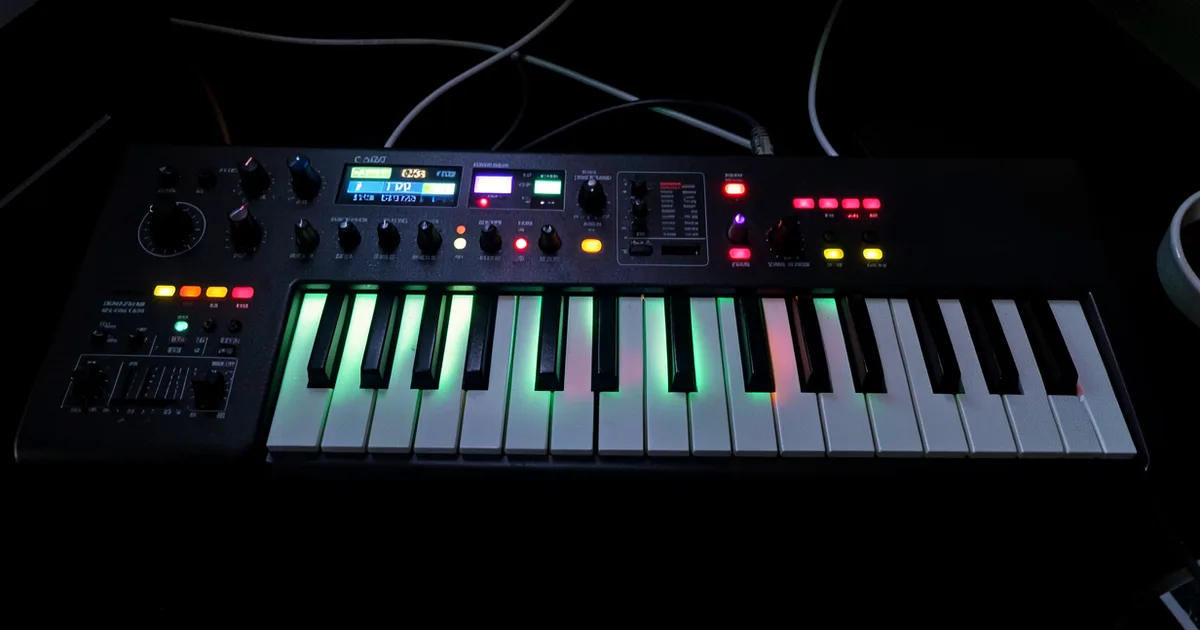
A MIDI controller is any hardware device that sends MIDI data to your DAW or hardware synth, no audio, just performance data like pitch, velocity, and modulation. The right one depends on your workflow: keyboard players need weighted or semi-weighted keys, beat makers need pads, and film composers need 88 keys with hammer action.
MIDI controllers are the most important hardware decision a home studio producer makes. Not the interface. Not the monitors. The controller is your hands-on relationship with every sound in your studio, and a bad choice costs you years of working around it.
This guide covers every controller type, every key count, every action type, and the specs that actually matter in 2026. We've tested gear across all price points and we'll tell you exactly what to buy and what to skip.
We'll also cover what most guides ignore: hybrid rig setups, MPE and MIDI 2.0, AI-assisted mapping, and why the MiniLab 3 being made from 50% recycled materials with a 5-year warranty matters more than its price tag suggests.
What Type of MIDI Controller Do You Actually Need?
There are four controller categories. Each solves a different problem.
Keyboard Controllers
These are piano-style MIDI keyboards with no internal sound. They send note data to your DAW or a connected synth. They range from 25 mini-keys to full 88-key hammer-action boards.
They're the backbone of most home studios. If you play chords, melodies, or basslines by hand, you need one.
Pad Controllers
Grid pads trigger samples, launch clips, and fire drum hits. The Akai MPD218 sits at $79 to $99 and gets the job done for beat-makers who don't need keys. Ableton Live's session view was practically designed for pad controllers.
We've seen producers run entire live sets from a 4x4 pad grid. It's not for everyone, but it's a legitimate way to work.
Production Stations
The NI Maschine MK3 combines 16 velocity-sensitive pads with a built-in display, 8 knobs, transport controls, and Maschine's software. It's its own ecosystem. You'd use it if Maschine is your primary production tool, not just an occasional plugin.
Fader/Mixer Controllers
Motorised fader boxes like the Behringer X-Touch or the Avid Artist Series give you tactile mix control. These aren't for tracking or composition. They're for mix sessions where mouse-automation feels like using chopsticks with oven mitts.
Most producers buy a keyboard controller first. Pad controllers and fader boxes come later as the studio matures.
How Many Keys Do You Actually Need?
This is the question we get most. Here's the honest breakdown.
25 Keys
Portable. Desk-friendly. Good for producers who mostly program MIDI rather than play it. The M-Audio Keystation 25 MK3 sits around $129.99 and fits on a laptop bag. The limitation is real though: you can't play two-handed parts without shifting octaves constantly, which breaks your flow mid-session.
We'd only recommend 25 keys as a secondary travel controller or for pure beat-makers who occasionally need a keyboard.
49 Keys
The sweet spot for most producers. You get four octaves, enough for two-handed playing across most genres, and it still fits on a standard desk. The Arturia KeyLab MK3 49 at $449 is one of the best-specced 49-key controllers on the market right now.
61 Keys
Where trained pianists start feeling comfortable. Five octaves covers the vast majority of piano literature and all practical synth work. The Arturia KeyLab MK3 61 at $499 is worth the extra $50 over the 49-key version if your desk allows it.
88 Keys
For film composers and classically trained players, full 88 is non-negotiable. The Novation Launchkey 88 handles this at a price that doesn't require a mortgage. If you're scoring strings across their full range, or practicing piano technique while producing, go 88.
Don't buy 88 keys because it feels more professional. Buy it because you play things that need it.
What Keyboard Action Types Actually Feel Like
Action type shapes how you play. It's not cosmetic.
Synth Action (Semi-Weighted)
Light, fast, responsive. Works brilliantly for lead synth lines and quick chord stabs. We tracked a 140 BPM arpeggio on the Novation Launchkey 49 MK4 and hit every note cleanly. The low travel distance means your fingers don't fight the keybed at speed.
The frustrating side: it feels hollow to anyone with piano training. Long sessions on cheap synth action cause hand fatigue. The cheaper the controller, the worse this gets.
Semi-Weighted with Aftertouch
Aftertouch is pressure sensitivity after the key hits the bottom. You press harder to send a second layer of MIDI data, typically mapped to vibrato or filter cutoff. Most controllers offer channel aftertouch, meaning all notes respond to the same pressure signal.
Polyphonic aftertouch (poly AT) sends independent pressure data per key. The Arturia KeyLab MK3 has it. It's rare. It matters a lot for expressive playing on strings and pads.
Hammer Action (Weighted)
This feels like a real piano. Each key has a mechanical counterweight that provides resistance. It's satisfying in a way that's hard to explain until you play it.
The trade-off: heavier desk footprint, slower key return at extreme tempo, higher price. The Arturia KeyLab 88 MK3 at $599 gives you hammer action with polyphonic aftertouch. That combination used to cost over $1,000.
What Is MPE and Do You Need It in 2026?
MPE stands for MIDI Polyphonic Expression. It assigns each note its own MIDI channel, so every finger on the keybed can carry independent X-axis (pitch slide), Y-axis (pressure), and Z-axis (vertical position) data simultaneously.
On a standard MIDI controller, pitch bend affects every note you're holding. On an MPE controller, you can bend one note of a chord while the others stay in place. That changes everything for string writing, guitar-like expression, and synthesiser work where per-note modulation matters.
Which Controllers Support MPE?
The LinnStrument is the most expressive MPE controller available. The 128-pad version is $899, the 200-pad version is $1,599. It's a grid surface rather than a keyboard, and it rewards serious practice.
The Roli Seaboard range also delivers MPE. The Arturia KeyLab MK3 supports MPE via its polyphonic aftertouch. For most producers, poly AT on a traditional keyboard is a practical entry point without the learning curve of a grid instrument.
MPE support in DAWs is now standard. Ableton 12, Logic Pro 11, and Bitwig 5 all handle it natively. Bitwig's modulator system makes MPE data the most immediately musical to work with.
MIDI 2.0, AI Mapping, and What's Changing in 2026
MIDI 2.0 launched its specifications in 2018 but hardware adoption has been slow. In 2026, that changes. The spec's roadmap now includes Property Exchange: a handshake protocol where your DAW and controller negotiate capabilities automatically.
In practice, this means a MIDI 2.0-compatible controller plugged into a MIDI 2.0-aware DAW can announce its capabilities, receive optimised parameter mappings, and adapt its controls contextually. The Arturia KeyLab MK3 is already MIDI 2.0 compatible. More controllers will follow.
AI-Assisted Mapping
This is the underreported development. Controllers like the KeyLab MK3, with its touchscreen and 8 encoders, already support plugin-aware mapping through Arturia Analog Lab. The logical next step is AI that reads your session, identifies your most-used plugins, and proposes encoder mappings without you touching a preference panel.
Native Instruments' NKS format does a version of this for their hardware. Ableton's Push 3 takes it further with standalone operation and visual parameter feedback. The direction is clear: controllers that know what you're trying to do before you do.
Bluetooth Latency
We know why Bluetooth MIDI is tempting. Cable-free setup is genuinely satisfying. The problem: Bluetooth MIDI latency averages around 15ms, sometimes higher. For triggering samples or playing pads, 15ms is annoying but liveable. For playing piano parts or tracking melodies, it ruins feel. Use USB for anything that needs timing precision.
How Professional Producers Build Hybrid Rigs
Most serious home studios don't run a single controller. They run three.
The setup we see most often in professional home studios: a 49-key keyboard controller on the main desk for composition and playing, a standalone pad controller to the left for beats and clip launching, and a compact fader box or the DAW controller built into a surface like the Push 3 for mixing.
We set up a rig last year: KeyLab MK3 49 for composing, Akai Fire for FL Studio pattern launching, and a Behringer X-Touch Mini handling eight send levels. Total outlay under $700. The workflow difference compared to a single controller was significant. Each device did one thing perfectly instead of three things adequately.
The key is MIDI channel separation. Assign each controller to a dedicated MIDI channel or device port in your DAW so they don't conflict. Every major DAW handles this in its MIDI preferences.
Sustainability Worth Mentioning
The Arturia MiniLab 3 is made from 50% recycled materials and ships with a 5-year warranty. That's not marketing copy. That's a $99 controller that's designed to last half a decade, which makes it a genuinely clever buy for producers who move gear hard. We wish more manufacturers took this approach.
Worth Bookmarking
- MIDI.org, official MIDI 2.0 specification documentation and compatibility updates
- Roger Linn Design, LinnStrument specs, MPE tutorials, and expressive MIDI resources
- Arturia KeyLab MK3, product page with MIDI 2.0 and poly AT spec details
- NKS Format, NI's plugin-aware mapping standard, compatible with Komplete Kontrol and Maschine
- Ableton MPE Pack, free instruments and devices built specifically for MPE controllers
- Ask.Audio, practical tutorials on DAW-specific MIDI controller setup and mapping workflows
- Sweetwater MIDI Buying Guide, useful spec comparison tables and user reviews across major controller brands
Summary
A MIDI controller is the physical interface between your ideas and your DAW. Key count, action type, aftertouch, and pad count all determine whether that interface helps or fights you. For most producers, a 49-key semi-weighted controller with aftertouch handles 90% of sessions. Add a pad controller when you need it. Consider 88 keys only if you play piano-range parts regularly. MPE and MIDI 2.0 are real and worth buying into now if you're spending over $300. Build a hybrid rig gradually. Don't let a single device try to do everything badly.
Part of our complete Studio Signal Chain Guide: Build a Clean Audio Path series.
Frequently Asked Questions
Do I need a MIDI controller to produce music?
No. You can program every MIDI note with a mouse in your DAW's piano roll. But hand-playing parts, even imperfectly, produces more natural velocity variation and timing feel than drawing notes in a grid. A $99 controller changes the quality of your MIDI data in ways that are hard to replicate otherwise.
What's the difference between a MIDI controller and a synthesiser?
A synthesiser generates its own audio. A MIDI controller generates no audio at all: it only sends MIDI data to whatever instrument you point it at. A controller needs a connected DAW or hardware synth to make sound. A synth is self-contained.
Is Bluetooth MIDI good enough for studio use?
For pad triggering or clip launching, yes. For keyboard playing, no. Bluetooth MIDI averages 15ms latency, sometimes higher depending on your system. That delay is noticeable when you're playing melodic parts and it messes with your timing feel. Use USB for keyboard work.
What does polyphonic aftertouch do that regular aftertouch doesn't?
Standard channel aftertouch sends one pressure value for all notes simultaneously: press harder on any key and every held note gets the same modulation signal. Polyphonic aftertouch sends independent pressure data per key, so you can add vibrato to one note of a chord while the others stay still. It's a significantly more expressive tool for anyone playing live pads or strings.
Do I need MPE support in 2026?
Only if you play expressively and want per-note pitch bend, pressure, or slide on a single controller. For most DAW programming and standard playing, MPE is unnecessary. If you're spending $400 or more on a controller, buying one with MPE support makes sense as future-proofing. The Arturia KeyLab MK3 delivers polyphonic aftertouch, which covers most MPE use cases on a traditional keyboard.
What MIDI controller works best with Ableton Live?
Ableton's own Push 3 is deeply integrated and handles standalone operation. For a third-party option, the Novation Launchkey series has native Ableton integration built in at every key count. The KeyLab MK3 has a dedicated Ableton preset mode that maps transport, clips, and device parameters without any manual setup.
Can one MIDI controller work with multiple DAWs?
Yes. Every MIDI controller sends standard MIDI over USB, which every DAW reads. The question is whether the controller has dedicated preset modes or deep integration scripts for your specific DAW. Generic MIDI works everywhere. Deep DAW integration requires software support from the manufacturer, which varies by controller and DAW combination.
How do I avoid buying a MIDI controller I'll outgrow?
Buy for the type of music you make most, not the type you imagine making. If you program beats and occasionally noodle melodies, buy a good pad controller and a 25-key secondary keyboard. If you play chords and write songs, start at 49 keys with aftertouch and don't look back. The mistake is buying 88 keys because it looks serious when you've never needed more than three octaves.