
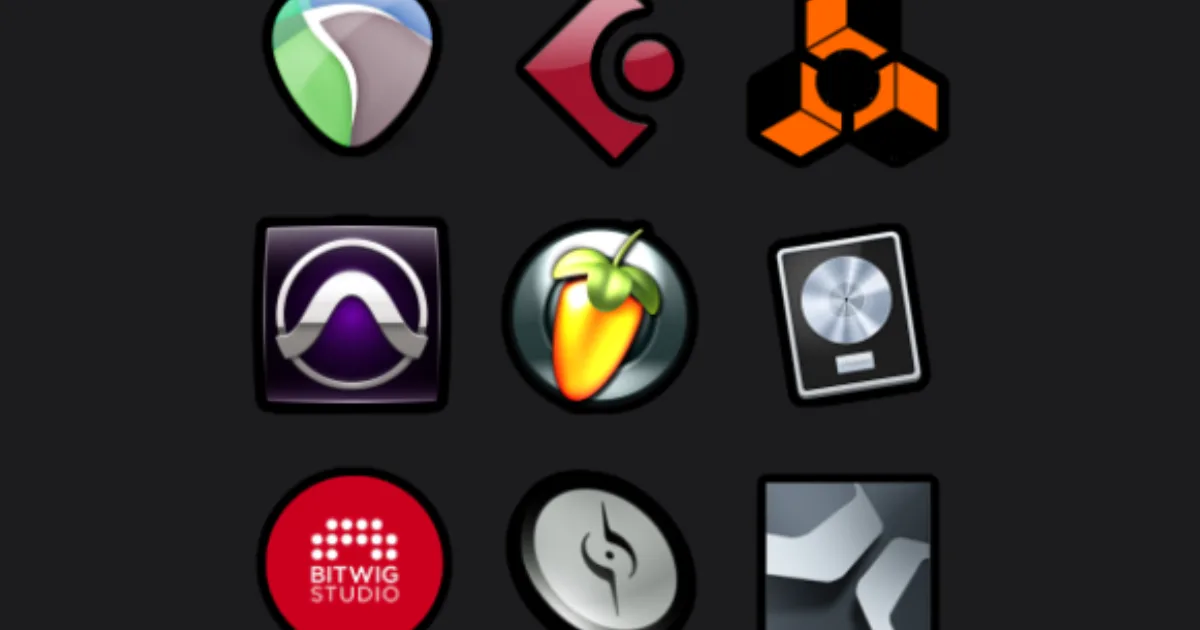
Choose your first DAW by matching it to the music you actually want to make, then downloading the free trial and finishing one song in it. If the workflow fights you, try a different one. If it doesn't, you've found your DAW.
The right first DAW is whichever one gets you to a finished track fastest. Not the one your favourite producer uses. Not the most expensive. Not the one with the longest feature list. The one that doesn't make you feel stupid at 2 a.m. when you just want to hear your idea play back.
That sounds obvious. It's not, because the internet makes DAW choice feel like a permanent, irreversible life decision. We've watched beginners spend three weeks reading comparison threads and zero weeks actually making music. That's the real mistake here.
There's a framework that actually works. It takes about 20 minutes to run through, and it ends with you downloading a trial. We'll walk you through it.
Does Your DAW Choice Actually Affect Sound Quality?
No. Stop reading those threads. Every major DAW processes audio at 32-bit float internally. The summing differences between DAWs are below the noise floor of virtually any recording environment. Your room, your mic placement, and your gain staging matter infinitely more than which piece of software adds your tracks together.
We've bounced the same session through four different DAWs and ABX tested the results. Nobody could reliably tell them apart. Not even close.
What does vary is the workflow. And workflow is everything, because workflow determines whether you finish songs or abandon them.
What Kind of Music Do You Actually Want to Make?
This is the question that cuts through everything else. Answer it honestly and about 70% of your DAW decision makes itself.
Electronic, beats, and loop-based music
If you're making hip-hop, trap, EDM, house, or anything that starts from a loop or a drum pattern, you want a DAW built around a clip-based or pattern-based workflow.
Ableton Live is the standard here. Its Session View is a grid of clips you launch and rearrange live or in the studio. You build a track by playing with loops in real time, which matches how beat-makers actually think. The Intro edition costs $99 and gives you 16 audio/MIDI tracks and around 1,500 sounds. More than enough to start.
FL Studio uses a step sequencer and pattern system that a lot of producers find faster for building beats. The Producer Edition is €199, and FL Studio includes lifetime free updates forever. That's a genuinely good deal long-term.
Recording live instruments and vocals
If you're tracking a band, recording yourself as a singer-songwriter, or building sessions around live audio, you want a DAW designed around a linear timeline with strong comping and editing tools.
Logic Pro at $199.99 is the smartest buy for Mac users. The included plugin library alone is worth the price: EQ, compression, reverb, delay, and a full orchestral sample library that third-party developers charge hundreds for separately. The 90-day free trial is the longest in the industry.
Reaper at $60 for a discounted license is the answer for anyone on Windows who doesn't want to spend $600 on Pro Tools. It's ugly. The interface looks like it was designed in 2007 because a lot of it was. But it's stable, endlessly customisable, and has a ferocious user community. We'd point you to the Reaper.fm forums before any other DAW community online.
Composition and scoring
Writing for picture, composing orchestral music, or working with complex arrangements? Cubase and Studio One both have strong notation and MIDI editing tools. Cubase offers a 60-day free trial. Studio One's free tier (called Prime) has real limitations, but it's enough to test the workflow.
Which Platform Are You On, and Does It Matter?
Platform narrows your options immediately. Some of these choices are already made for you.
Mac only: Logic Pro, GarageBand (free, and a legitimate starting point).
Windows only: Nothing major is Windows-exclusive anymore. FL Studio and Reaper started there, both now run on Mac too.
Cross-platform: Ableton Live, Reaper, FL Studio, Studio One, Cubase, Pro Tools, Bitwig.
If you're on Mac and budget is tight, start with GarageBand. It's free, it's already on your machine, and it's more capable than most beginners realise. When you hit its limits, Logic Pro opens GarageBand projects natively. The upgrade path costs $199.99 and loses nothing.
If you're on Windows and budget is tight, download the Reaper trial. It's a 60-day full-feature trial with no track limits. No other DAW at that price level comes close to its flexibility.
What Do Free Trials Actually Tell You?
More than any review. Here's how to use them properly.
Don't spend the trial watching tutorials. Spend 30 minutes trying to do one specific thing you want to do in your music. Record a melody. Build a drum pattern. Chop a sample. If you can figure out the basic version of that task without reading the manual, the DAW's workflow probably suits you. If you're lost in menu hierarchies after 20 minutes, that's information.
We tried this test with a first-time producer we know. She wanted to make lo-fi beats. We sat her down with Ableton Live's trial with no instructions. Within 40 minutes she had a drum pattern running and a sample chopped over it. Satisfying. Then we tried the same exercise in Pro Tools. She rage-quit in 15 minutes. Not because Pro Tools is worse. Because its workflow is built for tracking sessions, not beat construction. Wrong tool, wrong person.
Trial periods to know:
- Ableton Live: 30 days, full-feature trial
- Logic Pro: 90 days, full-feature trial
- Cubase: 60 days, full-feature trial
- Reaper: 60 days, full-feature trial (the license is $60 and runs on the honour system)
- FL Studio: Demo version available, but you can't reopen saved projects. Frustrating to evaluate properly.
- Studio One: Free Prime tier, limited but testable
Use ProducerBox and Looperman for free samples to use in your trials. No budget needed to get realistic test material.
What Are the Long-Term Costs Nobody Mentions?
This is where we see beginners get surprised later. The sticker price isn't the full cost of a DAW.
Plugin ecosystem lock-in
Some DAWs come with included plugins that are legitimately good. Logic Pro's stock compressors and EQs are ones we'd use on a professional session. FL Studio's Fruity parametric EQ 2 is clean and free. If your DAW has a weak stock library, you'll spend money filling gaps with third-party plugins faster.
Pro Tools' included plugins are mediocre at best. Budget an extra $200-$400 for decent third-party tools if you go that route. That changes the real cost of "entry-level" Pro Tools considerably.
Project portability when you switch later
Here's the thing nobody tells you upfront: switching DAWs later is annoying, and switching with a body of work is worse. You cannot open a Logic Pro project in Ableton Live. You cannot open an FL Studio .flp in Reaper. You can export stems (individual audio files) and rebuild, but that takes time, and you lose MIDI data, automation, and routing.
We had a producer friend who spent three years building in Logic Pro, then tried to collaborate with an Ableton-only artist. The session took four hours to convert into something they could both work on. Painful.
This doesn't mean you should pick your DAW based on collaboration risk. It means: know that switching has a real cost, so take the trial seriously before committing.
Subscription vs. one-time purchase
Pro Tools' cheapest plan is around $9.99/month as of writing. Ableton Live is a one-time purchase. FL Studio is one-time with lifetime updates. Logic Pro is one-time at $199.99.
Over five years, a $10/month subscription costs $600. That's more expensive than Logic Pro, Ableton Intro, and Reaper combined. Subscriptions aren't inherently bad, but run the actual numbers for your situation.
What Educational Resources Exist for Your Chosen DAW?
This matters more than beginners expect. A DAW with a weaker feature set but a brilliant learning community will get you further faster than a more powerful DAW with sparse tutorials.
Ableton has an official learning platform called learningmusic.ableton.com that teaches music theory and production concepts inside a browser-based version of Ableton's interface. It's free and genuinely brilliant for absolute beginners.
Logic Pro has one of the best YouTube communities of any DAW. Search any specific task and you'll find multiple clear tutorials. Music Tech Help Guy on YouTube has covered Logic comprehensively for years.
FL Studio's community is enormous in the hip-hop and trap world. r/WeAreTheMusicMakers on Reddit is one of the better general-production communities for any DAW. The Image-Line forum is surprisingly active and helpful.
Reaper's community at forum.cockos.com is technically deep. These are people who will help you write custom scripts. More advanced, but invaluable once you're past the basics.
For any DAW, Sound On Sound's Techniques section covers production concepts at a level that holds up regardless of which software you're in.
Worth Bookmarking
- Learning Music by Ableton, free browser-based production and theory lessons
- Reaper.fm, download, forum, and documentation for Reaper
- Looperman, free loops and samples for trial testing
- r/WeAreTheMusicMakers, general production community, DAW-agnostic
- Sound On Sound Techniques, deep-dive production tutorials across all DAWs
- ProducerBox, free sample packs for testing your new DAW
- Image-Line FL Studio Forum, official community for FL users
Summary
Pick your genre first. That cuts the list to two or three options. Then run the trial and try to finish something, not browse menus. If you're on Mac and broke, GarageBand is a real starting point. If you're on Windows and broke, Reaper at $60 is the most underrated DAW alive. If you want beats and loops, try Ableton or FL. If you're tracking live instruments, Logic Pro on Mac or Reaper on Windows. Sound quality is not a DAW decision. Finishing songs is. Pick the one that makes finishing feel possible.
Frequently Asked Questions
Is GarageBand good enough for beginners?
Yes. GarageBand is a real DAW, not a toy. It runs 32-bit float audio processing, includes quality stock instruments and loops, and handles multi-track recording without limits. When you outgrow it, Logic Pro opens your GarageBand projects with no conversion needed. Start here if you're on Mac and not ready to spend money yet.
Can I switch DAWs later without losing my work?
You can, but it's time-consuming. You'll export each track as individual audio stems and reimport them into the new DAW. MIDI data, plugin settings, and automation won't transfer automatically. Plan on spending several hours per project to rebuild a session when switching. Take your trial seriously to avoid doing this with a year's worth of work.
Does Ableton Live work for recording live instruments?
Yes. Ableton's Arrangement View is a standard linear timeline, and it handles audio recording, comping, and editing well. The reputation for "only doing electronic music" comes from its Session View, which is loop-based. Both views are in every edition. It's not our first recommendation for a band tracking sessions, but it's capable.
What's the difference between Ableton Live Intro, Standard, and Suite?
Intro at $99 gives you 16 audio/MIDI tracks, 1,500 sounds, and the core workflow. Standard at $449 removes the track limit and adds more instruments and effects. Suite at $749 adds Max for Live and the full instrument and sample library. Start with Intro. You can upgrade later and your projects carry over completely.
Is FL Studio really free to update forever?
Yes. Image-Line has maintained this policy since the beginning, and it's held. You buy FL Studio once and receive every future version update at no additional cost. FL Studio 21 is the current version. Owners of version 1 got it free. That's a legitimate long-term advantage over subscription-based competitors.
What DAW do most professional producers use?
It depends on the genre. Hip-hop and electronic producers skew heavily toward Ableton Live and FL Studio. Pop and singer-songwriter sessions often run on Logic Pro. Film and TV scoring leans toward Logic Pro and Cubase. Post-production and broadcast still uses Pro Tools in many facilities. No single DAW dominates across all areas, which means the professionals chose based on workflow fit, not prestige.
Can I use a DAW without any music theory knowledge?
Yes. You'll go further faster if you learn basic theory alongside production, but you don't need it on day one. Loop-based DAWs like Ableton and FL Studio make it easy to get rhythmic and melodic results without knowing chord names. Ableton's free learningmusic.ableton.com teaches both production workflow and music fundamentals simultaneously, which is a smart way to build both at once.
Is Pro Tools worth it for a first DAW?
Probably not. Pro Tools is industry-standard in commercial recording studios, and knowing it matters if you plan to work in those environments. But its workflow is session-focused and less intuitive for solo producers making music at home. The stock plugins are weak relative to the price, and the subscription model adds up. Learn it if your career goal is studio engineering. Skip it if you just want to make music.
How much RAM do I need to run a DAW?
8GB gets you started with lighter sessions. 16GB handles most real-world projects comfortably. 32GB makes sense if you're running large orchestral sample libraries or parallel-processing-heavy sessions. Check the minimum and recommended specs for whichever DAW you choose, but 16GB is the safe general recommendation for 2024 and beyond.
What's Bitwig Studio and should beginners consider it?
Bitwig is an Ableton Live alternative with a similar clip-based workflow but a more modular approach to modulation and signal routing. It runs on Mac, Windows, and Linux. At around $399, it's harder to recommend over Ableton for a first DAW purely because the tutorial library is smaller. But if Linux is your platform, Bitwig is the strongest serious option available.
Will my DAW choice affect which plugins I can use?
Mostly no. VST3 plugins run on every major DAW on Windows and Mac. AU plugins are Mac-only. AAX plugins are Pro Tools-only. The vast majority of third-party plugins come in VST3 and AU formats, so plugin access is not meaningfully limited by DAW choice unless you go deep into Pro Tools territory. Buy the DAW that suits your workflow and don't let plugin format worry you at the beginner stage.
How long does it take to learn a DAW?
You can make a finished, listenable track in most DAWs within your first week if you commit to it. Intermediate fluency, where the software stops slowing you down and starts accelerating your ideas, typically takes two to six months of regular use. Deep mastery takes years and honestly never fully ends. The fastest path is finishing projects rather than studying features you haven't needed yet.