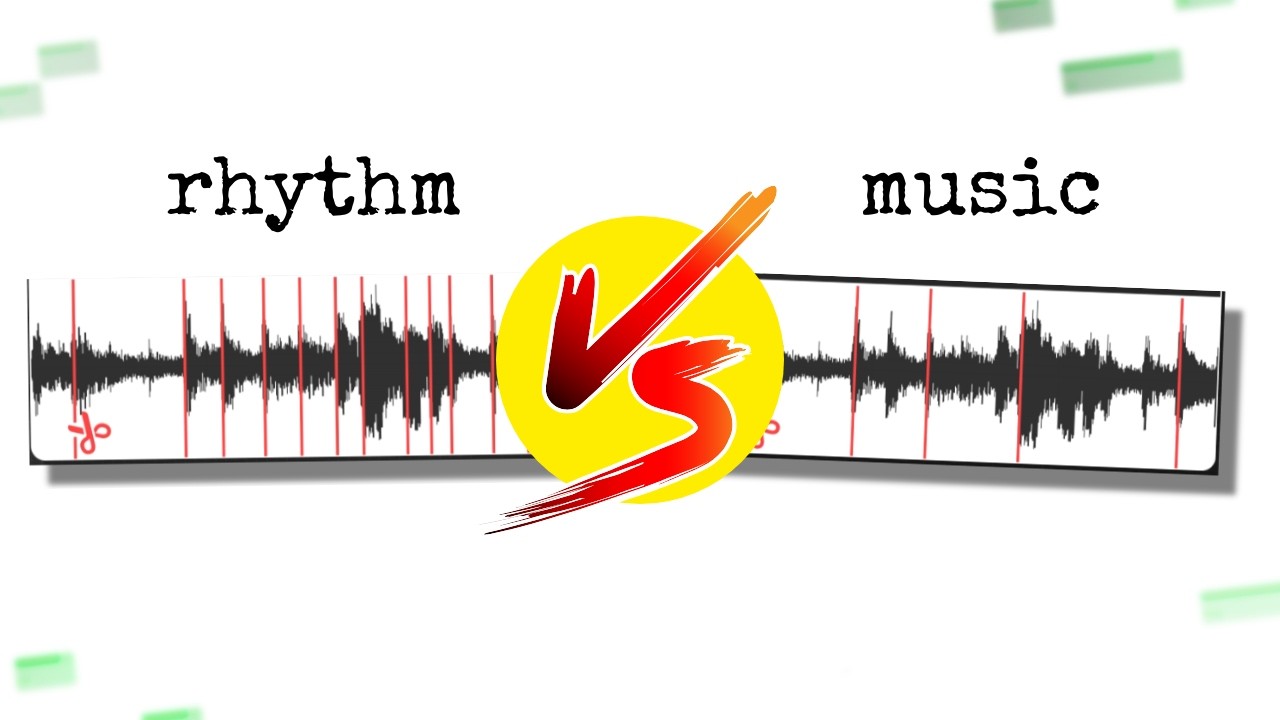
Sample chopping means slicing an audio recording into smaller segments, then rearranging, pitching, and triggering those segments to build a new piece of music. You can do it inside any modern DAW, on a hardware sampler like the AKAI MPC, or with a dedicated plugin like Serato Sample.
Sample chopping is the foundation of hip-hop production, and it's been the engine behind almost every iconic beat you can name. Pete Rock, J Dilla, Madlib, Flying Lotus: all of them built careers around taking someone else's record and making it unrecognizable in the best possible way.
It's not a beginner technique or an advanced technique. It's a core technique. If you produce beats and you don't chop samples, you're leaving the most expressive tool in the kit unused.
This guide covers everything: the theory behind why chops work, which tools we'd actually use, how to get musical results fast, and the part most guides skip entirely: how to chop competitively, under pressure, when everyone in the room has the same source material as you.
We've tested these workflows across Ableton Live, FL Studio, Logic Pro, and hardware. Here's what we know.
What Is Sample Chopping, Really?
Chopping is the act of cutting an audio file at specific points, then treating each cut as its own playable piece. You're dissecting a recording, a drum break, a piano loop, a vocal phrase, and reassigning every fragment to a pad, a key, or a MIDI note.
Once you've done that, you're not playing back the original. You're playing a new instrument built from it.
The classic use case is the breakbeat. Take the Amen break, 6 seconds of live drums recorded in 1969. Chop it into 8 or 16 slices. Move them around. Pitch the snare up 2 semitones. Reverse the hat. Drop the kick on beat 3 instead of 1. You've just made drum and bass.
The same logic applies to melodic loops. A 4-bar soul sample becomes a 1-bar loop when you isolate the most interesting chord hit. Pitch it down 3 semitones to change the key. Layer two chops against each other. Now it's yours.
Why 4 or 8 Pads?
Most producers default to 4 or 8 slice points, and it's not arbitrary. Most source material sits in 4/4 time. Four slices align to quarter notes. Eight slices land on eighth notes. This gives you a grid that already feels musical without any extra work.
That said, some of the best chops break this completely. We'll get to that.
Which DAW Should You Chop In?
The honest answer: the one you already know. But the slightly longer answer matters if you're still deciding.
Ableton Live
Ableton's Simpler and Sampler are the best native chopping tools in any DAW. Load an audio clip, switch Simpler to Slice mode, set your slice markers manually or by transient, and every slice maps to a pad or MIDI note automatically.
The warping engine is what separates Ableton for electronic and experimental work. You can time-stretch individual slices independently without bouncing, which means you can run a breakbeat at 140 BPM while keeping its tonal character intact. We ran a dusty 1970s drum loop at 97 BPM up to 145 inside Ableton's Complex Pro warp mode. The grain smearing was noticeable above 130, but below that it was clean.
If your chops are going into an arrangement rather than a beat machine, Ableton is our pick.
FL Studio
FL Studio's native chopper is the Slicex plugin. Load a sample, and it auto-detects transients and maps them to its internal pads. You get individual envelopes, filters, and pitch controls per slice. It's satisfying to dial in.
Slicex also lets you draw custom slice points by hand, which matters when the transient detection misses a subtle chord hit. We've had it place 14 auto-slices on a 4-bar loop where we only wanted 8. Manual override is fast, though.
For hip-hop and trap workflows where you're feeding slices into a pattern sequencer, FL Studio is the most natural. The step sequencer integration with Slicex is faster than any comparable Ableton workflow we've tested.
Logic Pro
Logic's Quick Sampler handles chopping with a clean drag-and-drop workflow. Drop audio in, select Slice mode, and your transients become zones. The integration with Drummer and Live Loops makes Logic strong for producers who want chops as part of a larger arrangement.
Logic is our pick for detail work. The Flex Time editing underneath Quick Sampler gives you per-slice timing adjustment that's more surgical than what Ableton offers natively. If you're chopping a complex melodic phrase and the timing needs to be perfect, Logic's tools get you there faster.
Hardware: AKAI MPC and Roland SP-404
The AKAI MPC One, MPC Live II, and MPC X all have onboard sample chopping that works entirely standalone, no laptop needed. The chop workflow is pad-centric: you set start and end points, assign them to pads, and play. The tactile feedback changes how you perform the chops. You feel the groove in your hands. That's not poetic. It changes your timing in ways that a mouse click doesn't.
The Roland SP-404 MK2 is a different beast. Its chopping tools are simpler, but the onboard effects, scatter function, and vinyl-simulation processing give your chops a character that's hard to replicate ITB. A lot of lo-fi and sample-flip producers run Ableton for the arrangement and the SP-404 as the processing stage for exactly this reason.
How Do You Actually Chop a Sample Well?
This is where most guides go vague. We won't.
Step 1: Identify Your Source Points
Before you set a single slice marker, listen to the full loop three times. Find the 2 or 3 moments that hit hardest. Those are your anchors. Build your chop points around what you want to keep, not around even grid spacing.
A frustrating mistake beginners make is slicing evenly first and musical second. Twelve equal slices of a 4-bar piano loop will give you twelve mediocre options. Four slices placed at the four most interesting harmonic moments give you four powerful ones.
Step 2: Set Your Slice Points
Use transient detection as a starting point, not a final answer. In Ableton Simpler, set the sensitivity threshold high enough to catch drum hits but not so high that it's splitting every reverb tail. We usually start at around 50% sensitivity and adjust by ear.
In FL Studio Slicex, the transient detection tends to be more aggressive. Expect to manually delete 30-40% of the auto-placed markers on melodic material.
For tight slice points on drums, zoom into the waveform until you can see the transient's attack phase clearly. Place your marker at the zero-crossing just before the peak. This prevents the audible click you get when a cut starts mid-wave.
Step 3: Map and Play
Map your slices to pads or keys. If you're on an MPC or in FL Studio, pads are more intuitive for rhythmic material. If you're building a melodic instrument from chops, key mapping in Ableton Sampler or Logic Quick Sampler gives you more range.
Now play them wrong on purpose. That's the creative step nobody writes about clearly.
We loaded an 8-slice drum break into Ableton Simpler once and spent 10 minutes playing slices in exactly the order the original had them. The beat sounded like a worse version of the source. Then we started moving things out of order, pitching slice 3 down 4 semitones, reversing slice 6, triggering slice 1 twice in a row. Three minutes later we had something worth keeping.
Off-Grid Chopping
Playing chops strictly on the grid sounds mechanical. The real skill is playing slightly ahead of or behind the beat. On the MPC this happens naturally because your hands aren't perfectly quantized. ITB, you need to either play it in live with quantize turned off, or manually nudge MIDI note positions after the fact.
In Ableton, try 85% swing on an 8th-note grid applied to your MIDI clip. Not as good as live performance, but close.
Should You Use AI Stem Separation Before Chopping?
Yes, and this is the workflow change from 2024 that's actually worth adopting.
Tools like iZotope RX 11, Spleeter (free, open-source), and the Stem Splitter inside Serato Sample let you isolate drums, bass, vocals, or melodic elements from a full mix before you chop. This means instead of chopping a full band recording and fighting the kick every time you want the piano, you can pull the piano out first.
The quality isn't perfect. Spleeter at 4-stem separation leaves audible bleed artifacts on complex material. iZotope RX 11's Music Rebalance function handles it more cleanly, though the processing takes longer and the plugin costs significantly more than Spleeter's free tier.
Serato Sample at $99 combines stem separation, chopping, key detection, and time-stretching in one interface. For producers who want a single dedicated tool for this workflow, it's the most complete option we've seen at that price.
How Do You Chop Samples for Beat Battles?
This is the gap almost every guide ignores. Competitive sample chopping, where everyone in a beat battle or "cookup" session receives identical source material and has to make something original with it, requires a completely different mindset.
When you and nine other producers have the same 2-minute soul record, the person who wins isn't the one with the cleanest chops. It's the one who found something no one else heard.
Our approach: on first listen, skip the obvious hook. Every producer in the room will chop the main melodic phrase. Go for the transitions, the room tone between phrases, the faded-out tail at the end of the record. These have less obvious pitch and rhythm, which means they take more work but yield something no one else will have.
We judged a cookup session with 6 producers all working from the same 1970s funk loop. Five of them chopped the horn riff in the first 8 bars. One of them looped a single drum fill from bar 14, pitched it down 5 semitones until it sounded like a bass stab, and built a completely different beat on top. That beat won. It didn't sound anything like the source.
Under time pressure, speed matters more than perfection. Know your DAW's chopping workflow well enough to go from raw audio to mapped pads in under 90 seconds. In Ableton, that's: drag to Simpler, Slice mode, press Tab to see the map, done. In FL, it's: load into Slicex, run transient detection, delete excess markers, done. Practice this until it's automatic.
Worth Bookmarking
- Ableton Simpler Manual, the official slice mode documentation is more thorough than most tutorials
- Spleeter by Deezer, free, open-source stem separation for pre-chop isolation
- Serato Sample, $99 dedicated chopping plugin with built-in stem separation and key detection
- iZotope RX 11, best-in-class stem isolation before chopping complex material
- AKAI MPC One, standalone hardware chopping workflow reference
- Native Instruments Battery 4, useful for building sample kits from chopped material
- Splice, source material library with loop stems that are legally cleared for chopping
Summary
Sample chopping is slicing audio into playable fragments, then rearranging them into something new. Ableton Simpler works best for arrangement-focused workflows. FL Studio Slicex wins for hip-hop sequencing. Logic Quick Sampler has the best surgical precision. Hardware like the MPC adds physical performance feel that changes your timing in real ways.
Use AI stem separation before chopping when your source material is a full mix. Set slice points by ear, not just by transient detection. Play your chops off-grid. And if you're competing, skip the obvious hook and find the part of the record no one else will hear.
That's where the interesting music lives.
Part of our complete Music Production Guide: From First Session to Finished Song series.
Frequently Asked Questions
What does sample chopping mean in music production?
It means cutting an audio recording into smaller segments and assigning each segment to a pad, key, or MIDI note so you can trigger them independently. Once chopped, you can rearrange the segments, change their pitch, reverse them, and combine them into a completely new musical idea. The original recording becomes raw material rather than a fixed loop.
What's the best DAW for sample chopping?
Ableton Live with Simpler in Slice mode is our pick for electronic and experimental work. FL Studio with Slicex is faster for hip-hop and trap. Logic Pro's Quick Sampler is best when you need precise control over individual slice timing. The honest answer: use whichever DAW you know, because speed matters more than the specific tool.
How many slices should I cut a sample into?
Start with 4 or 8. These align to quarter and eighth notes in 4/4 time, which means your slices already feel musical without extra work. Once you're comfortable, break the convention: cut melodic samples by harmonic content rather than timing, and place markers wherever something interesting happens rather than at even intervals.
Do I need a hardware sampler to chop samples?
No. Every major DAW handles sample chopping natively and with more visual feedback than hardware. That said, an AKAI MPC or Roland SP-404 changes how you perform chops because you're using your hands on physical pads. The tactile element affects your timing and feel in ways that playing pads with a mouse doesn't replicate. It's not required, but it's worth trying if you get the chance.
What is Serato Sample and is it worth $99?
Serato Sample is a dedicated virtual sampler plugin that combines sample playback, chopping, key detection, time-stretching, and, in recent versions, AI stem separation. At $99 it's competitive for what it does in one interface. If you already use Ableton Simpler or Slicex and have separate stem separation tools, you may not need it. If you want everything in one window, it earns its price.
How do I prevent clicks when chopping samples?
Place your slice markers at zero-crossings in the waveform, the points where the audio amplitude crosses 0 dB on its way up or down. Starting a slice mid-wave creates an instantaneous voltage jump that your speakers reproduce as a click. Zoom in far enough to see individual wave cycles, then place markers just before the transient peak where the waveform crosses zero.
What is off-grid chopping and why does it matter?
Off-grid chopping means triggering your slices slightly ahead of or behind the strict quantize grid rather than perfectly on the beat. This introduces human timing feel into the loop, which makes it sound less mechanical. On hardware like the MPC it happens naturally. ITB, try reducing quantize strength or applying 75-85% swing in your DAW's MIDI clip settings.
Can I legally chop and release samples in my music?
This is a legal question, not a production question, and the answer is: not without clearance unless the source material is in the public domain or explicitly licensed for reuse. Even a 2-second chop can infringe copyright if it's recognizable. Services like Splice and Looperman offer loops that are cleared for commercial use. If you're using commercial records, you need a sample clearance before release.
What is stem separation and how does it help with chopping?
Stem separation uses AI processing to isolate individual elements from a mixed recording, separating drums, bass, vocals, and melodic content into individual audio files. Before chopping, this lets you work with just the piano or just the drums from a full-band recording. Tools like Spleeter (free), iZotope RX 11, and the built-in function in Serato Sample all do this, with varying quality and processing time.
How do I get better at sample chopping fast?
Practice the mechanical workflow until it's automatic: you want to go from raw audio to mapped, playable pads in under 90 seconds. Then spend your creative time on what you do with those slices rather than setting them up. After that, the fastest improvement comes from listening to producers who chop well: Madlib, J Dilla, Knxwledge, and Flying Lotus all have publicly discussed sessions and interviews where they demonstrate their approach.