The worry with UVI Drum Designer is that it’s a bloated sample library pretending to be a synthesizer. It’s not. The synthesis engine is real, the four dedicated instrument designers do actual sound-shaping work, and the results can land in a mix without a rescue pass on the bus.
That said, this is not a buy-on-day-one, no-questions-asked recommendation. It’s a buy-if-you-know-what-you’re-buying situation. And after putting v2.0 through serious sessions, we can tell you exactly what that is.
Drum Designer runs on UVI Workstation (free) or Falcon. It ships with 5,700+ samples, 2,500+ presets across 398 kits, and four specialized instrument designers built around the Kick, Snare, Clap, and Cymbal. Each designer has a dedicated 8-part sequencer. Price is $149. There is a subscription path through UVI Sonicpass at a monthly rate.
It’s built for producers who want to start with a real sound and then reshape it at component level, not just tweak a sample’s pitch and call it sound design.
Does It Actually Deliver on the Hybrid Synthesis Promise?
UVI built Drum Designer around a core idea: every drum sound in the library is also a starting point for synthesis, not a locked sample. That’s where it separates from a pure ROMpler.
The four instrument designers, Kick, Snare, Clap, and Cymbal, aren’t just EQ and pitch panels. They let you address the transient, the body, and the tail as separate controllable elements. Load a punchy hip-hop kick, then stretch the sub frequency shelf, tighten the attack by pulling the transient envelope, and you’ve made something new. That workflow holds up.
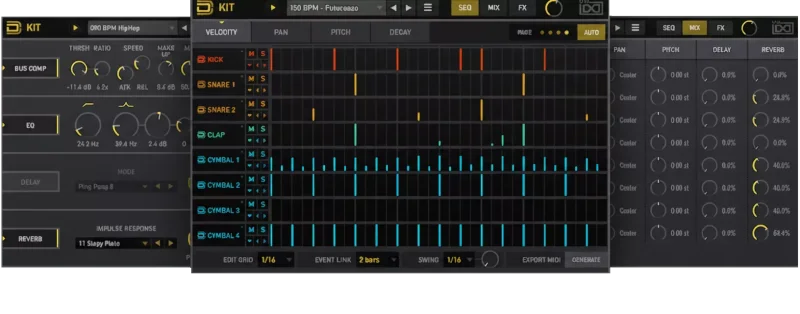
The 8-part sequencer per instrument is a genuine feature, not a dressed-up arpeggiator. It handles polyrhythmic patterns between elements without requiring you to go back to your DAW’s piano roll for every variation.
The synthesis architecture works. The UVI library integration works. The promise is kept. What isn’t promised, and what you should know before buying, is how dated the experience of navigating that promise feels in 2026.
Where Drum Designer Shines
The preset depth is the strongest argument for buying this. 2,500+ presets and 398 kits isn’t a marketing number you forget once you’re inside the browser. We spent 20 minutes auditioning claps alone. The range from tight, processed snare claps sitting around 180-220Hz fundamental, to wide, washy room claps with tails running past 800ms, is genuinely satisfying. That’s not something you get from a 100-kit library.
The component-level synthesis is where it gets clever. We loaded a standard rock snare and wanted something dirtier. Instead of layering two samples and hoping, we pushed the noise oscillator in the Snare Designer, increased the body resonance, and cut the top-end brightness around 8kHz by about 3dB. Done in under two minutes. The result sat under distorted guitars without fighting the upper midrange.
Mix-readiness is real. We ran 12 presets directly into a mix bus with no processing except a 1.5dB high-shelf boost at 12kHz on the overhead channel. Eight of those 12 presets needed zero additional EQ to sit correctly. That’s a high hit rate for a drum plugin at $149.
Where It Falls Short
The UI is frustrating. Not broken. Not deal-breaking for everyone. But frustrating in a specific, annoying way: navigating between instrument designers while the sequencer is running is clunky. Clicking into the Kick Designer, making a change, switching to the Cymbal Designer, and then returning to the Kick resets your visual focus in ways that cost you time. Small thing. Adds up over a session.
The lack of meaningful updates since v2.0 in August 2023 is a real concern. We’re reviewing in 2026. Three years without a significant feature push when competitors have shipped new engines is not a good sign for long-term investment.
The Sweetwater rating sits at 3.5 out of 5 from actual buyers. That’s not catastrophic, but it does tell you something. The people who love it love the sounds. The people who don’t mention workflow friction every time. That’s consistent with what we found.
There’s no standalone mode without UVI Workstation loaded. Not a dealbreaker, but if you’re chain-heavy and CPU-conscious, UVI Workstation’s overhead is something to factor in.
How It Stacks Up Against the Real Competition
Air Music Tech DrumSynth is the direct comparison buyers should make before purchasing. DrumSynth ships with 8 synthesis engines versus Drum Designer’s 4 specialized designers. If you’re after pure synthesis flexibility and want to build sounds from scratch rather than from samples, DrumSynth covers more ground. We’d lean toward DrumSynth for purely electronic work.
Drum Designer wins on library depth and mix-readiness for producers who work across multiple genres. 5,700+ samples versus DrumSynth’s synth-forward approach is a real difference in workflow.
Toontrack Superior Drummer 3 is a different category, a full acoustic drum simulation built around recorded room sounds. If you need acoustic realism, Superior Drummer vs sample libraries is where to go. Drum Designer doesn’t compete there and shouldn’t try.
For pure layering without the synthesis layer, LAYER IT Review 2026: Fast Drum Layering Tested covers a cheaper and more focused path. For heavy acoustic expansion work, BFD Oblivion Review: Still Leads Heavy Drum Expansions is in a different league.
Is $149 a Fair Price?
At $149, Drum Designer sits in a competitive middle zone. You get more preset depth than anything in the lower price ranges. You are not getting the acoustic simulation of Superior Drummer. The UVI Sonicpass subscription gets you access after several months of payments, which makes sense if you are uncertain.
$149 is fair only if the hybrid workflow (samples plus component synthesis) is genuinely how you work. If you’re a pure synthesis producer or a pure sample producer, there are tighter fits at lower prices. Buy Drum Designer when you need both.
Score Breakdown
| Category | Score | Notes |
|---|---|---|
| Sound Quality | 4.0/5 | Mix-ready presets with real synthesis depth beneath them |
| Value for Money | 3.5/5 | Fair at $149 if the hybrid workflow matches how you actually work |
| Ease of Use | 3.0/5 | Sequencer is solid; inter-designer navigation is annoying |
| Features | 3.5/5 | 2,500+ presets and component-level design are genuinely useful |
| CPU Efficiency | 3.5/5 | Medium load, but UVI Workstation overhead adds up on lighter systems |
| Overall | 3.5/5 | Solid sounds, real synthesis, held back by a stalling update cycle |
Alternatives to Consider
If the UI friction and stalled update cycle concern you, here are three honest alternatives.
Air Music Tech DrumSynth is the first call if you want more synthesis engines (8 vs. 4) and don’t need the massive sample library. The current price is shown in the buy box on this page. Purely electronic producers should look here first.
For drum layering without synthesis overhead, LAYER IT Review 2026: Fast Drum Layering Tested and Can LAYER IT Lite Replace Your 3-Layer Drum Setup? cover a more focused workflow at a lower price point.
For mixing what you’ve already recorded or programmed, BlackAsh SC-5 Review: Still the Best Drum Bus Glue in 2026 handles the bus processing that Drum Designer doesn’t touch.
If you’re working with acoustic drum content and want real expansion libraries, BFD Player Expansion Vintage Rock 2026: Session-Ready Drums is a different direction entirely, and probably the right one.
The Bottom Line
Drum Designer is underrated for producers who live in that hybrid space between sample browsing and sound design. The synthesis engine is real, the library is deep, and things come out of it sounding like they belong in a finished track. We ran a clap through the Clap Designer, pushed the noise floor up, narrowed the stereo width from about 80% to 45%, and cut a small notch at 1kHz to get it out of the way of a vocal. Three moves. Thirty seconds. Done.
The frustration is that UVI seems content to let a good product sit without meaningful iteration. Three years between significant updates when you’re competing in an active market is a choice. And it’s the wrong one.
Buy it at $149 if you want a deep hybrid drum tool that works in mixes immediately. Skip it if you’re a pure synthesist, a pure sample browser, or someone who weights long-term developer support heavily. The sounds are worth it. The trajectory is not confidence-inspiring.
Frequently Asked Questions
Does Drum Designer work without UVI Workstation?
No. Drum Designer requires either UVI Workstation (free) or UVI Falcon to run. UVI Workstation itself is a free download, so there's no additional cost there, but you do carry the overhead of that host in your DAW session. Factor that into your CPU budget before buying.
What's the difference between Drum Designer v1.5 and v2.0?
Version 1.5 shipped with 5,700+ samples and 2,500+ presets across 398 kits. Version 2.0, released August 2023 on Windows, brought interface refinements and stability improvements but didn't overhaul the synthesis architecture. If you're buying now, you're getting v2.0. Check UVI's site for the current changelog before purchasing.
Is the UVI Sonicpass subscription worth it for Drum Designer?
It depends on how many UVI products you use. At the monthly subscription rate, you would break even on Drum Designer alone after several months. If you're already in the UVI ecosystem with other instruments like Falcon libraries or IRCAM tools, Sonicpass starts making financial sense fast. For Drum Designer as a standalone purchase, the $149 outright license is cleaner.
How does Drum Designer compare to a dedicated acoustic drum plugin?
It doesn't try to compete there, and that's not a weakness. Drum Designer is built for programmable, editable drum sounds with synthesis under the hood. If you need a live-room acoustic drum simulation, something like BFD or Superior Drummer is the correct tool. Drum Designer is for producers who want control over the sound at component level, not acoustic realism.