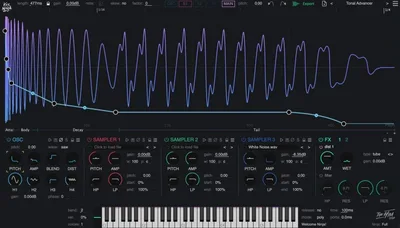
Kick Ninja is a kick drum synthesis plugin from The Him DSP that combines a main oscillator, harmonic oscillator, three sample layers, and 28 automatable envelopes to give you something most kick plugins never offer: total control over every stage of your kick's evolution from attack to tail.
You're at the point in a session where the drum bus is sounding close, but the kick isn't sitting right. It's either too soft for the groove, too woolly in the low-mids, or the tail is flapping around loose and stepping on the bass. You've tried layering samples. You've tried high-passing the room. You've tried parallel compression. None of it has fixed the actual problem, which is that the kick you're using was designed for someone else's mix. What you actually want is a kick that you built for this track. That's the problem Kick Ninja is designed to solve, and at $39, it's priced at a level where that promise needs to be real.
This review is built around one question: does what you get at $39 justify the investment, or are you better served by alternatives that have been in the field longer?
What Kick Ninja Actually Does (And Where It Stops)
Kick Ninja is a synthesis-first kick drum plugin. The architecture starts with a main anti-aliasing oscillator supported by a harmonic oscillator, with three sample layers sitting underneath for blending synthetic punch with real-world transient character.
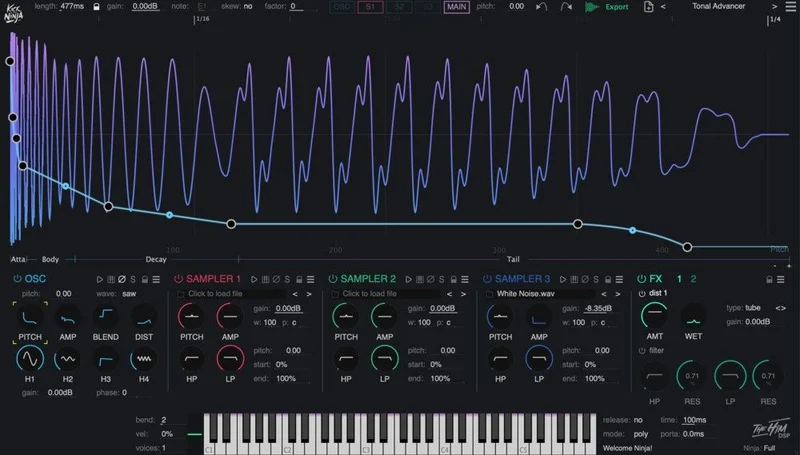
The 28 envelopes are the headline feature. These aren't just amp and pitch envelopes. They touch pitch, amplitude, filters, and distortion parameters across every layer of the plugin. Each one is automatable. Each one supports custom curves with tension control. That's a different depth of programming than most single-purpose kick plugins offer.
What Kick Ninja is not: it's not a drag-and-drop sample replacement tool, and it's not the most beginner-friendly plugin in this space. If you're looking for 200 ready-to-go kicks that sit in every genre instantly, you'll want to look elsewhere. The 70 presets included give you starting points, but owners report the variety is limited. This is a programming tool dressed up as a kick synth, and it rewards producers who want to understand why a kick sounds the way it does, not just grab one and move on.
The 16-voice polyphony, legato, and glide settings push it past pure drum synthesis into melodic percussion territory. You can roll kicks across a chord or glide between pitched notes. That's a niche use case but a clever one when you need a kick that's tonally fused to your bassline.
Pitch snapping lets you tune your kick to track notes without doing the math by ear, and pitch tracking opens up full MIDI control of pitch in real time. These two features together are what makes Kick Ninja genuinely useful in melodic bass genres where the kick and sub need to lock together.
Where Kick Ninja Fits in a Session
You'll reach for Kick Ninja at the design stage, before the mix exists. Drop it on a MIDI track, pick a preset near the weight you want, then start shaping. The 28 envelopes mean you can sculpt the pitch sweep, control how fast the low-end blooms, dial in exactly how the amp decays, and automate any of that over time within the MIDI itself.
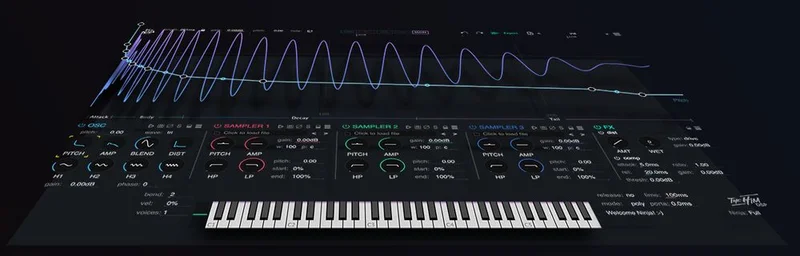
The three sample layers sit alongside the oscillator, not in front of it. So your signal chain inside the plugin looks like this: oscillator foundation with harmonic content on top, then sample layers blended in for attack character or body, then the two FX sections for compression and filtering, then out to your DAW bus.
The two oversampled FX sections include a compressor and an automatable filter. That filter being automatable is worth pausing on. You're not just setting a static high-pass or low-pass and leaving it. You can draw an envelope for the filter cutoff and have it sweep over the course of the kick's tail. For producers working in bass-heavy genres, that kind of movement is what stops a kick from sounding static.
Phase locking deserves more attention than it usually gets. It locks any point in the pitch envelope to stabilise the tail. If you've ever built a kick where the pitch sustain wandered on retriggers or sounded inconsistent under fast tempos, that's the fix. Set it once and your tail locks in place regardless of note timing.
The linear and logarithmic time view options in the envelope editor let you switch between how you think about time. Logarithmic is usually more natural for transient design where the first few milliseconds carry most of the action. Linear keeps everything proportional if you're doing longer, evolving shapes. Picking the right view makes editing faster.
Time skew and extreme zoom are there for precision work. The zoom issues that owners report are real: the function isn't as intuitive as you'd want when you're trying to place envelope points at the microsecond level. It works, but you'll spend some time figuring out the interaction before it feels natural.
Sample-accurate automation runs through the whole plugin. Everything you draw in an envelope is sample-accurate, which matters for fast tempo changes and polyrhythmic patterns where slightly late automation causes audible flamming on the kick.
The Envelope System: Where Kick Ninja Earns Its Name
Twenty-eight envelopes is not a marketing number. It's genuinely what the plugin has, and it's what separates Kick Ninja from most competitors in this price bracket.
Standard kick synths give you pitch and amp envelopes. Some give you a filter envelope. Kick Ninja gives you envelopes for parameters you don't usually think of as dynamic: distortion amount, harmonic oscillator level, individual sample layer pitch, and high-pass and low-pass filter cutoff on each sample layer independently. Each parameter that moves over time gets its own envelope, and each envelope has the same feature set: custom curves with tension, copy and paste of envelope points, undo and redo, and automatic simplification when you've overdrawn something complex.
The automatic simplification feature is a small but satisfying detail. Draw a messy freehand curve, hit simplify, and the plugin reduces the point count while keeping the shape. That's the kind of quality-of-life thinking that shows up in tools built by people who actually use them.
The section ruler and extreme zoom give you the precision to work at the sub-millisecond level. The UI feedback during editing is instant: move a point and the waveform display updates live. No waiting for a preview bounce.
The drag-and-export function is worth mentioning specifically. After you design a kick in Kick Ninja, you can drag the rendered audio directly out of the plugin as a sample. That means your Kick Ninja preset can live in your sample library as a rendered audio file, ready for a session where you don't want the plugin loaded. Frustratingly, that also makes the plugin easier to love: even if you later stop using it, your work survives as audio.
The AI Import Feature: What It Actually Does
The developer's headline claim for the AI import is that it can analyse any kick drum sample and recreate its pitch and amplitude curves as a Kick Ninja preset, turning your existing sample library into editable synthesiser presets.
Owners report this works well, and that it performs better than the equivalent feature in KickDrum (one of the competing tools). The workflow is straightforward: import a sample, let the AI run its analysis, and you get a Kick Ninja patch that approximates the behaviour of that sample using the oscillator engine.
The honest limitation is this: the AI performs at its best on simple, clean percussive sounds. A well-recorded 909-style sub kick with a clear pitch sweep and minimal saturation comes out cleanly as an editable preset. A heavily layered, multiband-processed sample with complex transient shaping is harder to replicate faithfully. The developer is transparent that the system leans on sample generation for complex sounds, meaning the output might blend synthesis with direct sample playback rather than fully synthesising what you imported.
That's not a dealbreaker. It's just a realistic picture of where the technology is. If you're importing simple kicks to customise them, the AI import is a genuine workflow accelerator. If you're trying to perfectly clone a studio kick that's been through 12 layers of processing, you'll find the preset needs manual work afterwards.
The practical value: you have a kick sample from a classic drum machine that sounds right for your track but sits at the wrong pitch. Import it, let AI generate the envelope shapes, then use pitch snapping to tune it to your session. That's a streamlined workflow that would take much longer in a traditional editor.
The Oscillator Engine and Distortion
The main anti-aliasing oscillator is the core of every kick you build here. Anti-aliasing matters most in the low end, where aliasing artifacts can appear as faint high-frequency noise that smears the punch of the kick. Owners describe the low-end as weighty, controlled, and defined in dense mixes. That tracks with what good anti-aliasing buys you: clean fundamentals that cut through without adding unwanted high-frequency content.
The harmonic oscillator sits alongside the main oscillator and adds upper harmonic content. This is where you dial in the attack character and body. Push it up and the kick gains definition in the 100-800Hz range. Pull it back and the kick becomes a pure sub thump. The relationship between the two oscillators is where most of your tonal shaping happens before you touch the envelopes.
Nine distortion types. That's a meaningful number. Distortion on a kick drum isn't about making it sound aggressive (though it can do that). It's about adding harmonic content that gives the kick presence on smaller speakers and in the mid-range where most listeners actually hear music. Owners specifically report that distortion in Kick Ninja adds perceived loudness and density while the fundamental frequency stays intact. That's the right behaviour: the sub stays sub, and the saturation adds energy higher up where you can hear it on a laptop speaker or phone.
Different distortion types react differently to the drive amount. Some clip hard and symmetrically. Others fold. Others add even-order harmonics that feel warmer. Without having a user manual in front of you, the best approach is to treat the distortion type as a tonal colour choice and the drive amount as a volume/density control. Push the drive until you hear the fundamental start to blur, then back off slightly.
The Sample Layer System
The three sample layers are where Kick Ninja bridges synthesis and sample design. Each layer has its own automatable pitch, amp, high-pass filter, and low-pass filter. That's four independent envelopes per sample layer, adding 12 more envelopes to the oscillator-based ones.
The practical use: load a sharp, clicky transient sample in layer one to give your kick a faster attack above what the oscillator alone can deliver. Load a room sample in layer two for a hint of size. Keep layer three empty or use it for a mid-body layer that fills in the 200-400Hz range. Balance the three with their amp envelopes, adjust the pitch of each layer independently, and filter them to sit in their useful frequency ranges without overlapping badly.
All three layers are fully automatable in pitch and filter cutoff, so you can write automation that shifts layer one's sample pitch over time for a moving, melodic quality. That's not a typical use case for a kick plugin, but Kick Ninja clearly wasn't built to be a typical kick plugin.
The drag-and-export function applies to the full rendered output: oscillator, harmonic content, sample layers, FX sections, all mixed together and bounced as audio when you drag out of the plugin. You're not exporting layers separately, but the final output captures everything.
Polyphony, Legato, and Glide: The Features You Didn't Know You Needed
Sixteen-voice polyphony on a kick synth sounds excessive until you need it.
In a fast breakbeat or a polyrhythmic pattern, kicks retrigger before the previous tail has decayed. Without polyphony, the new hit cuts off the previous tail abruptly. With 16 voices, each hit gets its own voice, so the previous tail continues underneath. Whether you want that behaviour or not depends on the genre and the tempo, but having the option is better than not having it.
Legato and glide open up the melodic percussion use case properly. Enable glide, set your glide time, and play a MIDI melody. The kick's pitch will slide between notes rather than jumping. In low-tempo melodic bass music or slow groove productions, a kicking bassline built with Kick Ninja's glide is a sound you can't easily get from a static sample.
Pitch tracking extends this further. With pitch tracking on, the pitch of your kick follows whatever MIDI note you send. Play a C and the kick is tuned to C. Play an F and it shifts. Combined with pitch snapping, you can build a kick that's always in key with your progression without manual tuning per note.
These features add genuine value in specific genres. In four-to-the-floor electronic music where the kick is a metronomic thump, you'll probably leave all three off. But for any production that blurs the line between kick drum and bass instrument, they're the features that make Kick Ninja stand out.
The Trade-Offs
The control depth that makes Kick Ninja brilliant is the same thing that makes it frustrating for new users. Twenty-eight envelopes is a lot to understand before you've built your first good kick. The zoom function that owners report as unintuitive is exactly the tool you need most when you're trying to fine-tune a transient point. If the navigation is confusing, that precision becomes harder to access than it should be.
The cluttered GUI is a real issue. When you're working on a kick at two in the morning and you need to find the high-pass filter envelope for sample layer two, the last thing you want is a UI that makes you hunt for it. The feature set is there. The presentation doesn't always make finding it fast.
The 70 presets cover the essentials. But owners note the variety is limited compared to plugins with deeper preset libraries. For producers who use presets as sketching tools before diving into synthesis, that's a noticeable gap. You'll be building from scratch or heavily modifying what's there more often than not.
The AI import is genuinely clever and genuinely constrained. For clean, simple kicks it's a fast workflow. For anything complex, the results need manual work. That's not a reason to avoid the plugin, but it means you shouldn't buy Kick Ninja primarily for the AI import and expect it to replace manual sound design.
What the trade-offs add up to: Kick Ninja delivers at the deep end of kick synthesis. If you're willing to learn the system, the control is there. If you want something fast and immediately usable across a wide range of presets, the investment of time doesn't pay off as quickly.
Against the Field
Three plugins come up most often next to Kick Ninja.
Sonic Academy Kick 3 is rated by owners as the most intuitive node-based kick editor available. If you need to get a good kick fast and the interface matters as much as the depth, Kick 3 wins on approachability. The node editing feels more natural to most users than the envelope-heavy approach in Kick Ninja.
Audija KickDrum is the alternative for precision editing with better zoom functionality. If the zoom issues in Kick Ninja are a dealbreaker for your workflow, KickDrum gives you that precision without the same interface friction. Owners who do very detailed transient work prefer it for that reason.
F9 Audio KiCK! Argon Drums v1.5 is positioned as the value option. If you're budget-conscious and need a capable kick synth that gets out of the way, Argon Drums is worth checking before committing to Kick Ninja at $39.
Where Kick Ninja wins: AI import that outperforms the KickDrum equivalent, 28 envelopes covering more parameters than any of the three alternatives, and the melodic features (polyphony, legato, glide, pitch tracking) that the others don't emphasise. If you need those things specifically, Kick Ninja is the right call. If you need intuitive editing or excellent zoom, it isn't.
Who Should Buy This, Who Should Skip It
Buy Kick Ninja if you're a producer who designs kicks from raw synthesis and wants deeper envelope control than the standard pitch-plus-amp approach offers. Buy it if you use AI import as a starting point for modifying existing samples rather than expecting perfect clones. Buy it if glide, legato, and pitch tracking are features you'll actually use in melodic bass or experimental percussion work. At $39, the depth of the feature set justifies the price for a producer who will spend time with it.
Skip it if you're new to synthesis and need fast results with a shallow learning curve. The cluttered GUI and unintuitive zoom will slow you down before you get to the good stuff. Skip it if preset variety is important to your workflow: 70 presets with limited genre spread means you'll be building, not browsing. Skip it if you're primarily after a quick AI-to-finished-kick pipeline with complex source material, because that's not what the AI import does reliably yet.
The honest truth is that Kick Ninja is a specialist tool sitting at a price that asks you to be serious about it. The low-end that owners describe as controlled and weighty in dense mixes, the 28-envelope system, and the drag-to-export function together make a compelling package. But it rewards patience and synthesis knowledge, and it'll frustrate you if you're looking for something you can be productive with in the first hour.
Specs & Technical Details
| Developer | The Him DSP |
| Price | $39 |
| Plugin Format | VST3 / AU / AAX |
| OS Support | Mac (AU, VST3, AAX) / Windows (VST3, AAX) |
| Activation | N/A |
| CPU Usage | N/A |
| Trial Available | N/A |
| Version Reviewed | N/A |
Score Breakdown
| Category | Score | Notes |
|---|---|---|
| Sound Quality | 4.5/5 | Anti-aliased oscillator delivers clean, controlled low-end that holds in dense mixes; distortion types add presence without destroying the fundamental |
| Value for Money | 4.0/5 | At $39, the 28-envelope system and AI import offer real depth; limited preset variety and steep learning curve reduce the return for casual users |
| Ease of Use | 3.0/5 | Cluttered GUI, unintuitive zoom, and synthesis knowledge required keep this out of reach for newcomers |
| Features | 4.5/5 | 28 automatable envelopes, 9 distortion types, polyphony, legato, glide, AI import, and drag-to-export cover far more than most kick plugins |
| CPU Efficiency | N/A | No data available |
| Overall | 4.0/5 | Deep, capable kick synthesis tool that rewards patient, synthesis-literate producers; not the fastest path to a finished kick |
Alternatives to Consider
Sonic Academy Kick 3 is the most intuitive kick plugin in this category according to owners. It features node-based editing for a more intuitive workflow. If getting a great kick in the shortest time is the priority, Kick 3 is what we'd point you toward first.
Audija KickDrum wins on precise editing and zoom functionality specifically. If the UI friction in Kick Ninja concerns you and you do a lot of detailed transient work, KickDrum handles that side of the workflow better. The zoom issues that frustrate Kick Ninja users aren't a problem there.
F9 Audio KiCK! Argon Drums v1.5 is the choice if budget is the primary consideration. It's positioned as the value option and is worth evaluating before committing to Kick Ninja if you're not certain you'll use the deeper feature set that justifies the price difference.
None of these three offer the same combination of AI import, 28-envelope depth, and melodic features (glide, legato, pitch tracking) that Kick Ninja brings together. The question is whether those specific things are what you need.
Kick Ninja earns its place as the choice for synthesis-led kick design with AI-assisted sample conversion. It's not the easiest plugin in this space and it's not the cheapest. But the producers who love it tend to love it because nothing else gives them this level of control over how a kick moves through time, from the first microsecond of the attack through to the last moment of the tail. If that's the problem you're trying to solve, $39 is a fair price to solve it.
Frequently Asked Questions
What is Kick Ninja and who makes it?
Kick Ninja is a kick drum synthesis plugin developed by The Him DSP. It combines a main anti-aliasing oscillator, a harmonic oscillator, and three sample layers, with 28 fully automatable envelopes covering parameters across every section of the signal chain. It's built for producers who want granular, programming-level control over how a kick sounds and evolves from attack to tail.
How does the AI import feature work in Kick Ninja?
The AI import analyses a kick drum sample you load into the plugin and uses an algorithm to recreate the sample's pitch and amplitude curves as a Kick Ninja preset. This gives you an editable synthesiser patch derived from your original sample, which you can then modify using all of the plugin's envelopes and controls. Owners report it works best on clean, simple percussive sounds and requires more manual adjustment on complex, heavily processed source material.
Is Kick Ninja suitable for beginners?
Honestly? Not really. The plugin has a steep learning curve for anyone who isn't already comfortable with synthesis concepts like envelope shapes, oscillator relationships, and filter behaviour. The GUI is reported as cluttered, and the zoom function takes time to get used to. If you're new to synthesis, something with a more approachable interface will get you to a good kick faster. Kick Ninja rewards producers who want to understand and control every aspect of their kick drum design.
What DAWs and formats does Kick Ninja support?
On Mac, Kick Ninja runs as AU, VST3, and AAX, covering Logic, Ableton, Pro Tools, and most other major DAWs. On Windows, it's available as VST3 and AAX. AU is Mac-only, which is standard across the industry.
How does Kick Ninja compare to Sonic Academy Kick 3?
Kick 3 is rated by owners as more intuitive and faster to get a finished kick from, with node-based editing that most users find natural. Kick Ninja goes deeper on envelope control and adds features like AI sample import, polyphony, legato, and glide that Kick 3 doesn't emphasise. If speed and ease of use matter most, Kick 3 wins. If you need the depth of 28 automatable envelopes and AI-assisted import, Kick Ninja is the stronger tool.
Can you export kick drum samples directly from Kick Ninja?
Yes. Kick Ninja includes a drag-and-export function that lets you drag the rendered audio of your kick directly out of the plugin as a sample file. The export captures the full output: oscillator layers, sample layers, and both FX sections combined. This means you can design a kick in Kick Ninja and keep it as a rendered audio file in your sample library for sessions where you don't need the plugin loaded.