
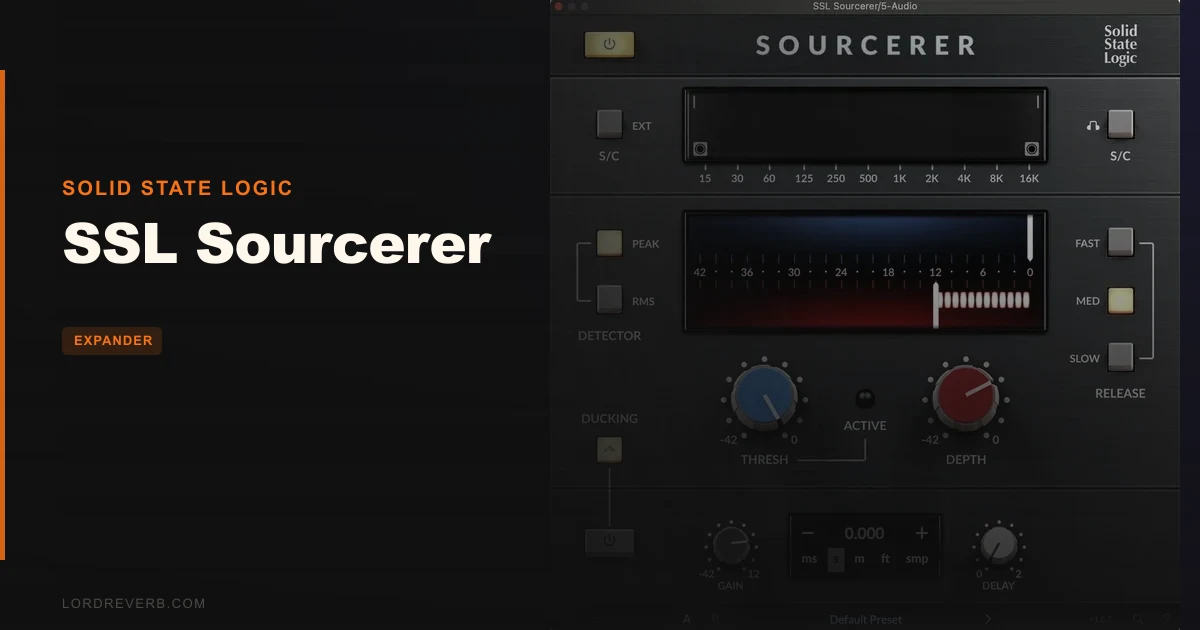
SSL Sourcerer is an expander plugin built to reduce microphone bleed in live and studio recordings, and it does that job with a naturalness that standard gates rarely match. You're mid-session, your drum overhead mics are picking up guitar amp spill, your close mics are swimming in room noise, and a gate keeps chopping the tails in ways that sound wrong in the mix. That's the exact moment Sourcerer was designed for. At $49, it's a focused tool with a clear purpose, and if that purpose matches your problem, it's hard to argue against it. If you need a full dynamics swiss-army-knife, look elsewhere.
What It Is and What It's Not
Sourcerer is an expander, not a gate. That distinction matters more than it sounds. A gate cuts the signal below a threshold with a hard binary decision. An expander reduces the signal below threshold gradually, following the natural decay of whatever you're trying to suppress.
SSL developed Sourcerer originally for their Live console range. The plugin version brings that same concept into any DAW session on Mac or Windows. It's built for one scenario: you have bleed you want reduced, and you don't want the solution to sound worse than the problem.
What it's not: a general-purpose dynamics processor. You won't find a compressor mode, a limiter, or a traditional gate curve here. There's no input/output volume control or wet/dry mix control. It's narrow in scope by design, and that focus is both its strength and its limit depending on what you're trying to do.
Where It Fits In Your Session
Picture this: you're mixing a live recording. The snare mic is decent, but every time the drummer hits a crash, it bleeds into the snare channel and clutters your reverb send. A gate would work, but the snare has a long, satisfying decay that keeps getting clipped. You want the bleed gone, not the tail.
Drop Sourcerer on the snare channel. Set the High-Pass Filter on the sidechain to push the low end out of the detection signal so kick drum hits aren't triggering the expander. Dial the Threshold so the plugin is reacting to the bleed level, not the snare hit. Choose your release time: Slow (~500ms), Medium (~250ms), or Fast for snappier transients. Owners report the plugin can sit on a drum kit and ignore kicks and hi-hats while responding cleanly to snare hits. That's the sidechain filter doing its job.
The dual visual feedback graphs are where you actually learn what the plugin is doing. One graph shows you the sidechain and filtered signal. The other shows your threshold line against the actual gain reduction. If you've ever dialed a gate by ear and felt like you were guessing, these graphs make the process feel honest. Owners describe them as invaluable for fine-tuning.
RMS detection mode averages the incoming signal over time, which works best for continuous sounds like room noise or sustained instruments. Peak mode handles fast transients. You'll probably run Peak on drums and RMS on ambient bleed. The choice is clear once you hear the difference on your source.
The ducking feature adds another layer. It lets you use an external audio source to pull a channel down when that source is active, a useful concept in live broadcast or theater contexts. But there's a catch we'll get to.
Digging Into the Controls
Threshold, Time, and Depth
These are your three core knobs. Threshold sets where the expansion starts. Time controls the release: slow, medium, or fast. Depth sets how much gain reduction you're applying below the threshold.
For most bleed scenarios this works well, but if your source has an unusual decay that falls between medium and slow, you're making a compromise, which can be annoying when you're chasing precision on a tricky source.
Depth behaves predictably. Push it too hard and the expansion becomes gate-like, which defeats the point. Owners confirm that staying at moderate Depth values is where the natural sound lives. Think of it as a dial you use to find the minimum effective dose, then stop there.
Sidechain Filters
The High-Pass and Low-Pass Filters on the sidechain are genuinely clever. They let you tell the plugin what frequency content should trigger the expansion, separate from what frequency content actually gets processed.
That means you can have a full-range signal processed while only the midrange of that signal drives the detection. On a tom mic catching hi-hat bleed, you'd set the High-Pass to push the low-end drum fundamentals out of the sidechain, so the plugin ignores big hits and only responds to the thin, high bleed. Owners find this approach cleaner than traditional gating on complex drum setups. It is.
RMS and Peak Detection
This choice shapes how the plugin hears the incoming signal before making its gain reduction decision. RMS smooths out the response by averaging signal level over time. Peak reacts to the sharpest transients immediately.
On a drum kit, Peak keeps up with fast hits. On a choir mic catching room noise, RMS avoids the plugin pumping on every consonant. You'll want to audition both before committing. The visual feedback graph makes this a quick experiment rather than a guessing game.
Ducking Feature
The ducking mode lets a secondary source trigger gain reduction on your primary channel. The concept is useful in live broadcast scenarios where, say, an announcer mic needs to gently duck a music bed.
The frustrating part: the Threshold is shared between the expander and the ducker. There's no separate threshold for each function. That means dialing in the expander perfectly can throw off your ducking behavior, or vice versa. Owners call this configuration awkward, and they're right. The ducking delay is adjustable, which helps, but the shared threshold is a real design compromise. Owners also confirm ducking strength needs to stay subtle to keep responsiveness intact, which limits how hard you can push it in practice.
External Sidechain
External sidechain lets a completely separate audio source trigger Sourcerer's gain reduction. This opens up creative routing: use a reference track to drive bleed reduction on a problem channel, or set up a complex live rig where one instrument's activity controls another's level.
The internal sidechain monitor feature lets you hear exactly what the detection circuit is responding to, removing all the guesswork about whether your filter settings are actually hitting the right frequencies.
The Trade-Offs
The strongest thing Sourcerer has going for it is what it doesn't do. It doesn't chop tails. It doesn't create the unnatural silence that makes a gated drum recording sound like it was edited with scissors. Owners consistently report forgiving, natural-sounding results, and that matches exactly what SSL says the plugin is designed to deliver.
The missing controls are a genuine problem though. No input/output volume means you can't compensate for level changes at the plugin itself. No wet/dry mix means you can't blend the processed and unprocessed signal without a parallel track in your DAW. For a plugin with this focus, those omissions feel like they were left off the list rather than a principled decision.
The shared threshold between the expander and the ducker is the one design choice that feels undercooked. In a tool this focused, having two functions compete for a single parameter creates unnecessary friction. You'd wish for a second threshold slider, even a simple one.
The dual visual feedback graphs provide real-time monitoring of gain reduction and sidechain activity. Watching the gain reduction graph in real time tells you a lot about what the plugin is actually doing, even when you can't directly see the signal level relationships. It's clever design solving a problem that better controls would have prevented.
Against the Field
FabFilter Pro-G is a pricier gate and expander alternative with detailed control options. Pro-G gives you a full ADSR-style control set, multiple knee options, and a lookahead function. If you're working on complex studio projects where flexibility matters above all else, Pro-G has more range. It costs noticeably more.
TDR Nova gets mentioned alongside Sourcerer because it's free and handles dynamics processing with an EQ-based approach. But Nova is a dynamic EQ, not an expander. The functionality genuinely doesn't overlap in the way the comparison suggests. Nova won't solve mic bleed the way Sourcerer does.
Sourcerer wins specifically in the live-to-DAW, natural-decay scenario. If that's your problem, it's a better-fitted tool than a full gate expander with dozens of parameters you'll never need. If your work demands full dynamic control across multiple modes, Pro-G is worth the higher price.
Who Should Buy This
The Live Sound Engineer Mixing in the Box
You've got multi-track live recordings and mic bleed is the enemy. Gates are making your mix sound clipped and artificial. Sourcerer was literally built for this scenario. Buy it.
The Studio Producer Working With Acoustic Instruments
Recording an acoustic guitar next to a vocal? Room mics catching too much bleed on a drum session? Sourcerer's sidechain filter approach handles this well, preserving the room sound you recorded with natural-decay behavior.
The Mixing Engineer Who Needs Full Dynamics Control
If you want compression, gating, and expansion in one plugin with complete parameter control, Sourcerer isn't it. The missing wet/dry and volume controls will frustrate you. Look at FabFilter Pro-G instead. Skip this one.
The Broadcast or Theater Engineer
The ducking feature is interesting on paper, but the shared threshold limitation makes it awkward to configure precisely. It's marginally useful, not brilliantly useful. The expander side is excellent. The ducking side is a compromise. Know that going in.
The Real Verdict
SSL Sourcerer solves a specific, annoying problem better than most alternatives at this price. The natural expansion behavior, the sidechain filters, and the visual feedback make it a satisfying tool for its intended job. The missing wet/dry and volume controls are real omissions, and the shared threshold for the ducking feature is a notable design limitation.
But for the live engineer or studio producer chasing cleaner bleed reduction without the robotic sound of a gate, this is a focused, well-executed tool. At $49, the value holds up. Just don't buy it expecting a complete dynamics solution. It's a specialist, and specialists are only overrated when you hire them for the wrong job.
Specs & Technical Details
| Developer | Solid State Logic |
| Price | $49 |
| Plugin Format | VST2 / VST3 / AU / AAX Native |
| OS Support | macOS 11–13 (Intel, M1) / Windows 10–11 (64-bit) |
| Activation | Free iLok Account (no dongle required) |
| CPU Usage | N/A |
| Trial Available | N/A |
| Version Reviewed | N/A |
Score Breakdown
| Category | Score | Notes |
|---|---|---|
| Sound Quality | 4.5/5 | Natural expansion behavior avoids the gating artifacts owners specifically praise |
| Value for Money | 4.0/5 | Focused tool at a fair price, but missing controls hurt the case for some buyers |
| Ease of Use | 4.0/5 | Dual visual graphs make setup intuitive; shared threshold for ducking adds unnecessary complexity |
| Features | 3.5/5 | Sidechain filters and dual detection modes are clever; no wet/dry or volume controls is a real gap |
| CPU Efficiency | N/A | No verified performance data available |
| Overall | 4.2/5 | A specialist that excels at its intended job with a few design rough edges |
Alternatives to Consider
FabFilter Pro-G is the fuller-featured gate and expander for engineers who need complete parameter control: attack, hold, release, multiple knee types, and lookahead. It costs more. If you're working across varied session types and need one dynamics tool that handles everything, Pro-G earns its price. Sourcerer is more focused and more affordable; Pro-G is more versatile.
TDR Nova comes up in comparisons because it's free and handles dynamics. But it's a dynamic EQ, not an expander. It won't reduce mic bleed the way Sourcerer does. If you need dynamic frequency shaping rather than broadband expansion, Nova is worth loading. For bleed reduction specifically, it's a different tool solving a different problem.
SSL Sourcerer is the right call when you've hit the limit of what a standard gate or basic expander can do cleanly. If bleed reduction with natural-sounding tails is the specific problem you're trying to solve, this plugin was built for exactly that scenario and it delivers.
Frequently Asked Questions
Is SSL Sourcerer a gate or an expander?
It's an expander. That means it reduces signals below the threshold gradually, following the natural decay of the sound rather than cutting it off hard. The result is less of the robotic silence that traditional gates produce on sustained or complex sounds like drums or acoustic instruments.
Does SSL Sourcerer work on Apple Silicon Macs?
Yes. It supports M1 Macs running macOS 11 Big Sur through macOS 13 Ventura. On Mac it runs as AU, VST2, VST3, or AAX Native. Windows 10 and 11 users get VST2, VST3, and AAX Native formats.
Do I need a physical iLok dongle to run SSL Sourcerer?
No. It requires a free iLok Account for software authorisation, but you don't need the physical dongle. The account-based license is enough to activate and run the plugin.
What's the difference between RMS and Peak detection in Sourcerer?
RMS detection averages the incoming signal level over time, which produces a smoother, slower response. It works best on continuous sounds like room noise or sustained pads. Peak detection reacts to the loudest transient points immediately, making it the right choice for drums or any source with fast, sharp hits you want the plugin to catch quickly.
Can you use SSL Sourcerer as a parallel processor?
Not directly. It has no wet/dry mix control, so you can't blend processed and unprocessed signal at the plugin itself. To run it in parallel, you'd need to set up a parallel track in your DAW and route the signal manually.