
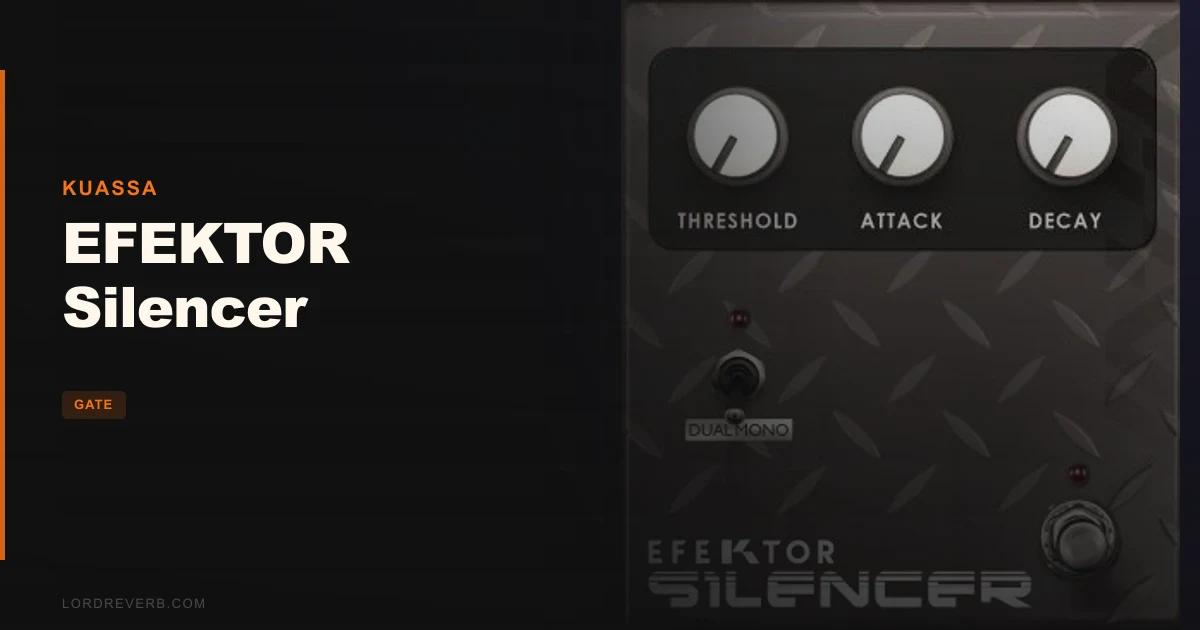
EFEKTOR Silencer is a free noise gate plugin by Kuassa that handles distorted signals and breakbeats without the clicking problem that plagues most comparable free gates. If you download it hoping for a surgical, multi-band, sidechain-equipped gate with keying options, you'll be disappointed. That's the regret some buyers run into: they expect more than three knobs can deliver. But if your actual problem is noise bleed on a heavy guitar track or a breakbeat that keeps breathing in places it shouldn't, this is where owners say the plugin earns its reputation as the best free noise gate they've found.
It's built for straightforward gating tasks. Three controls. A bypass switch. Dual-mono mode for stereo routing. Nothing hidden, nothing modular. If you need that, and only that, read on.
Who Ends Up Regretting This
The regret is almost always a mismatch in expectations, not a failure in the plugin itself.
If you're coming from a DAW native gate and expecting this to add something your DAW doesn't already have, you might close the installer wondering what the point was. Owners are clear: this doesn't go beyond basic noise gating functionality. There's no sidechain input, no hysteresis control, no hold time. It's threshold, attack, release. That's it.
If you value being able to type a specific threshold value with your keyboard, this will frustrate you. The plugin requires mouse-knob adjustment for every parameter. No keyboard entry. Ever. For producers who work fast and dial in precise numbers, that's annoying enough to push them elsewhere.
And if you're trying to gate a signal that isn't distorted guitar, dense breakbeats, or something with a sharp, obvious noise floor? Owners report it doesn't work for every occasion. Some signal types just don't respond cleanly. Go in knowing that.
What Owners Actually Say
The recurring theme in owner reports is relief. Not excitement, not surprise. Relief that the clicking didn't happen.
Most free VST gates click. It's a known problem: the gate opens and closes with a hard edge, and on transient-rich material like breakbeats or metal rhythm guitars, you hear it. Reviewers specifically flag this with EFEKTOR Silencer: the clicking that ruins comparable plugins doesn't appear here. On breakbeats, it reportedly works cleanly. That's not a small thing.
Metal guitarists are the loudest advocates. Heavily distorted signals are hard to gate because the noise between notes shares frequency content with the notes themselves. Owners in that space say problems disappear when they apply this plugin. That's their word: disappear.
The knobs are easy to dial in. That comes up repeatedly. No hunting for the right range, no confusing response curve. You move the threshold and it behaves the way you expect a gate to behave.
The one consistent complaint beyond the no-keyboard-entry issue: it doesn't work for every signal. Some users hit a wall with certain material and kept ReaGate running alongside it as a backup. That's not a glowing endorsement, but it's honest.
What You Actually Get
Three knobs. That's the whole interface: threshold, attack, and release.
Threshold sets the level below which the gate closes. Push it too high and you'll chop your sustain. Set it too low and the noise floor bleeds through. On a distorted guitar bus, you'll want to find the point where the noise between chord hits drops out cleanly but the natural decay of the note doesn't get truncated. That's the sweet spot, and owners say it's findable.
Attack controls how fast the gate opens when signal crosses the threshold. Too slow and your transients get eaten. Too fast and you risk artifacts on material with a slow onset. For sharp, picked metal guitar parts, a fast attack is usually right. For something with a slower envelope, back it off.
Release is where the character of the gating lives. Set it short and the gate slams shut. Set it long and the signal fades out more naturally before the gate closes. On breakbeats, this is where you'll spend most of your time.
Dual-mono mode handles stereo signals by processing each channel independently. That matters when you're gating a stereo room mic or a stereo synth with different noise profiles on left and right.
The bypass switch is there. Simple. Works.
What's not there: hold time, sidechain, lookahead, hysteresis, range control. If any of those are on your requirement list, EFEKTOR Silencer won't cover them.
Format support is broad: VST, VST3, AU, and AAX on Mac; VST, VST3, and AAX on PC. Mac requires OS X 10.5 or later, Windows goes back to XP. Most modern DAWs will load it without a second thought.
Distorted Guitar: The Use Case This Was Built For
Picture this: you're tracking rhythm guitars for a metal record. High gain. Lots of amp noise between riffs. Your gate needs to close fast between palm-muted chugs and stay out of the way during the actual playing.
That's exactly the scenario this plugin handles. Set the threshold to catch the amp hiss between notes. Set the attack fast enough that the first transient of each hit comes through fully. Dial the release so the gate closes cleanly before the next hit without adding a noticeable tail.
Owners in this situation report a satisfying result: the noise disappears and the playing stays intact. The plugin earns its developer's claim of being an improvement over the basic gate in the Kuassa Amplifikation series. For this specific signal type, on this specific problem, it's the right tool.
What you can't do is key the gate off a different signal. If your problem needs external sidechain triggering, you're looking at the wrong plugin.
Breakbeats and the Clicking Problem
Here's the thing about free gates and breakbeats. A breakbeat has fast, irregular transients. The gate has to open and close constantly, and every opening and closing is a potential click. Most free plugins fail this test.
You load a gate onto a breakbeat loop with room noise between hits. You set the threshold. You hit play. And you hear it: a tiny click every time the gate snaps shut. On a loop that repeats 32 bars in, that click is every listen. Infuriating.
Reviewers specifically note that EFEKTOR Silencer avoids this. On breakbeat material, the gating happens without audible clicks at the transitions. That's not universal across all signal types, but for breakbeats specifically, it's a documented strength. If that's your use case, this is worth loading before anything else in the free tier.
The Mouse-Only Problem
Parameter entry has been a known limitation since the plugin's release in December 2017. You cannot type a value into the threshold knob. You cannot type an attack time in milliseconds. Every adjustment is made by dragging the knob with your mouse.
That's fine when you're auditioning settings by ear. Less fine when you want to match settings across multiple instances, or when you're A/B testing against another gate and you want both set to identical thresholds. You're estimating by position, not precision.
Annoying? Yes. A dealbreaker for free? Probably not. But it's a real limit and you should know it before you build a template around this plugin.
The Smarter Route
If EFEKTOR Silencer doesn't cover your use case, the main alternative owners mention is ReaGate, which users keep running alongside this one for signal types that Silencer doesn't handle cleanly. ReaGate comes bundled with Reaper and is available as a standalone plugin. It offers more controls and a sidechain input, so if you need anything beyond threshold, attack, and release, that's where to look.
Your DAW's native gate is also worth checking before you install anything. DAW native gates often include more parameters than EFEKTOR Silencer's three-knob design. The reason to pick Silencer over those is the reported click-free performance on distorted and breakbeat material. If that specific problem isn't yours, the native gate probably wins.
For anything more complex, you're moving into paid territory. But given that EFEKTOR Silencer is free, "the smarter route" often means loading this first, confirming it works, and never needing anything else.
Buy or Wait?
It's free. There's no waiting involved in any meaningful sense.
Download it if you work with distorted guitars, heavily processed drums, or breakbeat loops where clicking is a documented problem. The three-knob layout is underrated for fast sessions where you want a gate on a track and you want to move on.
Skip it if you need sidechain capability, precise parameter entry, or a gate that works across every signal type you throw at it. It's wrong for producers who need a utility gate that covers every situation with one plugin. It does one thing brilliantly and a narrower range of things adequately. Know which side of that line your work sits on.
Specs & Technical Details
| Developer | Kuassa |
| Price | Free |
| Plugin Format | VST / VST3 / AU / AAX |
| OS Support | Mac (OS X 10.5 or later) / Windows (XP or later), 32/64-bit |
| Activation | N/A |
| CPU Usage | N/A |
| Trial Available | N/A (free plugin) |
| Version Reviewed | 1.0.1 |
Score Breakdown
| Category | Score | Notes |
|---|---|---|
| Sound Quality | 4.0/5 | Click-free gating on distorted signals and breakbeats is a real differentiator at this price point |
| Value for Money | 5.0/5 | Free, broad format support, does what it says |
| Ease of Use | 4.0/5 | Three knobs is as simple as it gets, but no keyboard parameter entry is a friction point |
| Features | 3.0/5 | Threshold, attack, release, and bypass only. No sidechain, no hold, no range control |
| CPU Efficiency | N/A | N/A |
| Overall | 4.1/5 | Narrow scope, executed well, genuinely free, and fixes a real problem for the right user |
Alternatives to Consider
| Plugin | Price | Strongest Point | Weakest Point | Best For |
|---|---|---|---|---|
| ReaGate | Free (with Reaper) | More controls, sidechain input, handles a wider range of signal types | Slightly more complex to dial in quickly | Producers who need a gate that works across varied material and use cases |
| DAW Native Gate | Included with your DAW | Integrated, often includes sidechain and more parameters | Reported clicking on distorted and breakbeat material that EFEKTOR Silencer avoids | General-purpose gating where click artifacts aren't a documented problem |
ReaGate is the plugin owners reach for when EFEKTOR Silencer hits its limits. That tells you something. It's not that Silencer is weak. It's that ReaGate covers more ground. If you're only dealing with metal guitars and breakbeats, Silencer is likely enough. If your sessions are varied, keep both loaded.
Your DAW's native gate is the other option, and honestly, for a lot of use cases it wins on features alone. The reason Silencer stays on people's drives is that click-free performance. If your DAW gate clicks on your distorted bus, that's the moment to reach for this.
There's no paid alternative worth naming here. The point of EFEKTOR Silencer is that it's free and it solves a specific problem. If your problem is more complex than this plugin's feature set, you're already looking at a different category of tools.
Here's the honest summary: EFEKTOR Silencer is underrated for what it costs (nothing) and overrated if you expect it to replace a full-featured gate. For metal rhythm tracks sitting in a session with amp noise bleed between riffs, or a breakbeat loop where every other gate clicks, this is the right tool. It doesn't try to be clever. It's satisfying in the way a simple thing that works is always satisfying. Get it, keep it in your toolkit, and stop worrying about whether you're missing something. You're not.
Frequently Asked Questions
Is EFEKTOR Silencer really free?
Yes, it's completely free. There's no paid tier, no trial version that expires, and no hidden cost. You download it, install it in your supported format, and use it.
What DAWs does EFEKTOR Silencer work with?
It works in any DAW that supports VST, VST3, AU, or AAX plugin formats. On Mac that covers all four formats. On PC you get VST, VST3, and AAX. If your DAW accepts any of those, Silencer will load.
Does EFEKTOR Silencer have a sidechain input?
No. The plugin has three controls: threshold, attack, and release. There's no sidechain input, no external key, and no keying option. If your use case requires sidechain triggering, you'll need a different plugin.
Why do owners use ReaGate alongside EFEKTOR Silencer?
Owners report that Silencer doesn't work effectively for every signal type. ReaGate handles a broader range of material and has more controls, so some producers keep both installed and choose based on the signal. They're not competing for the same slot so much as covering each other's gaps.
Can I type in parameter values with my keyboard?
No. This is a documented limit of the plugin. Every parameter adjustment requires dragging the mouse knob. There's no keyboard entry option for threshold, attack, or release values. It's annoying for precision work but not a problem if you're setting by ear.
Does EFEKTOR Silencer work on Mac and Windows?
Yes on both. Mac requires OS X 10.5 or later and supports 32-bit and 64-bit operation. Windows support goes back to Windows XP and also covers 32-bit and 64-bit. Both versions support the VST, VST3, and AAX formats, with AU additionally available on Mac.