The HY-Plugins FX Bundle is three seriously deep effects plugins for $105, and if you produce in a DAW that skips built-in modulation sequencers, it fills that gap better than most bundles twice the price.
HY-Delay4, HY-Filter4, and HY-MBMFX2 land in that sweet spot where the UI complexity is real but the CPU hit stays manageable. Owners confirm it. Reviewers confirm it. The limitation list is short enough that it's worth your time.
This is an exclusive Plugin Boutique release, available for a limited time. That last part is true for once: HY-Plugins keeps these bundle deals tight. If the price is live when you're reading this, the decision should take about five minutes.
This review is for producers who want to know what they're actually buying: what each plugin does, what it doesn't, and whether the bundle is worth it for your specific workflow.
What You're Actually Getting
Three plugins. Each one is a real tool, not filler added to bulk up a bundle.
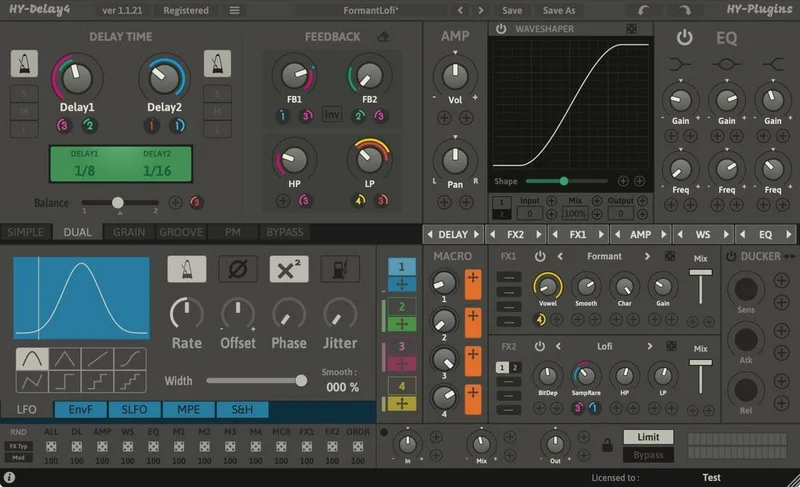
HY-Delay4 is a modular delay with 5 delay modes (Simple, Dual, Grain, Groove, and PM) plus Bypass Mode, 5 effects modules including amp simulation, waveshaper, and EQs, and 4 macro controls. You chain the delay and effects in any order. That's the part that matters most.
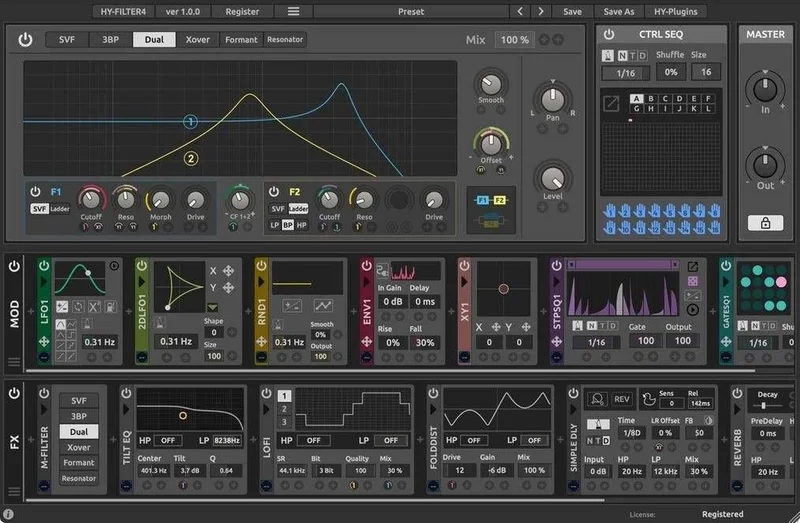
HY-Filter4 is a semi-modular multi-engine filter. It carries 38 built-in effect units, 10 modulator types across 42 units, and a 16-track CTRL SEQ grid sequencer with 12 pattern snapshots. That sequencer is the headline feature.
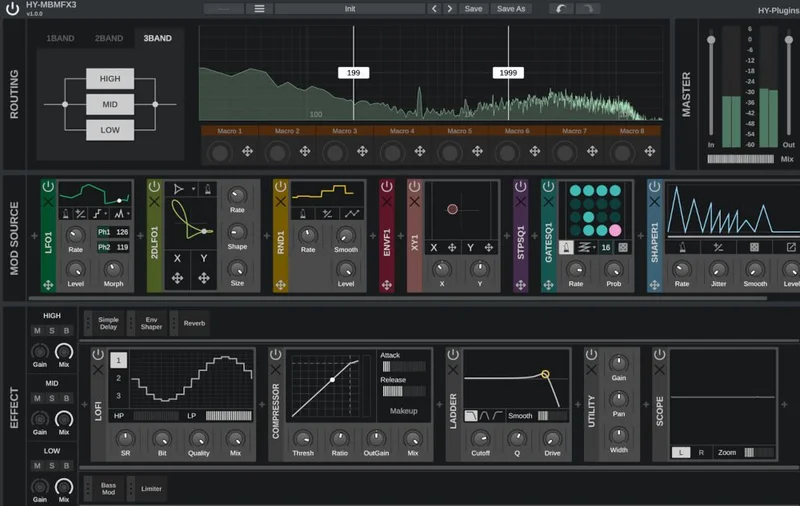
HY-MBMFX2 is a 3-band multiband multi-FX unit. Each band takes up to 5 effect units from a library of 22 FX types, with a master effect slot on top. Modulation comes from 4 LFOs and 2 envelope followers. Drag and drop reorders everything.
All three support VST2 and VST3; AU is available on macOS only. All three run on macOS 10.12 Sierra or higher (64-bit only) and Windows 7 or higher (32/64-bit). All three have resizable or scalable GUIs.
The bundle is exclusive to Plugin Boutique. You can't buy these three together anywhere else.
HY-Delay4: Where the Signal Chain Gets Interesting
Most delays give you time, feedback, and a tone knob. HY-Delay4 gives you five delay modes, five effects modules, and the freedom to decide which comes first.
That last part sounds small. It isn't.
When you run your amp simulation before the delay, you're smearing a driven tone. When you run it after, you're driving an already-smeared tail. Those are two different sounds. Most delay plugins make that choice for you. HY-Delay4 doesn't.
The Five Delay Modes
Simple mode is exactly what it says. Standard delay with a clean signal path. Good as a starting block when you just need echo without thinking.
Dual mode opens up two independent delay lines. You can set different times, different feedback amounts, and route them to different positions in the signal chain. Useful for wide stereo delays without washing out the center.
Grain mode is where things get creative. Granular processing inside a delay means you can get pitch-scattered, texture-heavy repeats. Push the grain parameters and your snare hit becomes something ambient. Back them off and it's a subtler shimmer on the tail.
Groove mode adds rhythmic, pattern-based delay. This is where you dial in syncopated echoes that sit inside the groove of a track rather than fighting it. If you produce anything where rhythm is structural, Groove mode is worth the price of entry on its own.
PM mode introduces phase modulation into the delay. The result is a kind of modulated, almost chorus-like echo that moves. Good for pads, found sounds, anything you want to feel alive.
Bypass mode sits in the list too, which lets you use the effects chain without any delay at all. HY-Delay4 becomes a standalone effects processor in that state.
The Five Effects Modules
The included effects modules are amp simulation, a waveshaper (editable, not static), and EQ sections. You build the signal path you want.
The editable waveshaper is the one to pay attention to. Draw your own transfer curve and you're shaping the harmonic content of the repeats directly. Soft-clip the tail for warmth. Push it toward hard clip for grit. It's a one-control-at-a-time way to work, which makes it precise.
The amp module adds color and drive. This isn't amp modeling in the full guitar-amp sense. Think of it as a drive stage that flavors the echo. Push it and the top end turns gritty. The texture sits differently when you place it before versus after the waveshaper in the chain.
EQs let you shape the frequency content of the delay specifically. Cut the low end of the repeats so they don't build up mud in a dense mix. Add a high-shelf boost to make the echo shimmer. This is basic but it's the kind of basic that matters in a real session.
Modulation in HY-Delay4
Four modulation generators. Five modulation types. The developer says these can target effect parameters directly, so you're not just modulating time and feedback.
Assign an LFO to the waveshaper curve depth. Set an envelope follower to your delay feedback via the sidechain input. The sidechain ducker means you can sidechain the delay to your kick and have the repeats duck automatically. That's a workflow that would take several separate plugins in a less integrated setup.
The 4 macro controls tie multiple parameters to a single knob. Set up a macro that opens the feedback, shifts the grain spread, and boosts the EQ high shelf simultaneously. One knob move, three changes. For live performance or automation, that's a real advantage.
There's also a randomizer. Hit it when you're stuck and the plugin generates a new state. Some of what it spits out is unusable. Some of it is exactly the unexpected direction you needed.
The Interface
Resizable. Two skin modes: Light and Dark.
The chain order is visible and adjustable from the interface, which keeps the workflow readable. You're not hunting through menus to see what's routing where.
HY-Filter4: The Sequencer Nobody Expects
Filter plugins are common. A filter with a 16-track CTRL SEQ grid sequencer and 12 saved pattern snapshots is not.
If you work in FL Studio or Reaper and you want complex, automatable filter movement that cycles through patterns on demand, HY-Filter4 is built for that exact problem. Owners in both DAWs specifically call this out.
The Multi-Engine Filter
HY-Filter4 isn't a single filter with a cutoff and resonance. It's a multi-engine filter, meaning the filter type itself can change. The 38 built-in effect units sit alongside the filter, so you're not choosing between filtering and effects processing. You're doing both.
The drag-and-drop modulation assignment means you don't menu-dive to connect a modulator to a parameter. You drag. That sounds obvious, but most filter plugins with this many modulation sources still make you dig through routing pages.
42 Modulation Units Across 10 Types
Ten modulator types. 42 total modulation units. That's a lot of moving parts.
The variety matters because different modulator types behave differently. An LFO sweeps smoothly. An envelope follower tracks your signal's dynamics. A step sequencer creates stepped, rhythmic movement. A random modulator generates unpredictable variation. Having all of these available and assignable via drag-and-drop means you can build filter movement that isn't just a wobble.
You could have a filter cutoff tracked by an envelope follower on the low end, with a separate LFO adding a slow cyclic sweep on top, while a step modulator controls the resonance in a rhythmic pattern. That's three modulator types on one parameter group, running simultaneously.
That's not a beginner workflow. But it's the kind of depth that keeps experienced producers from outgrowing a plugin.
The CTRL SEQ Grid Sequencer
This is the reason HY-Filter4 earns its place in the bundle for DAW users who lack native sequencer-modulation integration.
16 tracks. 12 pattern snapshots. The sequencer controls the filter and effect parameters across those tracks, and you can switch between pattern snapshots to change the entire behavior of the plugin. Build a pattern for your verse, another for the chorus, another for the breakdown. Switch between them in real time or via automation.
Owners working in FL Studio and Reaper specifically call this out as something their DAWs don't offer natively. That's honest feedback worth taking seriously.
The practical use case: you're building a filter sweep for a build section. Instead of drawing automation for every parameter across the timeline, you build a CTRL SEQ pattern and trigger it. The sequence loops and you automate the snapshot change. Faster, and more repeatable.
The 38 Effect Units
Thirty-eight effect units inside a filter plugin. That's generous. The diversity is what owners and reviewers flag: the selection covers enough ground to add real character to a signal, not just filter movement.
The diverse FX selection is praised for adding motion and character to signals. The combination of filtering, sequenced modulation, and embedded effects means HY-Filter4 can function as a creative insert for a full signal transformation, not just a tone-shaping step.
HY-MBMFX2: Multiband Processing That Actually Makes Sense
Multiband processors have a reputation for being complicated and easy to abuse. HY-MBMFX2 sidesteps both problems with a workflow that's more drag-and-drop than it is parameter-hunting.
Three bands. Up to 5 effect units per band. A master effect slot. Twenty-two FX types to draw from. That's the structure.
Why Multiband Multi-FX Changes the Way You Process
Processing a full signal with a single effect means every frequency range reacts the same way. That's sometimes what you want. It's often not.
Say you're processing a drum bus. You want the low band's kick and sub to stay controlled with compression, the mid band's snare and room to get some saturation, and the high band's cymbal detail to run through a subtle chorus for width. With a standard multi-FX, you can't do that in one plugin. With HY-MBMFX2, you can.
Five effect slots per band means you're building a small signal chain inside each frequency range. That's a lot of processing power in a single plugin instance, and owners report the CPU impact stays low.
Twenty-Two FX Types
Twenty-two. The bundle doesn't itemize all of them in public-facing material, but the owner description of "modular-style control and creative FX possibilities" and "diverse FX selection adding motion and character" gives a clear picture of the flavor.
What matters is that 22 types across three bands and a master slot means you're covering ground that would normally require a rack of separate plugins. And because HY-MBMFX2 includes drag-and-drop reordering, you can rearrange the effect chain within a band without breaking the signal path and rebuilding from scratch.
Modulation in HY-MBMFX2
Four LFOs. Two envelope followers. Four macro controls. Same drag-and-drop assignment system as HY-Filter4.
The envelope followers are especially useful in a multiband context. Set an envelope follower to track the input level of the low band and use it to control the compression ratio in that band. The plugin responds to the actual dynamics of the signal rather than a fixed setting. That's closer to how a good mix engineer works than how a standard compressor plugin works.
The 4 macros let you tie cross-band behavior to a single control. Want a knob that simultaneously opens the low-band effect depth, reduces the mid-band saturation, and brightens the high-band chorus rate? Build it. Automate it. The macro does the work.
The Randomizer and Preset Manager
HY-MBMFX2 includes a randomizer, same as HY-Delay4. The developer specifically calls this out as an inspiration tool, and that framing is accurate. It's not a way to build production-ready presets. It's a way to break a creative block or stumble into a direction you wouldn't have dialed in yourself.
The preset manager works at two levels: individual FX unit presets and overall plugin presets. That granularity is clever. Save a great saturation setting at the unit level, then recall it inside any band of any HY-MBMFX2 instance. The overall preset saves the whole multiband configuration.
This is the kind of workflow detail that separates plugins built by producers from plugins built by engineers who don't mix.
Scalable GUI
HY-MBMFX2 has a scalable interface. On a large monitor, you scale it up and see everything at once. On a laptop screen, you scale it down and keep the session readable.
This matters more for a multiband plugin than for most. With three bands, each containing up to 5 effect units, plus the modulation section, the interface has a lot of real estate to manage.
Who This Bundle Is Actually For
Not everyone should buy this. Here's how to know if you're in the right group.
The DAW Power User Who's Hit the Modulation Ceiling
You work in FL Studio, Reaper, or another DAW that doesn't have deep native modulation and filter sequencing. You've been stitching together workarounds with automation clips and plugin chains that feel overcomplicated.
HY-Filter4's CTRL SEQ grid sequencer is the answer to that. Owners in both FL Studio and Reaper call it out specifically as filling a gap their DAW doesn't cover. The 16 tracks and 12 pattern snapshots give you the sequenced modulation structure you've been missing.
Buy it. This is the core use case.
The Sound Designer Who Lives Off-Map
You build textures, pads, and found-sound transformations. You want tools that can take a signal somewhere unexpected without requiring you to stack five separate plugins.
HY-Delay4's Grain mode and editable waveshaper, combined with the modulation generators, gives you a delay that can double as a sound design tool. HY-Filter4's 38 effect units and 42 modulation units mean you can build complex, evolving filter behavior. The randomizers in both HY-Delay4 and HY-MBMFX2 give you a starting point when the blank canvas is frustrating.
Buy it. The depth is real.
The Mixing Engineer Building a Creative Effects Send
You run a creative effects bus: reverb, delay, and something to add movement. You're looking for a delay that does more than repeat, and a multiband processing unit that can treat different frequency ranges of that send differently.
HY-Delay4's sidechain ducker lets the delay duck when the source hits, keeping the mix clean without manual automation. HY-MBMFX2 on a parallel bus with different processing per band gives you nuanced parallel texture without washing out the main signal.
Buy it, with one caveat. If your session is 64-bit macOS or Windows, you're fine. If you need 32-bit macOS support, it doesn't exist here.
The Beginner Who Wants to Grow Into It
You've been producing for less than a year. You've got the basics down. You're starting to feel like your stock plugins aren't giving you enough movement.
Honestly? The plugin depth here is real, and that means the learning curve is real. HY-Filter4's 42 modulation units and CTRL SEQ grid will take time to understand properly. HY-MBMFX2's multiband routing isn't something you'll master in a session.
That's not a reason to skip it. It's a reason to be patient with it. If you're willing to spend time with the documentation and treat it as a long-term tool rather than a quick solution, $105 for three deep plugins is still good value.
Buy it if you're committed to learning it. Skip it if you want something you can open and use immediately.
The Linux Producer
Minor lagging and slow GUI loading on Linux x11 have been reported by users. It's not a dealbreaker for everyone, but if Linux is your primary system and GUI responsiveness affects your workflow, you need to know this going in.
Wait and see. Check current user reports in the Plugin Boutique review section before committing.
Modulation Architecture Across All Three Plugins
One of the things that makes this bundle coherent rather than just three random plugins thrown together is the consistent modulation philosophy across all three.
All three use LFOs and envelope followers. All three support drag-and-drop modulation assignment. HY-Delay4 and HY-MBMFX2 both have randomizers. HY-Filter4 and HY-MBMFX2 both have macro controls. The workflow logic transfers from plugin to plugin.
When you learn how to assign a modulation source in HY-Filter4, you already understand how to do it in HY-MBMFX2. That consistency shortens the learning curve for the second and third plugin once you've built fluency with the first.
This is a design choice, not an accident. HY-Plugins built these around a shared modulation language.
Drag-and-Drop Modulation Assignment
Both HY-Filter4 and HY-MBMFX2 use drag-and-drop to assign modulation sources to targets. This is worth dwelling on because most plugins with deep modulation make you navigate a routing matrix, a dropdown, or a context menu.
Drag-and-drop changes the speed of the creative decision. When you can physically drag an LFO to a parameter, you try things you wouldn't have tried if the assignment process took thirty seconds. The experimenting gets faster. The frustrating part shrinks.
HY-Delay4 uses modulation generators that connect to parameters via its own system, though the sidechain input for the ducker and envelope follower is a direct connection point that works intuitively.
Macro Controls
Four macros in HY-Delay4. Four macros in HY-MBMFX2. The concept is the same in both: one knob controlling multiple parameters.
The practical value of macros grows with session complexity. Early in a project, you probably don't need them. Midway through, when you've built a sound that relies on five parameters moving in relation to each other, a macro turns that into a single automation lane.
Map a macro to a MIDI controller and you have live performance control over complex multi-parameter behavior. That's not a small thing for producers who play instruments into their sessions or perform live.
The Sidechain Setup in HY-Delay4
The sidechain input on HY-Delay4 serves the ducker and the envelope follower. These are two different functions and it's worth being clear about what each does.
The ducker reduces the delay output when the sidechain source hits a threshold. Put your kick drum on the sidechain. The delay ducks every time the kick hits, then comes back up in the gaps. This keeps delay from blurring low-end hits in a mix. Standard technique, but having it built into the delay itself means one less routing step.
The envelope follower tracks the amplitude of the sidechain signal and uses that envelope to modulate a parameter. That's a different thing entirely. You could have the envelope follower track a vocal and use the vocal's dynamic envelope to modulate the waveshaper depth. When the vocalist gets loud, the harmonics shift. When they back off, the signal cleans up. Responsive, dynamic processing without manual automation.
Having both on a single sidechain input means you can run both simultaneously if you route the same source. The ducker cleans up the mix. The envelope follower adds movement. One sidechain source doing two jobs.
Format and Compatibility
All three plugins support VST2, VST3, and AU. That covers Ableton Live, Logic Pro, FL Studio, Reaper, Studio One, Cubase, and virtually every other major DAW.
macOS 10.12 Sierra or higher, 64-bit only. That 64-bit-only limitation is a real one for anyone still running older setups. 32-bit macOS support isn't here.
Windows 7 or higher, 32-bit and 64-bit both supported. Windows users have the flexibility macOS users don't get.
No AAX is listed in what HY-Plugins has shared. Pro Tools users need to verify this before purchasing. If AAX isn't supported and Pro Tools is your primary DAW, that's a hard stop.
CPU Usage: What Owners Report
Users consistently flag low CPU usage as a strength. That's a meaningful data point because all three plugins are genuinely complex under the hood. HY-Filter4 alone is running 42 modulation units, a 16-track sequencer, and 38 effect types. HY-MBMFX2 is running three separate processing chains simultaneously.
The fact that CPU impact stays manageable matters for producers who run dense sessions. If you're at 70% CPU in a 60-track mix and you're trying to decide what to add to your creative effects bus, a plugin that won't push you over the limit is a practical consideration, not a marketing point.
No specific CPU percentage figures are published. The consistent owner feedback is "low usage". Trust that directionally but benchmark your own system before stacking all three in a dense session.
The Limits You Should Know Before Buying
Every plugin has limits. These are the real ones for this bundle.
macOS 64-bit only. If you're on a legacy Mac system running 32-bit plugins, these don't work for you. Full stop.
Linux x11 GUI lag. This is real. Multiple users have reported it. If Linux is your production environment, the lag might be a workflow problem depending on how heavily you depend on GUI interaction for real-time parameter tweaking.
Limited-time availability. The bundle is an exclusive Plugin Boutique release and the developer says it's available for a limited time. This could mean a week or a few months. It's hard to know. If you're on the fence, the safer move is to decide now rather than come back and find the bundle price has reverted to individual plugin pricing.
No AAX in the listed formats. Pro Tools users: check Plugin Boutique's current format list before buying.
The learning curve on HY-Filter4 is real. Forty-two modulation units and a 16-track sequencer don't explain themselves. If you've never worked with semi-modular plugins before, expect to invest time before you're getting value out of it.
The Value Argument at $105
Three plugins. At $105 for the bundle.
HY-Delay4 alone with its 5 delay modes, editable waveshaper, 4 macros, and sidechain input would be defensible at that price as a single purchase. HY-Filter4 with its 38 effect units, 42 modulation units, and 16-track CTRL SEQ sequencer is the kind of plugin that takes a year to fully explore. HY-MBMFX2 with 22 FX types across three bands plus a master slot covers multiband creative processing that most producers only get from assembling separate plugins.
All three together at $105 is a strong package. The consistent owner reports of low CPU usage and competitive pricing validate the value case.
The value breaks down if you don't work in a DAW where the sequencer and modulation depth are relevant, or if you need AAX support, or if Linux GUI performance is unacceptable for your workflow. For everyone else, the math is simple.
Specific Workflow Scenarios: Putting It Into Practice
Building a Textured Pad with HY-Delay4
You've got a simple pad loop. Single note, held chord, nothing interesting in the motion.
Filter Automation Without Drawing Automation
You're building a 16-bar buildup. You want the filter to open progressively, with a step-sequenced resonance pattern underneath the main sweep. In most setups, this means drawing automation for the cutoff and separately automating a resonance control, then hoping the two feel musical together.
Treating a Drum Bus with HY-MBMFX2
Resizable and Scalable Interfaces: A Practical Note
HY-Delay4 has a resizable interface with two skin modes. HY-Filter4 and HY-MBMFX2 have scalable GUIs.
This is worth mentioning for a specific reason: plugins with complex modulation routing are notoriously difficult to read at default scale. The more parameters and modulation sources you're working with, the more you need to see at once.
Being able to scale HY-Filter4 up on a large monitor and see all 42 modulation units, the CTRL SEQ grid, and the effect units simultaneously without scrolling is a workflow advantage that's easy to undervalue until you're inside a dense session and you don't have it.
The Light and Dark skin modes in HY-Delay4 are a small thing that matters. Dark mode in a low-light mixing environment reduces eye strain during long sessions. Light mode in a bright room keeps the interface readable against window glare. These aren't premium features. They should be standard. It's good that they're here.
What Reviewers and Owners Actually Say
The owner feedback picture is consistent. Reaper users specifically call out the sequencer as filling a workflow gap. FL Studio users say the same. The word "modular-style" comes up repeatedly in user descriptions of how the plugins feel to use.
Reviewers flag the diverse FX selection as the standout. Not just the number of effects but the variety: different character types that add motion, not just static processing.
The bugs report is clean. Users confirm the plugins work without issues in Reaper specifically. No crashes, no parameter recall problems, no compatibility issues beyond the noted Linux GUI behavior.
The Linux lag is the only consistent negative. It's specific to Linux x11 and it covers both lagging and slow GUI loading. This isn't a catastrophic bug. It's a known limitation on a less-supported platform. HY-Plugins appears to have kept Windows and macOS as the primary targets.
The Exclusive Bundle: What That Actually Means
HY-Plugins has made this bundle exclusive to Plugin Boutique. You can't go to a competing store and buy it, and you can't buy these three plugins together anywhere else.
The practical implication: Plugin Boutique controls the availability. The developer says it's limited-time. When the limited time ends, the bundle either gets pulled or returns to individual pricing. Either way, the bundle deal likely goes away.
This kind of exclusive deal usually signals that Plugin Boutique negotiated a meaningful discount off combined individual pricing. That's good for the buyer as long as the buyer is aware that the window is real.
If you've read to this point and you're interested, don't put it in your wishlist and come back in three months. That's how you end up paying more for the same three plugins.
Specs & Technical Details
| Spec | Details |
|---|---|
| Developer | HY-Plugins |
| Price | $105 |
| Plugin Format | VST2 / VST3 / AU |
| OS Support | macOS 10.12 Sierra or higher (64-bit only) / Windows 7 or higher (32-bit and 64-bit) |
| Activation | N/A |
| CPU Usage | Low (owner-reported) |
| Trial Available | N/A |
| Version Reviewed | N/A |
Score Breakdown
| Category | Score | Notes |
|---|---|---|
| Sound Quality | 4.5/5 | Grain delay, editable waveshaper, and multiband FX all deliver genuine character |
| Value for Money | 4.5/5 | Three deep plugins at this price is hard to argue with |
| Ease of Use | 3.5/5 | Drag-and-drop helps but 42 modulation units takes time to learn |
| Features | 4.5/5 | Five delay modes, 38 FX, 16-track sequencer, multiband multi-FX: that's a serious feature list |
| CPU Efficiency | 4.5/5 | Owner-reported low CPU usage holds up against the complexity under the hood |
| Overall | 4.3/5 | A coherent, deep bundle that earns its price, with a small asterisk for Linux users and 32-bit Mac legacy setups |
Who Should Buy This, in Plain English
- ✅ Buy if you work in a DAW without deep native modulation sequencing and you want pattern-based filter control.
- ✅ Buy if you do sound design and you want a delay that can generate textured, granular, modulated tails rather than clean repeats.
- ✅ Buy if you're building creative effects sends and you want multiband processing of your wet signal in a single plugin.
- ❌ Skip if you need AAX support and can't verify it's available.
- ❌ Skip if you're on Linux x11 and GUI responsiveness is non-negotiable in your workflow.
- ❌ Skip if you're a complete beginner looking for something you can use productively in the first session. The depth is real and so is the learning curve.
The Verdict
Three plugins, real depth, low CPU, one price, limited time. That's the short version.
The longer version: HY-Delay4's chain-order flexibility and editable waveshaper give you a delay that behaves more like a signal design tool than a timing effect. HY-Filter4's CTRL SEQ grid sequencer is the kind of feature that FL Studio and Reaper producers have been stitching workarounds for. HY-MBMFX2's per-band effect chains with drag-and-drop reordering is genuinely clever for anyone who wants to process different frequency ranges differently on a single bus.
The limits are real but specific. macOS 32-bit users, Linux x11 users with GUI sensitivity, and anyone who needs AAX should check compatibility before buying. Everyone else is looking at a bundle that covers creative delay, modulation filtering, and multiband FX in one coherent package, built by a developer whose plugins work reliably in production environments.
At $105, this bundle doesn't ask you to compromise much to get a lot. We think it earns a confident buy for the right workflow, and we'd tell you to skip it only if your situation hits one of those specific walls.
Related reviews: FX Collection 6 INTRO Review · Dirty, Bad and Wasted Collection
Frequently Asked Questions
What plugins are included in the HY-Plugins FX Bundle?
The bundle contains three plugins: HY-Delay4, HY-Filter4, and HY-MBMFX2. HY-Delay4 is a modular delay with 5 delay modes and a customizable effects chain. HY-Filter4 is a semi-modular multi-engine filter with a 16-track grid sequencer. HY-MBMFX2 is a 3-band multiband multi-FX unit with up to 5 effects per band.
Where can I buy the HY-Plugins FX Bundle?
The bundle is exclusive to Plugin Boutique. It's not available from other plugin retailers or directly from HY-Plugins. The developer says it's available for a limited time, so availability isn't guaranteed long-term.
Is the HY-Plugins FX Bundle compatible with Pro Tools?
The listed formats are VST2, VST3, and AU. AAX support for Pro Tools is not confirmed in the available product information. Check Plugin Boutique's current format listing before purchasing if Pro Tools is your primary DAW.
Does HY-Plugins FX Bundle work on macOS?
All three plugins support macOS 10.12 Sierra or higher. The important caveat is that macOS support is 64-bit only. If you're running a legacy 32-bit macOS environment, these plugins won't work for you.
Is there any reported CPU performance issue with the bundle?
Owner reports consistently describe CPU usage as low, which is notable given the complexity of all three plugins. No specific CPU percentage benchmarks are published. The only reported performance issue is minor GUI lagging and slow loading on Linux x11, not on macOS or Windows.
What is the CTRL SEQ grid sequencer in HY-Filter4?
CTRL SEQ is a 16-track grid sequencer built into HY-Filter4 that controls the filter and effect parameters. It includes 12 pattern snapshots, so you can build different filter behaviors for different sections of a track and switch between them in real time or via automation. Owners in FL Studio and Reaper specifically call it out as filling a gap their DAWs don't cover natively.
Can I reorder effects inside HY-MBMFX2?
Yes. HY-MBMFX2 supports drag-and-drop reordering of effect units within each band. This means you can restructure the signal chain inside a band without breaking the routing and rebuilding from scratch. The same drag-and-drop system handles modulation assignment across HY-Filter4 and HY-MBMFX2.
Is the HY-Plugins FX Bundle suitable for beginners?
The plugins are genuinely powerful tools with real learning curves. HY-Filter4's 42 modulation units and grid sequencer, and HY-MBMFX2's multiband routing, take time to understand properly. If you're newer to production and want something you can use immediately, expect an investment period. If you're patient and treat it as a long-term tool, the depth rewards that patience.