
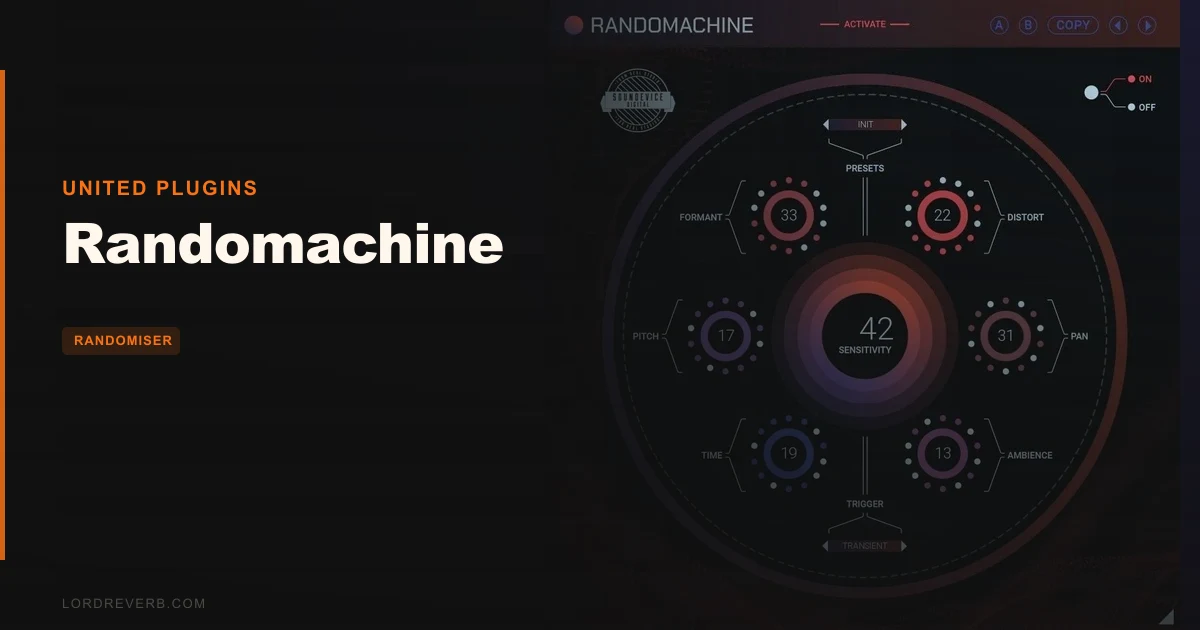
Your hi-hat loop sounds like a photocopier. Every hit is identical. The velocity is the same, the tone is the same, the stereo position is the same. It's technically correct and completely lifeless. Randomachine by United Plugins exists to fix exactly that.
This is a randomisation plugin that triggers six simultaneous audio processors every time a transient hits, a tempo division fires, or a MIDI note lands. Each trigger reshuffles pitch, formant, ambience, saturation, pan, and timing within ranges you set. The result is a loop that sounds like a human played it.
It costs $59 (check the Plugin Boutique listing or the manufacturer's site for current pricing). It works across VST, VST3, AU, and AAX. And it does one thing well enough that we'd recommend it to any producer stuck in the loop-sterility trap.
The Problem This Solves (And Why It's More Annoying Than It Sounds)
Drum machines and samplers are great at repetition. That's the problem.
When you copy-paste a one-shot kick 64 times across a bar, you get perfect timing and zero soul. Real drummers don't hit identically twice. Real rooms don't respond the same way to every hit. The mic position shifts slightly, the stick angle changes, the room breathes differently. You lose all of that the moment you drop a sample onto a grid.
The usual fix is painful. You're either manually randomising velocities, drawing automation curves for pitch and pan, layering multiple samples with different round-robin assignments, or spending an afternoon with a humanisation script. That's a frustrating amount of work for something that should feel natural.
Randomachine puts all of that in one plugin instance with a 15-minute setup.
How It Performs in Real Sessions
We dropped Randomachine on a sterile, quantised snare loop running at 128 BPM. Transient mode active, all six changers enabled at moderate range settings. On the first playback, the loop had breath. Hits tilted slightly left, then right. The pitch nudged up a cent or two on one hit, dropped a formant on the next. The tail on the ambience changer shifted between hits so the reverb decay didn't feel copy-pasted.
That's the satisfying version of this plugin. And it works.
The Pitch and Formant Shifter is the most audible changer on drums. Even a narrow randomisation range, maybe 10-15 cents pitch deviation with subtle formant movement, turns a flat snare into something that sounds like it was hit slightly off-centre on one stroke and dead centre on the next. That's exactly what you want.
The Time Offset changer is the one we kept returning to on percussion. Nudging the timing of each hit by a few milliseconds within the randomisation range adds groove that no quantise setting can replicate. It's the difference between a loop that sits in the mix and one that pushes through it.
MIDI trigger mode is where producers doing game audio or film sound design will spend most of their time. You control exactly when the randomisation fires. Each gunshot, footstep, or impact gets its own randomised character. We tested this on a foley-style kick sample and went from one sound to 40 convincingly different variations without leaving the plugin.
CPU load is light. The Sleep on Silence feature genuinely works. On a session with 12 instances running across a drum bus, individual drum channels, and a percussion loop, we saw minimal CPU impact during silent sections. United Plugins' internal 64-bit processing handles any sample rate, and we tested at 96 kHz without incident.
Strengths and Weaknesses
The best thing about Randomachine is how little time it takes to get a result you'd actually use. Load it, set your ranges, pick your trigger mode. Done. You're not reading a 40-page manual to find a useful sound.
The Sync mode (tempo-based triggering) is clever for grid music. You tell it to reshuffle every 16th note or every beat, and it locks to your DAW tempo. That's useful on hi-hat patterns where you want slight variation on every hit without transient detection misfiring.
The weakness we kept bumping into: you can't recall a specific result. If the plugin hits a combination that sounds brilliant, a snare that cracks with just the right pitch and pan, that moment is gone on the next playback. There's no "lock this result" button. For sound designers who need reproducibility, that's a real problem.
The individual changers also don't expose their parameters for per-changer automation in a granular way. You can automate the global randomisation amount, but you can't say "I want the pitch changer to go wide on bars 5 through 8 and narrow everywhere else" without workarounds. That gap will frustrate producers who want surgical control.
High range settings also cross from interesting to ugly fast. Pitch randomisation above roughly 50% of the available range starts sounding less like analog character and more like a broken plugin. Keep it in the lower third of the range for subtlety.
Value for the Price
At $59, Randomachine is a fair ask. You're buying time saved more than you're buying sound. The hours you'd otherwise spend on manual humanisation automation, round-robin sample layering, or velocity curve editing don't come free.
The free 15-day unlimited trial (no noise, no save limits) is one of the more honest trial offers in the plugin market. You can finish an actual track with it before deciding. That confidence is worth something.
Free-for-life updates mean you're not buying version 1 and getting left behind. For a $59 tool that solves a specific problem well, the price lands in the right place.
Who Should (and Shouldn't) Buy This
- ✅ Buy if you work with repetitive drum loops, percussion samples, or one-shots that need organic variation without manual automation work.
- ✅ Buy if you do game audio or film sound design and need fast sonic variety from a single sample across multiple triggered instances.
- ✅ Buy if you produce electronic music and want something that adds movement and groove to quantised patterns without rebuilding your session.
- ❌ Skip if you need to reproduce specific random results reliably. The lack of a result-locking function is a hard wall for reproducible sound design.
- ❌ Skip if you want granular per-changer automation control. This isn't built for that workflow.
- ❌ Skip if your primary issue is sound design on melodic content at wide pitch ranges. The pitch changer gets destructive quickly above moderate settings on pitched material.
Score Breakdown
| Category | Score | Notes |
|---|---|---|
| Sound Quality | 4.0/5 | Subtle settings sound clean and natural; high settings get rough fast on pitched material |
| Value for Money | 4.0/5 | $59 is fair for the time saved on manual humanisation; unlimited trial seals it |
| Ease of Use | 4.5/5 | Three trigger modes, six changers, and you're making useful sounds within minutes |
| Features | 3.5/5 | Six changers cover the bases, but no result-locking or per-changer automation is a real gap |
| CPU Efficiency | 4.5/5 | Sleep on Silence works as advertised; 12 instances ran without incident at 96 kHz |
| Overall | 4.1/5 | A focused tool that solves loop sterility efficiently, held back by limited reproducibility control |
Alternatives to Consider
If you want randomisation baked deeper into your sample workflow, Shaperbox 3 from Cableguys includes a randomisation layer across its modulation suite. It's a broader toolkit at a higher price, but you get more automation precision per parameter. Shaperbox 3 review
For producers already in the United Plugins ecosystem, the United Plugins Bass Bundle shows how the developer handles plugin sets with overlapping tools. If you're buying Randomachine, it's worth checking whether a bundle covers more of your signal chain. United Plugins Bass Bundle Review
XLN Audio's RC-20 Retro Color takes a different angle on the same problem. It adds degradation, noise, and wow/flutter to create organic variation, rather than randomising individual processing parameters per hit. Works better on full loops. Weaker on isolated one-shots. RC-20 Retro Color review
If drum humanisation specifically is your pain point, most modern DAWs include humanisation functions in their MIDI editors. That's free. It won't cover pitch and formant variation, but it handles timing and velocity before you spend $59. best free drum humanisation tools
Randomachine earns its place in a session because it works fast and sounds honest at moderate settings. The $59 ask is justified if loop sterility is a recurring problem in your workflow. It's the wrong buy if you need to reproduce results or automate individual changers with precision. Use the 15-day unlimited trial and stress-test it on your most monotonous loop. If that loop sounds alive by day three, keep it.
If the trial leaves you wanting a locking mechanism you can't have, skip it and build the variation manually. Some problems still need the long way around.
Frequently Asked Questions
Does Randomachine require an iLok or internet connection to activate?
No. United Plugins activates Randomachine via a license file. You download it, install it, and apply the license. No iLok, no dongle, no internet connection required after activation. You can run it on multiple computers as long as you're the sole user.
Can you freeze or recall a specific random result in Randomachine?
Not directly. The plugin doesn't include a seed-lock or result-recall function, which is the most common complaint from advanced users. If you hit a combination you love, your best option is to bounce that specific hit or loop to audio immediately. It's a real workflow limitation for reproducible sound design.
What trigger mode works best for drum loops?
Transient mode is the fastest starting point for drum loops. The plugin fires every time an incoming signal crosses the detection threshold, so each drum hit gets its own randomised character. For hi-hat patterns where transient detection might misfire on quieter hits, Sync mode tied to a tempo division gives you more consistent triggering.
Is Randomachine useful on melodic content or just drums and percussion?
It works best on percussive, transient-heavy material. On melodic content, the Pitch and Formant Shifter can introduce tuning variation that sounds unnatural above even moderate range settings. It's not the right tool for adding movement to a synth pad or a vocal. For that use case, look at dedicated modulation or chorus plugins instead.