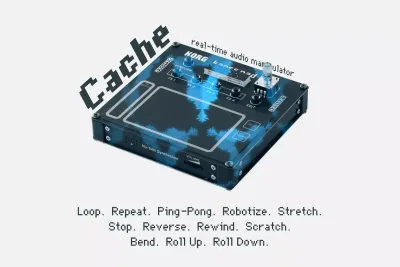
Cache for KORG NTS-3 is an expansion plugin from Sinevibes that turns the NTS-3 kaoss pad into a live buffer manipulation instrument, running 12 audio effect algorithms across four independent XY pad zones at $29. It's built for performers and sound designers who want more than the stock kaoss effects: specifically, the kind of real-time rewind, reverse, scratch and stutter control that makes a live set feel genuinely dangerous in the right way.
Picture this: you're running a live electronic set and you've got a synth loop feeding into the NTS-3. The energy in the room is there but the loop is sitting flat. You want to drop a Reverse right on the downbeat, let it breathe, then slam back into the forward motion. With the NTS-3's stock tools, that moment either isn't possible or it isn't clean. Cache is exactly the tool built to fix that moment.
This review is aimed at NTS-3 owners who already know the hardware and are deciding whether Cache earns its place in the signal chain. If you haven't picked up an NTS-3 yet, check the firmware requirements before anything else: Cache needs version 1.4.0 or later to run.
What's In The Box
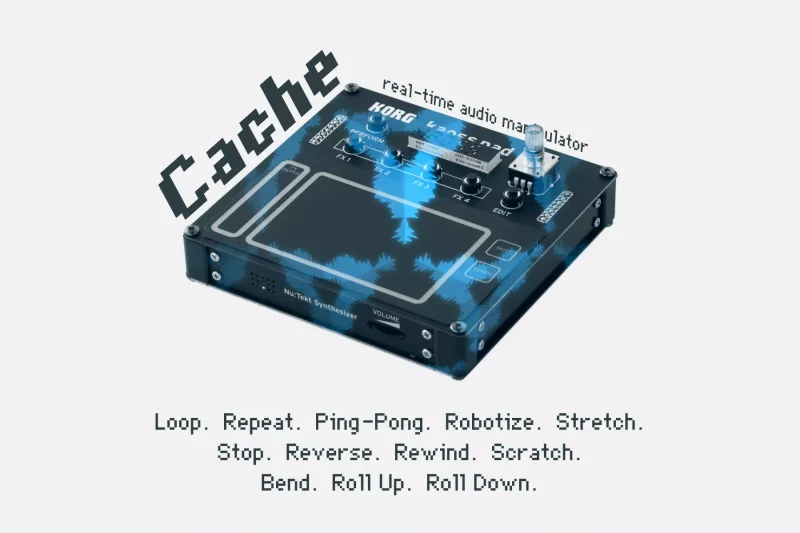
Cache gives you 12 effect algorithms: Loop, Repeat, Ping-Pong, Robotize, Stretch, Stop, Reverse, Rewind, Scratch, Bend, Roll Up, and Roll Down. Those aren't just names on a list. Each one describes a genuinely different way of treating the recorded buffer.
The plugin records up to 4 seconds of 32-bit stereo audio continuously. It uses high-quality spline interpolation for playback, which keeps pitch-shifted and time-stretched material sounding clean rather than grainy. Multiple fade envelopes are built in, and effect switching uses four exponential gates so transitions don't click or pop.
You get four XY pad zones, and each one can be assigned its own algorithm independently. Tempo sync is supported across effects. Plugin initialization is silent, which matters in a live context. Version 1.1 introduced Reverse, Rewind, and Scratch. Version 1.2.0 brought Bend, Roll Up, and Roll Down.
Where It Fits In Your Workflow
Cache lives at the performance layer of your signal chain, not in the mix. You're not reaching for it during a mix session in your DAW. This is a hardware-first tool: it runs on the NTS-3 itself, processing audio in real time as the device records it continuously into the buffer.
The four XY pad zones are your four trigger points. Assign an algorithm to each zone, set your tempo sync, and then play the pad like an instrument. Zone one could be a Loop on a one-beat division, zone two a Scratch, zone three a Reverse, zone four a Roll Down. You build the structure before the set and perform within it.
That firmware requirement is a hard gate. If your NTS-3 is on 1.3.x or below, Cache won't load. Update the firmware before you buy, not after. That's not a knock on Cache specifically, it's just how the NTS-3 plugin ecosystem works, and skipping that step wastes your time.
Cache also fits into studio sound design sessions where you're feeding audio through the NTS-3 and recording back into your DAW. Trigger a Rewind at a specific timeline point, capture the result, and you have a one-take texture that would take significant effort to fake with clip manipulation alone.
What It's Genuinely Good At
The 32-bit stereo recording quality and the spline interpolation are where Cache earns its reputation. Owners describe the playback as totally liquid. That's specific: when you trigger a Stretch or a Bend, the pitch and time artifacts that would normally flag the moment as a "plugin doing something" are largely absent. The transition feels like part of the performance.
The exponential gate switching between effects is clever design. When you move across zones on the XY pad, the outgoing effect fades out on its own curve rather than cutting hard. No clicks. No awkward silence. That matters enormously when you're performing live and your hands are on the pad, not at a mouse.
Having all 12 algorithms available across four zones simultaneously is the real argument for Cache over simpler kaoss-style effects. You don't get one mode at a time. You build a performance map and work across it. Improvisers report that the live MIDI control gives a precision and immediacy that more conventional pad-based tools don't match.
The Roll Up and Roll Down algorithms are satisfying in a way that's hard to explain without hearing them. Imagine a pitched stutter that builds toward or away from the original pitch over the course of the effect. Apply that to a vocal sample in zone four, trigger it on the last bar of a phrase, and the whole texture tips forward into the next section. That's the kind of moment Cache makes easy.
Tempo sync means you're not flying blind on timing. Lock your effects to the host tempo and your Repeats land where they should, your Rolls subdivide correctly, your Loops don't drift. For live use, that's not a luxury, it's the reason the tool works at all.
The Algorithm Detail: What Each Mode Actually Does
Buffer Playback and Loop Modes
Loop and Repeat are the foundational modes. Loop captures a slice of the buffer and cycles it, with the length determined by the zone's timing settings. Repeat fires the same slice back multiple times without necessarily cycling. The difference is subtle but audible: Loop sounds seamless, Repeat has a rhythmic punch to its re-trigger.
Ping-Pong bounces the buffer slice forward and backward alternately. Use it on a held pad chord and the stereo image starts to breathe in an interesting way. It's one of the more musical algorithms in the set.
Stop is exactly what it sounds like. The buffer freezes. The incoming audio halts from the listener's perspective. Used as a quick hit, it creates a sudden silence that's more dramatic than a simple mute because the reverb tail and room sound also stop cold.
Pitch and Time Manipulation
Stretch time-stretches the buffer content, letting you slow the playback without pitch change. Robotize adds a vocoder-adjacent quality to the buffer, introducing a tonal graininess to whatever's recorded. Neither of these is subtle at extreme settings, and that's the point.
Bend shifts pitch across the buffer playback. Roll Up and Roll Down are the stutter builds mentioned above, running pitch in ascending or descending direction across the effect window. These three algorithms in combination give you enough pitch-based performance material to build entire transitions around.
Reverse, Rewind, and Scratch
These three arrived together in version 1.1 and they're arguably the most performance-oriented algorithms in the set. Reverse plays the buffer backward. Rewind rapidly rewinds the playback position, creating that vinyl-brake sound without needing a turntable in the room. Scratch gives you manual-feeling scrub control over the buffer position, responding to your XY pad position in real time.
The scratch behavior is where the live MIDI precision owners mention actually becomes audible. Move fast across the pad and you get a hard scratch. Move slowly and it's more of a drift. The spline interpolation keeps both clean, which is why owners keep coming back to that word "liquid." There's no graininess flagging the artifact. It just sounds like something is physically moving.
The Rough Edges
Four seconds. That's your ceiling. For most performance applications it's enough, but if you're working with longer phrases, ambient swells, or anything that develops over more than four beats at a slow tempo, you're going to feel that limit. There's no way around it. The buffer is what it is.
Four zones is similarly fixed. You can build a thoughtful four-algorithm performance map, but if your set demands five distinct effects without reconfiguring mid-performance, that's a wall. It's frustrating when you're in a creative flow and the hardware constraint interrupts it.
Preset management is a genuine question mark. Preset management and save-and-recall functionality for zone configurations are not detailed in available information. If you're building a different setup for every gig, finding out mid-soundcheck that your configurations aren't saving would be annoying in a way that no amount of sound quality compensates for. That's worth verifying before you commit to the purchase.
The pricing is a real conversation. At $29, one user has pointed out that the plugin costs more than the device it runs on in certain markets. That's a legitimate gripe. It doesn't make Cache bad, but it does mean the value question depends entirely on how often you perform and how central the NTS-3 is to your setup.
Who This Is Really For
- ✅ Buy if you perform live with the NTS-3 and want real-time buffer manipulation that tracks your MIDI precisely and sounds clean at any tempo
- ✅ Buy if you use the NTS-3 for studio sound design and want 12 distinct algorithms to run audio through for one-take texture captures
- ✅ Buy if you're a looper or improviser who wants Reverse, Rewind, and Scratch-style effects without adding more hardware to your rig
- ❌ Skip if you need buffers longer than 4 seconds for your live material, because Cache won't stretch past that
- ❌ Skip if you're on NTS-3 firmware below 1.4.0 and aren't willing to update, because Cache simply won't run
- ❌ Skip if you don't own an NTS-3 and are hoping this translates to another platform. It doesn't. It's hardware-specific.
The Live Performer vs. The Studio Designer
Live performers are Cache's primary audience and the product clearly knows it. The silent initialization, the exponential gates, the tempo sync: every engineering decision points toward a stage context where a click artifact or a sluggish algorithm switch can derail a performance. If you're running the NTS-3 in a live rig, Cache gives that hardware a reason to be front and center rather than a texture source you trigger once and forget. Buy it.
Studio sound designers get a lot here too, though the value is slightly more situational. You'll need the NTS-3 as an outboard piece of your chain, feeding audio through the device and back into your DAW. That workflow isn't universal. But if that's already how you work, Cache's 12 algorithms give you a physical performance layer for buffer manipulation that's genuinely hard to replicate with software alone. The Scratch and Rewind behaviors on physical audio are different from automation curves. Worth it if you're already in that world.
If you're a beginner looking at the NTS-3 and Cache as a bundle for the first time, slow down. The NTS-3 is not a beginner device in the traditional sense, and Cache doesn't simplify it. It goes deeper. Get comfortable with the base firmware first, then revisit Cache when you know what you'd actually assign to those four zones.
Specs & Technical Details
| Specification | Detail |
|---|---|
| Developer | Sinevibes |
| Price | $29 |
| Plugin Format | KORG NTS-3 native (hardware plugin) |
| OS Support | N/A (runs on NTS-3 hardware) |
| Activation | N/A |
| CPU Usage | N/A |
| Trial Available | N/A |
| Minimum Firmware | NTS-3 firmware 1.4.0 or later |
| Buffer Length | 4 seconds (32-bit stereo) |
| Number of Algorithms | 12 |
| XY Pad Zones | 4 simultaneous |
| Tempo Sync | Yes |
| Version Reviewed | 1.2.0 |
Score Breakdown
| Category | Score | Notes |
|---|---|---|
| Sound Quality | 4.5/5 | 32-bit recording with spline interpolation delivers liquid, artifact-light playback across all 12 algorithms |
| Value for Money | 3.5/5 | The price point draws complaints from some owners relative to the hardware cost, though the feature depth justifies it for heavy performers |
| Ease of Use | 4.0/5 | Four-zone XY layout is intuitive; preset save-and-recall details unconfirmed, which is a real workflow unknown |
| Features | 4.5/5 | 12 algorithms spanning loop, pitch, reverse, and scratch covers most live and studio buffer manipulation needs |
| CPU Efficiency | N/A | Runs on NTS-3 hardware; host CPU usage not applicable |
| Overall | 4.3/5 | A well-engineered, performance-focused buffer tool that earns its place in a live NTS-3 rig |
Cache is one of those tools that rewards knowing exactly what you need it for. If you're performing live with an NTS-3 and you've ever wished the pad could do real Scratch, real Rewind, real Reverse without sounding like a corrupted file, this is the plugin that fills that gap. The 4-second buffer and four-zone ceiling are real constraints, not something we'd wave away. But within those constraints, the engineering is tight, the algorithms are genuinely varied, and the seamless switching makes the whole thing feel like an instrument rather than an effect insert.
At $29, it's a harder sell if the NTS-3 is a secondary piece of kit you barely touch. But if that device lives on your performance table, Cache turns it into something worth reaching for mid-set. That's not a small thing.
Frequently Asked Questions
Does Cache for KORG NTS-3 work with any KORG hardware, or only the NTS-3?
Cache is built specifically for the KORG NTS-3 kaoss pad. It won't load on other KORG hardware. The NTS-3 must also be running firmware version 1.4.0 or later for Cache to function at all.
Can you use all 12 algorithms at the same time?
Not simultaneously. Cache gives you four XY pad zones, and you assign one algorithm per zone. So you can have four algorithms active at any given time, selectable via the pad. The other eight algorithms are available but need to replace one of the four active assignments to be used.
How does the tempo sync work in Cache?
Cache supports tempo sync for its effects, meaning the loop lengths, repeat timings, and roll subdivisions can lock to a tempo reference. This keeps rhythmic effects landing on the grid rather than drifting free.
Is the 4-second buffer long enough for real-world use?
For most live performance applications, yes. At typical tempo and phrase lengths, four seconds covers a full bar or two of looped material, which is enough for the scratch, reverse, and stutter effects Cache is built for. Where it becomes a problem is with slow ambient material or longer phrases that develop over more than four beats at low BPM. If your performance relies on looping entire eight-bar progressions in real time, the buffer will cut you short.