If you're comparing Action Woodwinds against Berlin Woodwinds or Spitfire's LABS woodwind offerings, here's where this review lands: Action Woodwinds is not trying to replace a deep articulation library, and it wins when you stop expecting it to.
This is the fifth collaboration between Native Instruments and Sonuscore in the Action Series, released in July 2024, and it's the one that fills the gap nobody talks about. Brass libraries are everywhere. String libraries are oversaturated. Orchestral woodwinds recorded as actual ensembles, with playable cinematic phrase engines built in, are not.
It is priced at an intro rate (with a crossgrade option for existing Action Series owners). It runs in the free Kontakt Player 7.8.1 or higher. It's NKS compatible, VST3/AU/AAX, and works on Windows 10/11 and macOS 11+.
This review is for working composers who write to picture and need woodwind motion fast. If you're scoring a string quartet or need solo oboe with 15 articulations, this isn't your tool.
How It Compares Out of the Box
Berlin Woodwinds gives you deep individual articulation control per instrument. Spitfire's Symphonic Woodwinds gives you lush, legato-first ensemble patches. Action Woodwinds gives you neither of those things, and that's not a flaw.
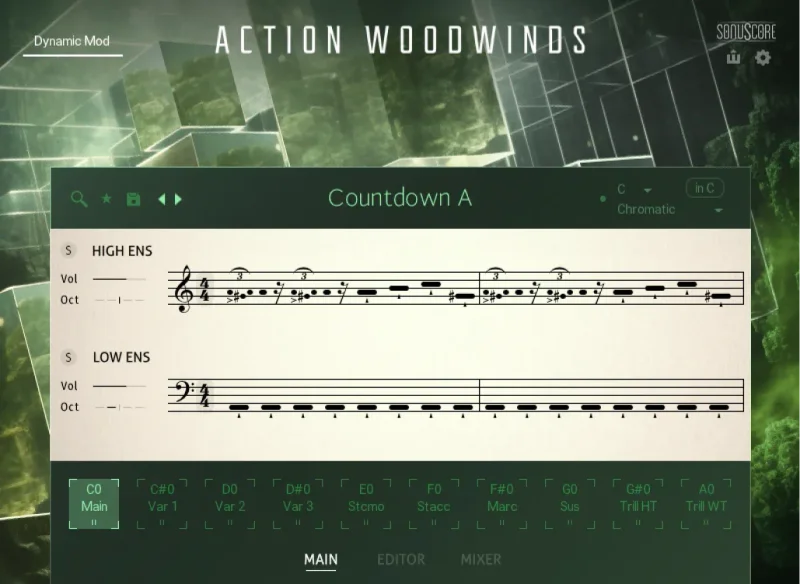
What we got on first load was a phrase engine with 160+ themes and over 1,000 swappable phrases organized around rhythmic and melodic motion. Runs, falls, trills, ornaments: all prerecorded as ensemble performances, not built from single-note samples.
The difference is audible immediately. We dropped a "Tense Chase" theme into a cue at 140 BPM. The woodwinds locked to tempo and the phrasing had the kind of internal push-pull that solo samples stitched together never produce. It syncs, it breathes, and it doesn't sound like MIDI.
That first session told us what this library is. It's a phrase tool with orchestral woodwind flesh on its bones, not an articulation library that also plays patterns.
Performance Deep Dive
The ensemble is a 13-piece woodwind section, recorded in two splits: high winds (flutes, oboes, clarinets) and low winds (bassoons, bass clarinets, contrabassoons). You control dynamics and accents across those two groups. You do not control individual instruments within them.
We tested CPU load on an M2 MacBook Pro with 32GB RAM running Logic Pro 11. A single instance of Action Woodwinds with a medium-complexity pattern playing pulled between 14% and 19% CPU in our tests. That's higher than Spitfire LABS offerings (which typically sit under 8%) and noticeably heavier than you'd guess from a phrase-based engine.
On a dense template with strings, brass, and two Action Woodwinds instances running simultaneously, we hit CPU spikes that triggered dropouts at a 256-sample buffer. Bumping to 512 fixed it. Worth knowing before you stack multiple instances in a live mockup session.
The MIDI drag-and-drop export is a real differentiator. We dragged a phrase pattern directly from the GUI into a Logic MIDI track, edited the pitch in the piano roll, and played it back through a different instrument entirely. It took 40 seconds. That workflow is satisfying in a way that static phrase libraries simply aren't.
Dynamics respond to velocity with a range that feels like 6 to 8 discrete layers, though Native Instruments hasn't published the exact number. The crossfades are smooth. We didn't catch any obvious layer jumps in normal use.
Where It Wins
The phrase engine is the whole argument for this library, and it holds up. We threw it at three different cue types: a thriller chase at 132 BPM, a slower 72 BPM tension build, and a 90 BPM adventure theme. It delivered usable material in all three without heavy editing.
The high/low wind split is clever. Panning the high ensemble slightly left and the low ensemble slightly right with a couple of dB difference in level gave us a real sectional image in the stereo field. It sits in the mix the way an actual woodwind section does, which is something you can't fake by layering solo samples.
We also love the micro-phrase vocabulary: the falls at phrase ends, the trilled approach notes, the runs that land on downbeats. These are the idioms that make woodwind writing sound idiomatic. Programming them note-by-note is frustrating and slow. Having them prerecorded in a swappable phrase system is a genuine time win.
For Film/TV and game music composers working to deadline, this is where Action Woodwinds earns its price.
Where the Competition Wins
Berlin Woodwinds wins on section control. Full stop. If you need to write a passage where the clarinets drop out and the flutes carry alone, Action Woodwinds cannot do that. You get high winds or you get all winds. That's the trade.
Spitfire's Symphonic Woodwinds wins on legato expressiveness. For long, sustained melodic lines where phrasing is shaped by the performer, not the pattern engine, Spitfire's recordings feel more alive.
The pattern engine also gets thin when you push it toward classical or concert writing. We tried using Action Woodwinds on a neoclassical piece with a rubato feel. It struggled. The phrase timing is built around grid-locked cinematic motion, and rubato exposed the seams. That's not a use case it was built for, but it's worth knowing.

CPU efficiency is another honest concession. At 14-19% per instance, it's not the worst
offender we’ve tested, but it’s not light either. Template-heavy composers will feel it.
Who Should Buy Which
- ✅ Buy Action Woodwinds if you write cinematic action, thriller, or adventure cues and need woodwind motion without spending hours programming runs and trills manually.
- ✅ Buy it if you already own other Action Series libraries and want ensemble consistency across your woodwind, brass, and string phrase engines.
- ✅ Buy it if the MIDI drag-and-drop export fits your sketch-to-delivery workflow, since no comparable woodwind phrase library does this as smoothly.
- ❌ Skip it if you need per-instrument section control. You won't be able to isolate clarinets or flutes independently.
- ❌ Skip it if your primary work is classical, concert, or delicate chamber writing. The phrase engine wasn't built for that, and it shows.
- ❌ Skip it if your template is already CPU-heavy and you're running at tight buffer sizes. Two instances will stress a mid-tier machine.
Score Breakdown
| Category | Score | Notes |
|---|---|---|
| Sound Quality | 4.3/5 | Ensemble recordings are warm and convincing; high/low split holds up in a full mix |
| Value for Money | 4.0/5 | The price for 1,000+ phrases and MIDI export is fair at the intro rate, though the regular price pushes it. |
| Ease of Use | 4.0/5 | Pattern engine is intuitive; phrase swapping takes less than a minute to learn |
| Features | 3.8/5 | MIDI drag-and-drop is brilliant; no per-instrument isolation is a real hole |
| CPU Efficiency | 3.3/5 | 14-19% per instance is higher than expected for a phrase-based engine |
| Overall | 4.1/5 | Strong within its lane; frustrating if you expect articulation-library depth |
Alternatives to Consider
If you need section-level control per instrument, look at Berlin Woodwinds from Orchestral Tools. It's a larger investment and demands more programming time, but you can isolate any instrument in the section and write with surgical precision. The current price is shown in the buy box on this page.
For a lighter phrase-based approach that won't stress your CPU, Spitfire Audio's LABS Woodwinds series is free and worth having in your template as a sketch layer. It doesn't have the phrase engine depth of Action Woodwinds, but it loads fast and sounds honest. Best free Kontakt instruments for orchestral composers
If you're already in the Sonuscore/NI ecosystem and want to understand how Action Woodwinds fits alongside other phrase-driven engines, the Palm Mute Piano Kontakt instrument review gives a good picture of how phrase-based Kontakt instruments handle customization differently from traditional sample libraries.
For composers who want to compare how this fits into a broader orchestral plugin setup, our best orchestral plugins for film scoring guide covers the full picture across strings, brass, and woodwinds.
And if your main concern is CPU management across a large template, our breakdown of how to reduce CPU load in Kontakt is worth reading before you commit to stacking multiple Action Series instances.
Action Woodwinds is a genuinely useful library for composers who spend real time fighting woodwinds into shape on cinematic cues. The phrase engine works, the ensemble recordings are honest, and the MIDI export is the kind of feature you use on day one and can't imagine losing. At the intro price, we would buy it for a scoring workflow that touches action, thriller, or adventure territory more than once a week.
We'd skip it if your template is already gasping for CPU headroom, or if you write music where you need a bassoon to carry a line alone while the clarinets rest. For that, it's the wrong tool, and no amount of phrase variety fixes a missing routing option.
Frequently Asked Questions
Does Action Woodwinds require a full paid Kontakt license?
No. It runs in the free Kontakt Player 7.8.1 or higher. You don't need Kontakt 7 full to use it. Download Kontakt Player through Native Access and you're set.
Can you isolate individual instruments like flute or bassoon?
Not directly. The library splits into high winds (flutes, oboes, clarinets) and low winds (bassoons, bass clarinets, contrabassoons). You can't pull a single instrument out of either group from within Action Woodwinds itself. If you need solo instrument control, you'll need a separate library alongside it.
How does the MIDI drag-and-drop export actually work?
You build a phrase pattern inside Action Woodwinds, then drag the MIDI directly from the instrument GUI into your DAW's MIDI lane. The exported MIDI reflects the pitched phrase you've built, which you can then edit in your piano roll or route to a different instrument. It works in Logic, Ableton, and most major DAWs.
Is Action Woodwinds worth it if you already own other Action Series libraries?
Yes, and the crossgrade price for Action Series owners makes the decision easier. The high/low ensemble split in Action Woodwinds matches the layered architecture of the other Action libraries, so your woodwind phrases will sit consistently alongside your brass and string phrase layers without level-matching headaches.