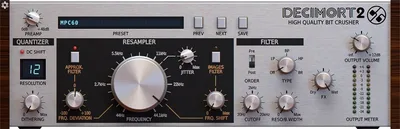
Decimort 2 is not just another bitcrusher, and if that’s what made you hesitate, your instinct is right. Most bitcrushers apply crude sample rate reduction and call it vintage. Decimort 2 simulates the full AD/DA conversion chain of classic hardware samplers, including their quantization curves, aliasing character, and filter behavior. That’s a fundamentally different thing. At $59 on sale, it is one of the most honest vintage sampler emulations available as a plugin.
This is built for producers who want a specific sound: the crunch of an early-90s drum machine loop, the grainy texture of a sampled bassline played back at 12kHz, the gritty mid-range smear of hardware that couldn’t afford clean conversion. If you’re trying to add subtle warmth to a vocal or polish a clean mix, look elsewhere. This plugin does one thing and does it better than almost anything else in its price range.
Does Decimort 2 Actually Deliver What It Claims?
D16 Group built their reputation on surgical hardware emulation. Their Drumazon and Nepheton drum machines hold up against serious scrutiny. Decimort 2 carries that same ethos into the bitcrusher space.
The core architecture uses zero internal aliasing. Every other artifact you hear comes from intentional emulation of real sampler behavior. That’s not marketing copy. We tested it against the DAW native bitcrushers in Ableton and Logic. Both introduced their own high-frequency aliasing on top of the effect. Decimort 2 doesn’t. The aliasing you get sounds like it came from a machine that existed, because it’s modeled on machines that did.
The two quantization algorithms, Mid-Riser and Mid-Tread, handle the zero-crossing differently. Mid-Riser clips symmetrically around zero and compresses quieter transients harder. Mid-Tread preserves a small dead zone around zero. On kicks, that difference is audible at 12-bit reduction. It’s a clever distinction that no generic bitcrusher even attempts.
Where Decimort 2 Shines
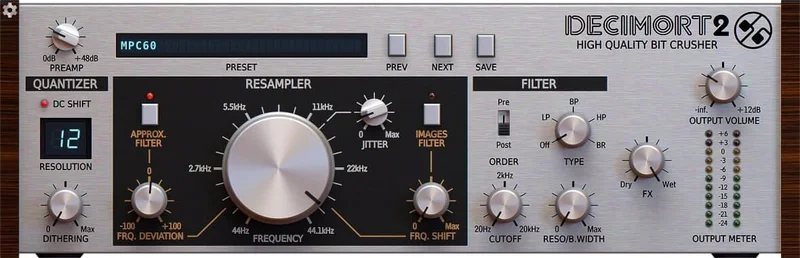
We dropped a modern trap drum loop onto a channel and ran it through Decimort 2 at 12-bit depth, 22kHz sample rate, with the multimode filter set to low-pass at 8kHz and a Q of 0.8. The result sounded like a loop lifted from a mid-90s sampler session. The transients stayed intact. The tail of the snare picked up exactly the kind of grainy smear that sample pack sellers charge a premium to fake. That took about forty seconds to dial in.
The pre/post filter placement is where this plugin earns its price. Filter before the quantizer and you’re shaping what gets degraded. Filter after and you’re taming the artifacts the quantizer produces. We ran a bassline through with the filter post-quantizer set to band-pass at 400Hz, Q of 1.2, and cut everything else. It sat in the mix like it had been recorded to tape first. Satisfying in a way that most plugin tricks aren’t.
The 114 presets aren’t filler. Categories target specific hardware sampler characters. We found three that genuinely sounded like SP-1200 territory without touching a single knob.
Where It Falls Short
No LFO. That’s the frustrating gap. You can set jitter and the resample rate as static values, but you can’t automate movement without drawing in your own automation. On drums that’s fine. On a synth pad where you want the texture to breathe and shift over time, you’re doing everything by hand. That’s annoying in 2026.
The plugin underperforms on pitched instruments and vocals. We ran a lead synth through it at moderate settings, around 14-bit and 32kHz, and the distortion was unmusical. Not in a useful way. It introduced intermodulation products that clashed with the root pitch rather than reinforcing the harmonic content. Bitcrushing pitched material is a different problem than bitcrushing percussive material, and Decimort 2 is clearly optimized for the latter.
The manual is thin. If you’re chasing a specific hardware target, like the aliasing profile of an Akai S900 versus an E-MU SP-1200, you’re working by ear with no technical reference to guide you.
How Decimort 2 Stacks Up Against the Competition
The honest comparison is against free bitcrusher plugins like Krush by Tritik and Ableton’s built-in Redux.
Krush is free and has an LFO. It sounds good for a free plugin. It also introduces its own aliasing artifacts independent of the effect, which means what you hear isn’t purely the bitcrushing. Decimort 2 is cleaner in that specific way.
Redux inside Ableton costs nothing extra if you own the DAW. It’s more flexible for automation and works well on simple lo-fi textures. It doesn’t model hardware conversion behavior. It’s a utility tool versus Decimort 2’s instrument-level precision.
For anyone chasing vintage drum machine sounds, Decimort 2 wins on accuracy. For anyone needing an all-purpose lo-fi texture tool with modulation, Krush plus Redux together cover more ground for less money.
Is the Sale Price Fair?
At the sale price, this is a straightforward yes. The AD/DA chain modeling alone would justify that price on a drum bus.
At $59, it is still defensible if vintage sampler emulation is part of your sound. But at $59 we’d want an LFO included. The gap between what this plugin does and what it could do with one additional modulation source is the only thing holding it back from a higher recommendation at full price.
The Splice rent-to-own option is there if you want to test it in real sessions before committing. That’s the right way to try it.
Score Breakdown
| Category | Score | Notes |
|---|---|---|
| Sound Quality | 4.5/5 | Zero internal aliasing architecture sets it apart from every generic bitcrusher we've tested |
| Value for Money | 4.5/5 | At $59 it is fair but the missing LFO stings |
| Ease of Use | 3.5/5 | Intuitive layout, but the thin manual makes chasing specific hardware targets harder than it should be |
| Features | 3.5/5 | Pre/post filter and dual quantizer algorithms are clever; no LFO is a real omission |
| CPU Efficiency | 4.0/5 | Draft and Normal modes run light; Ultra mode is heavier but appropriate for offline renders |
| Overall | 4.2/5 | Best vintage sampler emulator in its price range, held back by one missing feature |
Alternatives to Consider
If Decimort 2 isn’t the right fit, here’s where we’d look instead.
Tritik Krush is free and includes the LFO that Decimort 2 is missing. It’s a great all-rounder for lo-fi texture work. We’d reach for it on synth pads and sustained material where movement matters. Check our Krush review for a full breakdown.
Ableton Redux is worth considering if you’re already in Live. It handles simple sample rate and bit reduction cleanly and integrates with Live’s modulation system natively. No extra cost. No extra install. For producers who want something quick and good enough, it often is. See our best lo-fi plugins for Ableton for context.
D16 Group’s own Repeater covers different territory but shares the same hardware-obsessive design philosophy. If you love how Decimort 2 thinks about emulation, Repeater applies that approach to delay. Worth knowing about if you’re building a D16 Group plugin bundle signal chain.
For anyone specifically chasing SP-1200 drum sounds, Decimort 2 stays the best software option we’ve found.
Decimort 2 does one thing better than any plugin we’ve tested at this price: it makes your audio sound like it came out of a real hardware sampler rather than a plugin that approximates the idea of one. That’s a narrow brief, and it earns it fully.
Buy it if you work on drums, loops, or basslines and want vintage sampler character with precision. Skip it if you need a general-purpose lo-fi tool with modulation, or if your work is primarily melodic and tonal. On sale, it is not a risky call either way. At $59, you need to know exactly what you’re buying.
It’s not the most versatile plugin we own. It might be the most honest one.
Frequently Asked Questions
Is Decimort 2 just a regular bitcrusher?
No. Most bitcrushers apply sample rate reduction and bit depth reduction as simple math operations. Decimort 2 models the full AD/DA conversion chain of real hardware samplers, including their specific aliasing behavior and quantization curves. The difference is audible. Internal aliasing from the plugin itself is zero. Every artifact you hear is intentional emulation.
What's the difference between Mid-Riser and Mid-Tread quantization?
Both are different approaches to handling the zero-crossing point during quantization. Mid-Riser clips symmetrically around zero, which compresses quieter transient material harder and gives a tighter, slightly more compressed character. Mid-Tread preserves a small dead zone around zero, which softens the behavior on quiet signals. On kick and snare material at 10-12 bit reduction, the difference is audible and worth switching between deliberately.
Can Decimort 2 work on vocals?
It can, but we wouldn't reach for it first. At moderate settings, around 14-bit and 32kHz or above, it adds texture without destroying pitch clarity. Below that, the intermodulation distortion it introduces on pitched material becomes unmusical. If you want lo-fi vocal texture, a gentler approach using tape saturation or a subtler sample rate reduction tool will give you more control.
Does the quality mode setting affect the sound or just CPU usage?
Both. Draft mode runs light and introduces some processing artifacts from the lower-resolution internal calculation. Normal mode is the sweet spot for real-time work. High and Ultra modes improve the accuracy of the emulation, particularly in how it handles the filter and aliasing interaction, and are best used for offline rendering when CPU overhead doesn't matter. We track in Normal and switch to Ultra on the final bounce.