Affiliate disclosure: the "Get this deal" button is an affiliate link to the store. If you buy through it we earn a commission at no extra cost to you. Full policy

The Metro v2 Black Friday deal from Evertone Project takes 45% off this note-value calculator plugin, putting it at $37.95 until Nov 30, 2026.
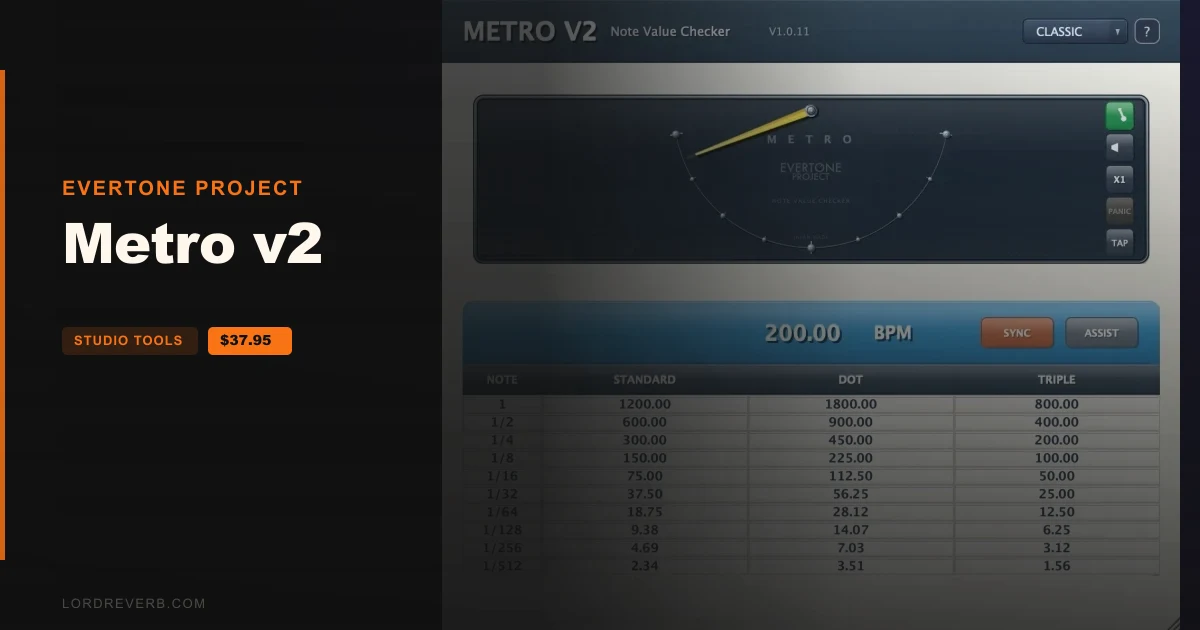
Metro v2 is a utility plugin that turns your song's BPM into recommended parameter values for expanders, compressors and other mixing and mastering effects. It also shows note lengths on a visual meter.
The maker's idea is to move from setting times by feel to setting them by note value. Each track then acts like a higher-grade form of sidechain processing, and the output waveform on an oscilloscope follows rational behaviour, per the maker.
Type a BPM from 30 to 990, or switch on SYNC and the field follows the session tempo and goes read-only. Metro v2 then fills a calculation table you can pick values from.
Click a cell and the value is copied to the clipboard when COPY is on. Paste it into the parameter field of your expander or compressor.
The ASSIST table has three types:
Each type has two modes. NORMAL gives general values for processors without a DRY/WET control. ADVANCED is tuned for parallel DRY/WET processing, for a more aggressive envelope curve.
A pendulum swings left and right. Full travel from one side to the other is a quarter note, and dots mark the 8th, 16th and 32nd positions.
While you shape kick or snare attack, hold and release, you can confirm which note value you are targeting by eye as well as by ear. The maker adds that it is easy to read at a glance, so clients can follow along too.
The PULSE FLOW SCOPE is a second view, toggled from the header. A phosphor-green line draws a single sine wave on screen, and the time it takes to sweep from one side to the other matches the note value you pick, anywhere from 1/1 down to 1/512.
A marker at the right edge brightens each time a cycle completes. Locked to DAW SYNC, the scope follows host tempo and bar position. In manual mode it runs from its own internal timer.
Tap Tempo averages your tap intervals into BPM (60000 divided by the average interval in ms) from the second tap on. A Taps counter shows the count, and a pause of 3 seconds starts a new session.
The Speed button switches pendulum and pulse speed between x0.5, x1 and x2. The Pulse button toggles pulse playback.
In Panic Mode, whichever row you tap supplies its timing from the STANDARD column, and that timing sets how the pendulum swings and how the pulse runs. The maker calls it a bonus mode, useful with short note values for exploring playback timing and the limits of human perception.
Two themes are available, CLASSIC and LUXURY.
Yes. The Metro v2 Black Friday deal from Evertone Project is 45% off, which brings the plugin to $37.95. The offer runs until Nov 30, 2026.
Metro v2 calculates note-length values from your song's BPM and suggests settings for expanders, compressors and glue compressors. A pendulum-style visual note meter lets you see which note value you are targeting.
V2 adds Tap Tempo, Help Mode tooltips, the PULSE FLOW SCOPE view and a reworked CLASSIC theme. Projects saved in V1 open unchanged, and the plugin shares one license with EXPANDER V2 and COMPRESSOR V2 in the EVERTONE V2 Bundle.
Turn on COPY, then click a value in the table. Metro v2 copies it to the clipboard, and you paste it into the parameter field of your expander or compressor. ASSIST offers values for upward expanders, compressors and glue compressors.
Prices and end dates are checked at publishing time and can change, so confirm them at the store before you buy.