Affiliate disclosure: the "Get this deal" button is an affiliate link to the store. If you buy through it we earn a commission at no extra cost to you. Full policy

Lunchbox Amp Sim Black Friday deals from Kiive Audio take 87% off this amp simulator plugin, bringing it to $9 until Dec 6, 2026.
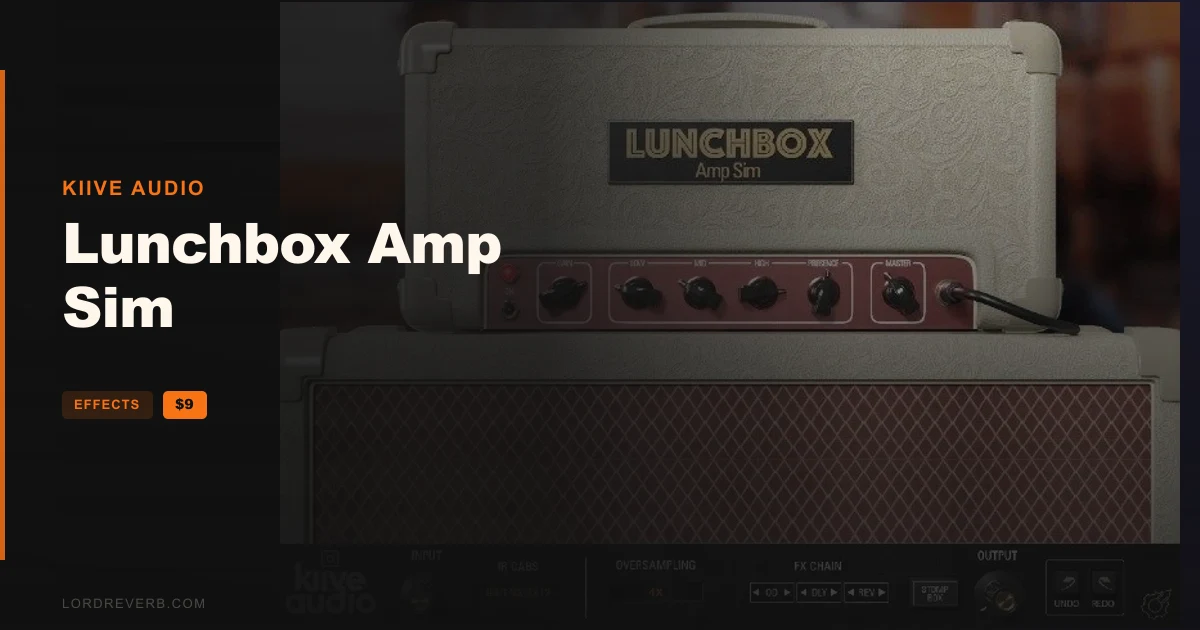
The Lunchbox Amp Sim is a recreation of one of the best-known British valve amps of the 1960s. It runs as a plugin in your DAW, so you can dial in guitar tones without a mic'd cabinet in the room.
Kiive Audio says the range runs from sparkly, jangly indie-rock cleans to aggressive gain. Push the signal into the built-in overdrive and you get into hard rock and hardcore territory.
The plugin bundles three parts in one window:
The three stompboxes sit in a Stomp Box Pedals section. You can switch each one on or off from the signal chain section on any page.
The amp controls work much like the knobs on a real amp, so you shape the tone the same way you would at a physical head.
You can flip between the 3 factory cabs, and the GUI updates to match whichever one is selected. If you'd rather load your own impulse response, bypass the cab IR and run yours in its place.
Resizing the GUI helps if you work on a small laptop screen or a large monitor. Oversampling is on the feature list, which matters for a plugin that drives a signal into overdrive.
On macOS, the plugin comes as VST, AU and AAX, in 64-bit only. It needs OS X 10.7 or higher, and macOS 10.14 or higher is recommended. The processor requirement is a 1 GHz Intel dual core or better.
On Windows, you get VST and AAX, again 64-bit only. It needs Windows 7 or above and a 1 GHz Intel dual core or AMD equivalent. The screen resolution for both platforms is 1024 x 768 or higher.
If your DAW is 32-bit, the plugin will not load, so check that before you buy.
Yes. The Lunchbox Amp Sim Black Friday deal takes 87% off Kiive Audio's amp simulator plugin, so it costs $9 until Dec 6, 2026.
Inside Lunchbox Amp Sim is an amp stage that models the feel of valve amplifiers, plus three cab impulse responses chosen by the developer. Pedal options consist of a clean-sounding drive, a delay, and a simple room reverb controlled by a single knob. You can bypass the cab to load your own IR.
On macOS it ships as VST, AU and AAX. On Windows it ships as VST and AAX. Both platforms support 64-bit DAWs only, so a 32-bit host will not run it.
Yes. The plugin has a cab bypass, which turns off the built-in cab IR so you can use your own. Otherwise you can switch between the 3 factory-selected cabs, and the GUI updates to match.
Prices and end dates are checked at publishing time and can change, so confirm them at the store before you buy.