Affiliate disclosure: the buy button is an affiliate link to the store. If you buy through it we earn a commission at no extra cost to you. Full policy

Jotter Black Friday pricing is 48% off, $25 until Dec 7, 2026, on NUGEN Audio's utility plugin for notes and comments that stay locked to the timeline.
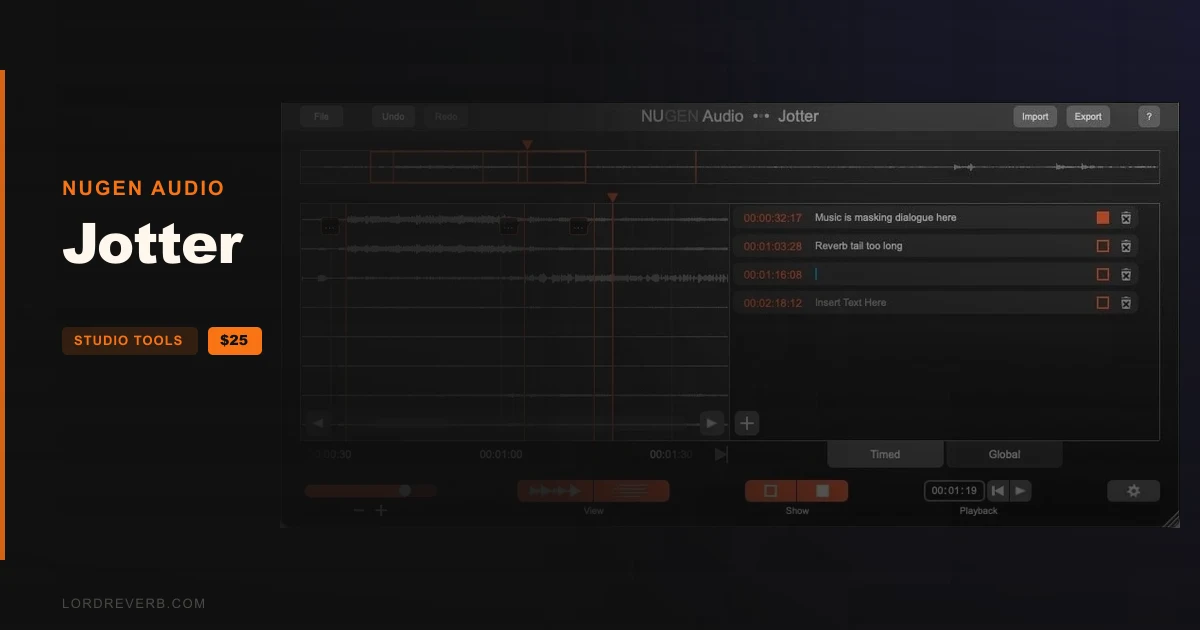
Jotter is a Jotter plugin built for collaboration. You drop it anywhere in a project and write annotations that are tied to the timecode.
NUGEN Audio describes it as a tool for engineers and mixers who work with each other and directly with clients, wherever in the world those people are.
Every note you add is anchored to a position in the timeline. A comment about a snare flam at a specific bar stays with that moment instead of living in a separate email thread.
That means feedback lands where it applies. The person opening the session sees what was said and exactly when.
Notes can travel between collaborators in two ways:
The.csv route means the comments can be opened outside the plugin as well, which is handy when someone on the other end is not running the same session.
Yes. The maker says Jotter also works as a standalone application, for situations where a DAW is not available or is simply not needed.
That suits a quick review pass: open the app, read or add notes, and leave the session closed.
The Jotter VST3 and its sibling formats cover the main pro audio hosts. Both platforms are 64-bit only, and the stated RAM requirement is 512 MB.
**Mac**
**Windows**
If you cut in Pro Tools, the AAX and AudioSuite versions are there on both Mac and Windows. AU is Mac only.
Jotter sits in the Utility Plugins range from NUGEN Audio, so it does not process your audio. It is there to hold the conversation about the mix.
Yes. The Jotter Black Friday deal takes 48% off NUGEN Audio's annotation plugin, bringing it to $25 until Dec 7, 2026. It is a utility plugin for timecode-locked notes and comments, so the discount applies to a collaboration tool, not an effect.
Jotter is a NUGEN Audio utility plugin for writing notes and comments. You insert it anywhere in a project and add annotations locked to the timecode, so each comment points to an exact moment in the session.
Annotations can be shared through the plugin or through an exported.csv file. NUGEN Audio says Jotter is meant for engineers and mixers collaborating with each other and directly with clients, from anywhere in the world.
On Mac, Jotter runs as AAX, VST3, AU and AudioSuite on macOS 10.13 and later. On Windows it is AAX, VST3 and AudioSuite on Windows 7 and later. Both are 64-bit only with 512 MB RAM, and a standalone app is included.
Prices and end dates are checked at publishing time and can change, so confirm them at the store before you buy.
Not signed in to Spotify? You hear 30 second previews. Signed in, you hear the full tracks.
Send your track and tick the Mixtape box. If we pick it, it joins this playlist and plays for everyone who opens the player.